

Activation delays can feel particularly nerve-racking when staying connected is essential and you don’t have a physical SIM as a backup. Imagine landing in a new city and being unable to load directions to your hotel or call a ride because your plan is stuck on “Activating.”
In most cases, eSIM activation takes a few minutes. Sometimes it’s closer to an hour, and some carriers can take up to 24 hours to fully provision a line. If it’s taking longer than a day, it’s usually a setup or compatibility issue you can troubleshoot.
Luckily, most eSIM activations are fast and predictable once you understand what affects the timing.
eSIM activation times at a glance
These are the most common eSIM causes for delays:
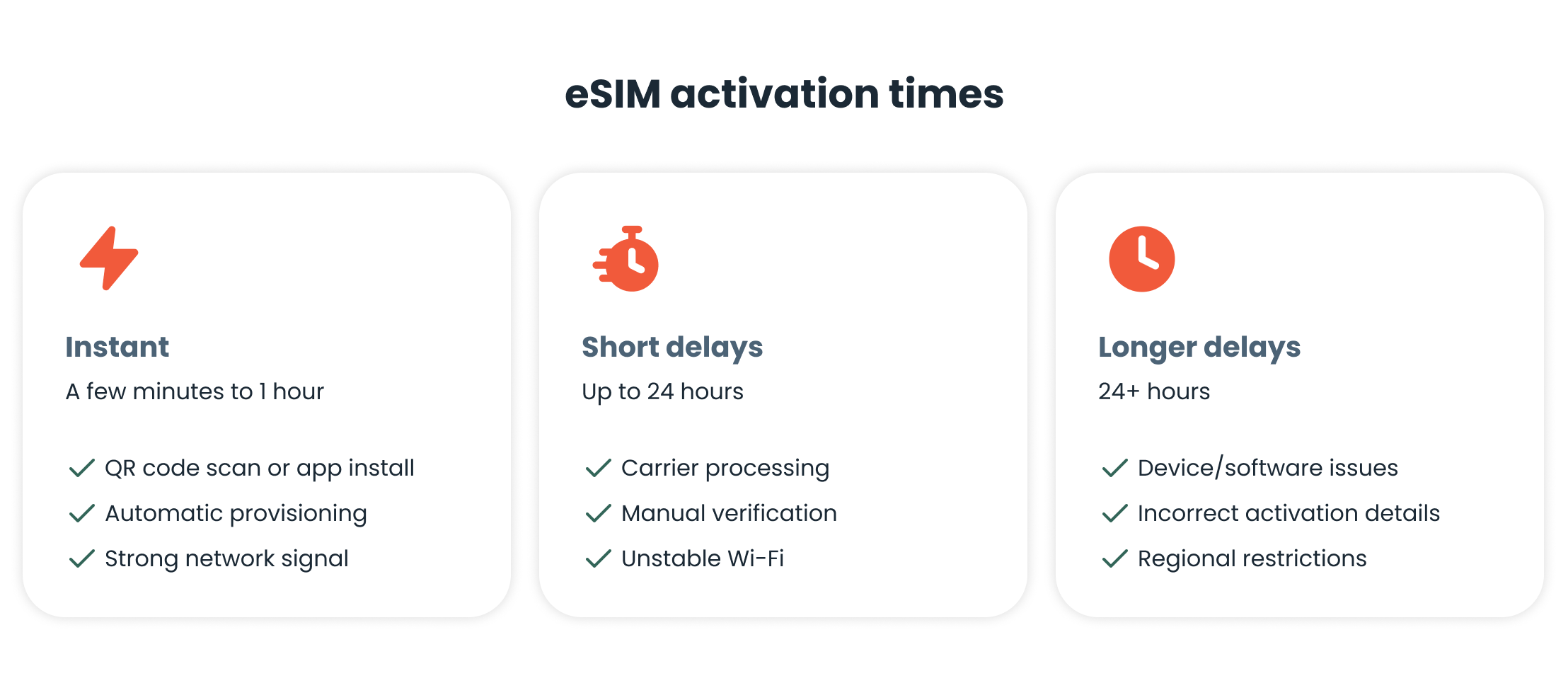
Instant activation (minutes to 1 hour)
This is the most common scenario. Many newer phone models and carriers that handle all of their processes digitally support near-instant eSIM activation. It’s often completed within minutes after scanning a QR code or installing an eSIM profile via an app, as with holiday.com.
With a compatible device, a stable internet connection, and an automated carrier system, you may see signal bars almost immediately. Even if it’s not immediate, activation within 15-60 minutes is still considered fast and usually doesn’t require any action on your part.
This timeframe is typical for:
- Newer smartphones (recent iPhone, Samsung, Google Pixel models)
- Travel eSIMs and prepaid data plans
- Fully automated carrier activations
If you don't see signal bars immediately, try toggling Airplane Mode on and off to force a network refresh.
Short delays (up to 24 hours)
Sometimes, eSIM activation takes longer, but it’s still completed within the same day.
Reasons for short delays include:
- Device model. Older phone models may take longer to register the eSIM with the network, even if they technically support eSIM.
- Connectivity. A weak or unstable Wi-Fi connection can slow down activation. You may be able to install an eSIM, but you won’t be able to complete network provisioning until the connection stabilizes.
- Verification. Some carriers require additional checks that take time, such as confirming your identity, validating payment, or matching the eSIM to your device’s IMEI.
- Carrier procedures. Not all carriers activate eSIMs right away. Some perform manual checks, especially if you’re buying a postpaid plan or you’re a first-time customer.
In these cases, a wait time of a few hours is standard.
Long delays (24+ hours)
If your activation takes longer than a day, there may be a specific problem.
Reasons for longer delays include:
- Device issues. Software bugs, outdated operating systems, or corrupted network settings can prevent your eSIM from activating properly.
- Incorrect activation details. Using an incorrect QR code, an expired activation link, or entering the wrong confirmation details can stop the process entirely.
- Regional restrictions. Some eSIMs only activate once you’re physically in a supported country or region. Attempting activation prior to arrival may cause delays.
If you’re unable to activate your eSIM after 24 hours, you’ll probably need to troubleshoot the issue.
How to speed up eSIM activation
If your eSIM is taking longer to activate, here’s what you can do:
- Check your internet connection. Make sure you’re connected to a strong, stable Wi-Fi network. Avoid public or unreliable connections during setup.
- Restart your phone. Restarting your device can refresh network settings and trigger the activation process.
- Update your phone’s software. Be sure to install the latest operating system updates. These often include fixes for eSIM and network issues.
- Reinstall your eSIM. If your carrier allows it, try deleting the eSIM profile and reinstalling it using the original QR code, activation link, or in-app.
If you’re still unable to activate the eSIM on your own, it’s best to reach out to your carrier. They can confirm if the eSIM is provisioned correctly or manually push activation. To help them resolve the issue faster, have your order number or device IMEI number ready when you reach out.
eSIM pre-activation checklist for travel
Planning ahead can save you from activation anxiety when you arrive at your destination.
- Verify eSIM compatibility. Not all phones support eSIM, and compatibility can vary by model and region. The fastest way to check is to dial *#06#. If you see an EID (Embedded Identity Document) number listed alongside your IMEI, your phone supports eSIM.
- Ensure you have an unlocked device. If your device is carrier-locked, you won’t be able to use international travel eSIMs like holiday.com. You can check this in your phone’s settings, typically under Network Operators (Android) or Carrier Lock (iPhone).
- Choose which line will use cellular data (before you start using data). Once you install your travel eSIM and you’re ready to go online, set it as your cellular data line. To avoid surprise roaming fees, also turn off data roaming on your home line while traveling.
With these items checked off, you remove the most common technical barriers that cause activation delays.
For best results, anticipate eSIM activation times
Typically, it takes a few minutes to an hour to activate your eSIM. Short delays of up to 24 hours can happen due to verification steps or carrier processes. However, if you’re experiencing longer delays, it usually means that there’s a setup or compatibility issue.
Understanding these times and knowing how to troubleshoot issues can make the eSIM activation process less stressful. With the right prep and the right provider, your eSIM will likely be ready when you are.
FAQ
-
Why is the eSIM taking so long to activate?

Device compatibility issues, weak internet, or carrier-specific procedures usually cause brief delays. If the activation takes longer than 24 hours, you may have entered incorrect details, or there may be regional restrictions.
-
Do I need Wi-Fi to activate an eSIM?
Yes, you need a stable Wi-Fi connection to install the profile and complete activation. Wi-Fi is the most reliable option, but some devices can use existing mobile data through a network plan to complete setup. If you’re traveling and don’t have data yet, plan to install your eSIM over Wi-Fi.
-
Can I activate my eSIM before traveling?
Sometimes. You can install many travel eSIMs (including holiday.com) in advance, but you can only activate them once you arrive in a supported country. As part of your pre-activation travel prep, be sure to set your eSIM as the primary data line so you can connect to a local network.
-
How do I know if my eSIM is working?
You’ll see signal bars and a network name in your status bar, provided the eSIM is set as the primary data line. You can also test connectivity by browsing a website or launching an app.
-
Does eSIM activation time vary by country?
Yes. Activation can depend on local carrier systems, regulations for identity verification, and whether you need to be physically present in the country to enable an eSIM.
-
What should I do if my eSIM activation fails?
There are different ways to trigger an eSIM activation. One of the first things to do is to check your internet and restart your phone. You can also try reinstalling the eSIM. If none of these work, it’s best to contact your carrier.
About our author