



An International Mobile Equipment Identity (IMEI) number acts as your phone’s unique ID. If you’re thinking about buying a second-hand phone, an IMEI number can help you avoid purchasing a device with a shady past. You can also use your IMEI number to flag a stolen phone and make it unusable on cellular networks. If you travel abroad, your IMEI number is also vital for eSIM activation.
In short, it’s important you get to know your IMEI.
Read on to learn about the purpose of an IMEI number, how you can find it (even without your phone), and tips on how you can use it to protect your data at home and abroad.
IMEI number explained
An IMEI number is a unique 15-digit code assigned to every mobile device. When your phone connects to a mobile network, this number identifies it, telling the network which device is calling, texting, or using data. While phone models can be identical, no two devices share the same IMEI.
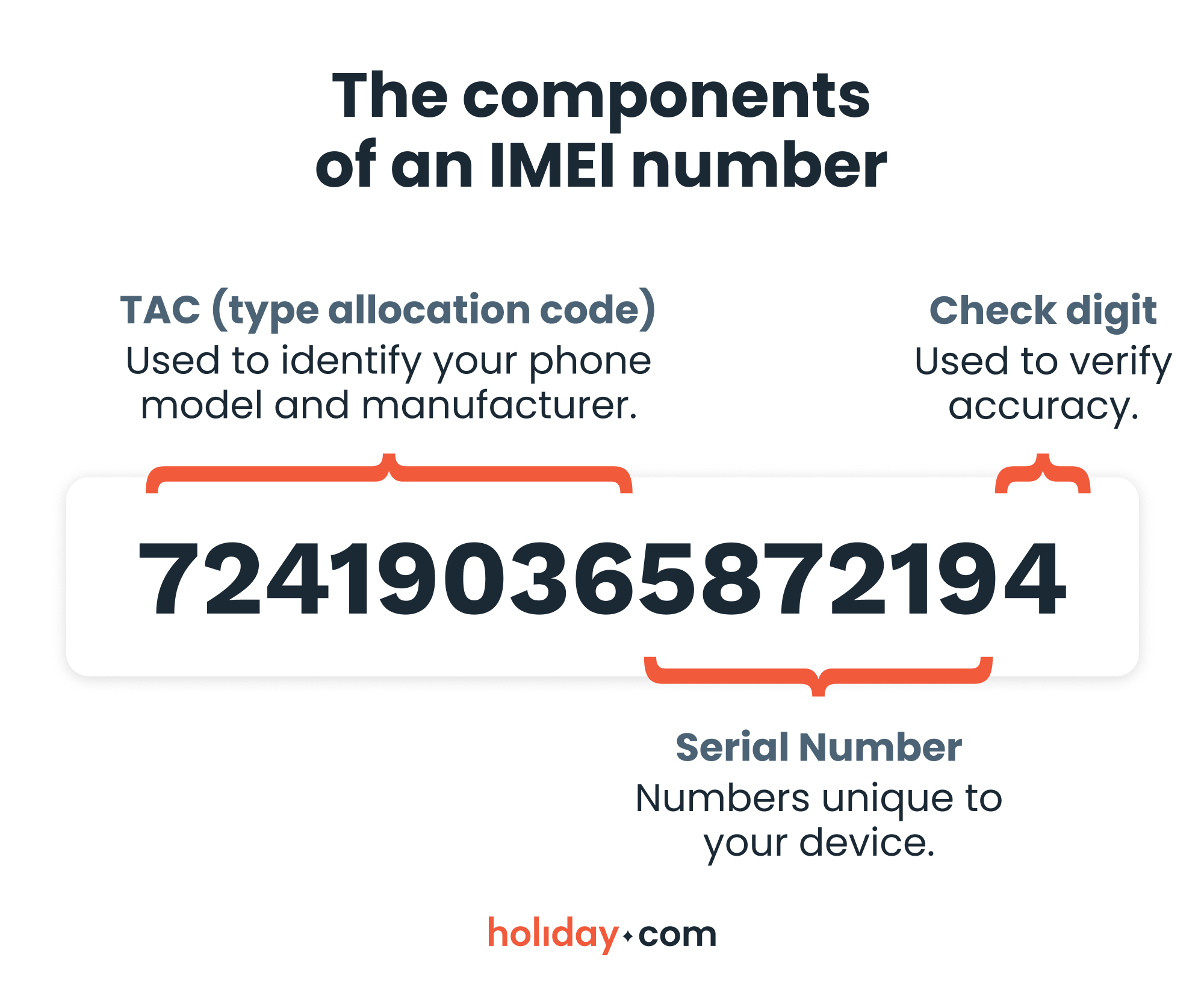
It’s important to note that an IMEI number only identifies a device's hardware. It doesn’t reveal information about a SIM card or a phone’s owner, so you don’t have to worry about your private data being exposed.
An IMEI number helps keep your phone secure
An IMEI number’s main role is related to security, but it’s also important for technical support.
Device activation and compatibility
When you insert a SIM card or activate an eSIM, the carrier checks your IMEI to ensure the phone is compatible with its network. Some devices are locked to certain carriers, which means that they can work only with a specific mobile network, such as Verizon. The IMEI helps confirm whether your phone can connect to other carriers’ networks. This is necessary if you want to use a travel eSIM like holiday.com on your trip.
Blocking stolen or lost phones
If your device is stolen or lost, your carrier can blacklist the IMEI. This prevents anyone from using the phone on most networks, even if they use a different SIM card.
Also, there are global databases that share blacklisted IMEI numbers, making it difficult for thieves to reuse the devices in other regions. This system significantly reduces a stolen phone’s resale value.
Verifying used phones before purchase
If you’re considering buying a second-hand phone, an IMEI number contributes to a safer purchase by providing key verification details. For instance, you can use it to confirm a phone isn’t reported lost or stolen, or that it’s not carrier-locked.
Support and warranty services
The IMEI number is also important for phone repairs and warranty status confirmations. Manufacturers and carriers often use the IMEI number to verify the phone’s model and whether it’s eligible for service.
How to find your IMEI number
You can locate the IMEI number by accessing your phone’s settings. Depending on the phone’s model, you may also be able to find it on the phone’s packaging or the device itself.
Dialing the *#06# code
The fastest way to get your IMEI number is to dial the *#06# code. When you type in the code, your IMEI number will instantly appear.
How to find an IMEI number on iPhone
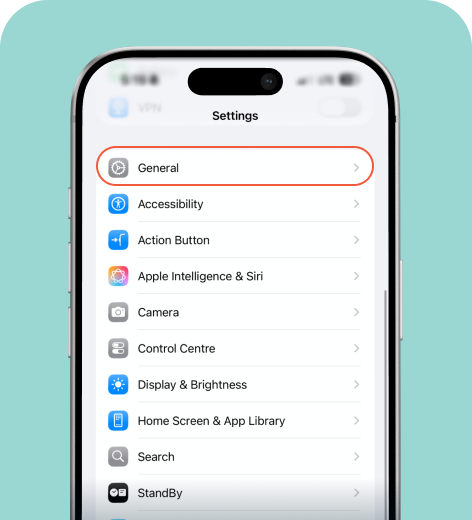
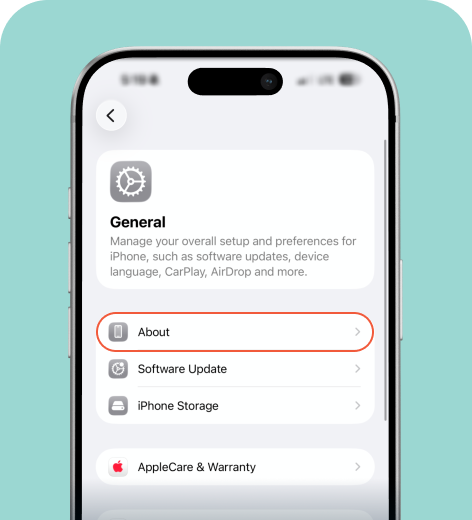
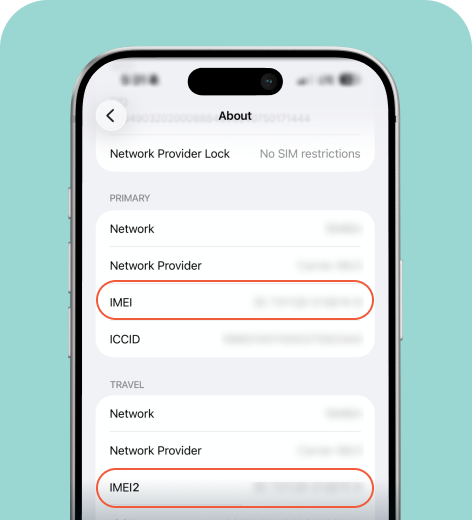
If your phone supports dual SIMs (your physical SIM and eSIM), you’ll see multiple IMEI numbers in your phone’s settings.
How to find an IMEI number on Android
The instructions for finding your IMEI number on an Android phone may vary depending on the device manufacturer, but the steps will look similar to this.
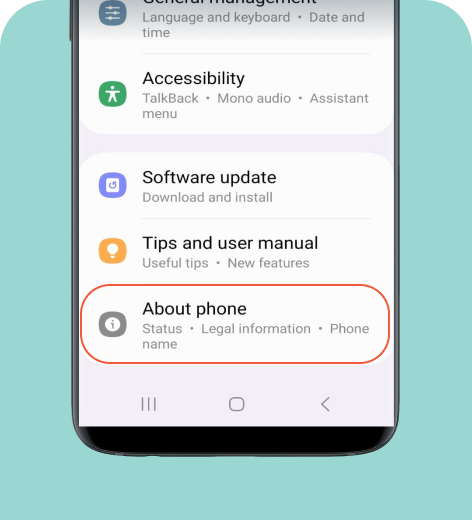
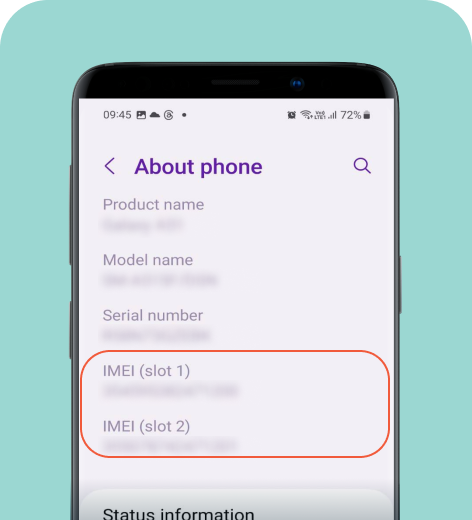
How or find an IMEI number on your device or packaging
Some older models may display the IMEI on the back of the phone. You may also find it on the SIM card tray or on the barcode label of the phone’s original box. Keeping the original packaging as a backup is a good idea if you end up losing your phone.
How to find an IMEI number without your phone
There are other ways to recover your IMEI if your phone goes missing, even if you didn’t keep the original packaging. Here’s how you can do it.
Using Google Find Hub
This method works if your Android phone is linked to your Google account:
- Visit the Google Find Hub website or app.
- Click on your phone model name.
- Click on Settings and you’ll be able to see your IMEI number.
Using Samsung SmartThings Find
If you have a Samsung phone and a Samsung account:
- Log in to your Samsung account on the SmartThings Find website (or the SmartThings app).
- Click on your phone model name.
- Click the three dots for more options.
- Under Device Details, you’ll see IMEI Information.
Using Apple ID website
If you have an iPhone:
- Log in to appleid.apple.com
- Go to the Devices list (a sidebar menu)
- Click on your phone model name
- Scroll down to the About section to find your IMEI number
Whether you have an iPhone or an Android, you’ll be able to locate the IMEI even if your phone is offline, just by logging into your account.
IMEI number and data privacy
An IMEI number doesn’t reveal the content stored on your phone, such as messages, photos, and contacts. But networks can use it to track the device’s location and gain insights into how it’s used, including frequency of calls and websites visited. This may seem like extreme oversight, but these measures prevent fraud, such as unauthorized payment transactions or personal account takeovers.
Hot tip
Even if exposing your IMEI number doesn’t put your private data at risk, it still creates a possibility for scams, such as fake unlocking services. You shouldn’t openly share your IMEI, except with trusted carriers, manufacturers, or the police if necessary.
Legal implications around IMEI numbers
IMEI cloning is considered a crime and involves copying IMEI numbers from clean devices to mask stolen phones. A criminal takes the IMEI details from a legitimate phone and transfers it to a different, most likely stolen device to avoid blacklisting. The carrier sees two devices with the same ID and may take safety measures that result in the legitimate phone not working.
If your IMEI seems invalid, always contact the manufacturer or carrier instead of using unofficial tools. Modifying your IMEI number on your own can break network compatibility, making your phone unusable.
IMEI numbers and eSIMs
If you plan to use an eSIM while traveling, the IMEI number is crucial for compatibility checks and a seamless eSIM activation process.
How IMEI affects eSIM compatibility
Travel eSIM providers may use your IMEI number to confirm that your phone model is compatible with eSIMs. This ensures you can actually use the eSIM abroad. This includes checking if your device is carrier-unlocked, which is necessary if you want to use international data providers like holiday.com.
IMEI and eSIM activation
During the eSIM activation process, your IMEI helps register your device on the mobile network. For instance, when you activate your holiday.com eSIM on an international trip, the IMEI sends information that your phone is authorized to connect to the foreign network. This ensures a smooth setup.
Travel eSIMs reduce the chances of the IMEI being misused. In some countries, you may need to provide your IMEI number at a kiosk to buy a SIM. Using a digital eSIM like holiday.com means you can skip this step as there’s no need to swap SIM cards. It also means that you don’t have to share your IMEI with third-party vendors.
IMEI number travel checklist
A few minutes of prep can spare you a major headache abroad in case you lose your phone. If you disregard the eSIM pre-activation steps, you won’t be able to use it when you arrive at your destination. Before leaving on your trip, make sure to do the following:
- Save your IMEI in a secure note or password manager
- Verify your phone is unlocked by reaching out to your carrier
- Check eSIM compatibility for your destination country
- Keep your device box or IMEI screenshot backed up online
What to do if you encounter IMEI-related issues
If your IMEI number appears as “invalid,” “blacklisted,” or “not recognized,” here are some things to consider:
- Check for software updates to rule out compatibility issues as a possibility. You can also contact your carrier and ask them to check the IMEI’s network status.
- Recently replaced hardware can cause an issue, so be sure to consult the manufacturer. Do not resort to unofficial IMEI repair services, which could make your phone unusable and create legal problems.
Your IMEI number works for your safety
Your IMEI number might seem like a tiny detail tucked away in your phone’s settings, but it plays a big role in keeping your device secure. It also ensures your phone stays functional at home and abroad, so keep it handy at all times, especially while traveling.
FAQ
-
How do I find my IMEI number?

The quickest way to find your IMEI number is to dial *#06#. You can also look it up in your phone’s settings or through Apple/Google account pages.
-
What happens if you give someone your IMEI number?
IMEI doesn’t reveal personal data, so someone having your IMEI number doesn’t pose a threat to your privacy. Still, it’s best to avoid sharing it publicly to prevent potential scams, such as fake unlocking.
-
Can I track my phone with an IMEI number?
You can’t track your phone with an IMEI number on your own, but you can contact your carrier and provide them with the IMEI to track your phone. If your phone is missing and you need an alternative way to access your IMEI, you can log into your Apple ID or Google Find Hub account to find it.
-
How can I check if an IMEI number is blacklisted?
Use your carrier’s IMEI check tool to find out if an IMEI number is blacklisted. Tampering with IMEI numbers can deem your phone unusable and cause legal issues, so it’s important to only use official tools.
-
Does my IMEI number affect eSIM activation?
Yes, your IMEI number is vital for eSIM activation. Carriers check IMEI to confirm device compatibility and network support. If the IMEI number isn’t supported or the phone is locked from the previous carrier, you may not be able to activate an eSIM.
-
Do eSIMs have IMEI numbers?
No. If you have a dual SIM phone, it will have two IMEI numbers, typically IMEI 1 (physical SIM) and IMEI 2 (eSIM). However, the eSIM itself does not have its own IMEI. The phone has the IMEI, and the eSIM simply uses that IMEI to connect to networks.
About our author

You might also be interested in...
-
 Glossary
What is data roaming and how does it work?
You step off the plane in a new country, open Google Maps or check your messages, and everything works like normal. What you may not see is how quickly those small actions can add up to big expenses w...
 Ana Marković
 06.09.2026
 -
 Glossary
What is a nano SIM card? Features and compatibility
If you’re buying a new phone or getting a new SIM card for any reason, using the correct size is vital for proper functionality. SIM cards come in multiple sizes like standard and micro, but these c...
Ivana Shteriova
06.08.2026 -
 Glossary
eKYC verification: What is it, when you need it, and how to do it
Seeing “Verification Failed” on your phone screen can be a major disruption to your plans. If you have to complete a facial scan to activate an eSIM or access international funds, an unsuccessful ...
Sarah Kirton
06.04.2026 -
 Glossary
What is a SIM card? How SIM technology works
A subscriber identity module (SIM) card is inside almost every mobile phone, yet most people never think about what it does or what it contains. Simply put, it keeps your device connected to a mobile ...
Jelena Relić
06.04.2026 -
 Glossary
What is GSM? Everything travelers need to know
If you’re a frequent international traveler, you’ve probably encountered GSM before. Whether you knew it, GSM plays an important role in keeping you connected when you travel abroad. But what exac...
Dawn Prevete
06.01.2026 -
 Glossary
What is an APN and how to fix connection errors
There’s nothing more frustrating than seeing full signal bars on your phone while your internet refuses to load. You might be able to make calls or send texts, but your browser, maps, and apps remai...
Jelena Relić
06.01.2026