



Public Wi-Fi feels convenient, but it’s not always safe to use. The biggest problem with most public networks is that they use weak security or no encryption at all. Encryption protects the data traveling between your device and the internet. Without it, others on the same Wi-Fi network can observe or intercept some of that traffic.
You’ll find free networks in many places, including airports, hotels, and coworking offices. They make it easy to get connected for all your online needs, but it’s important to understand the risks of using public Wi-Fi in any location. A bit of extra knowledge makes it so travelers and everyday users alike can protect their digital privacy.
Fortunately, you can stay safe on Wi-Fi if you’re vigilant and follow some practical advice. A few simple habits can make a big difference. In this guide, we’ll break down the key risks and show you practical ways to stay protected on public networks, whether you’re traveling abroad or just at a shopping mall downtown.
Why public Wi-Fi can be risky

It’s difficult to ensure complete security on public sources of internet. It doesn’t matter if you’re a digital nomad working from a beach bar in Bali or grabbing a coffee while checking emails at your local café. Everyone using public Wi-Fi is at risk, since open or poorly secured connections make it easier for others to monitor your traffic.
Easy access on open networks
In some cases, cybercriminals launch what’s known as a man-in-the-middle attack. This is when they secretly position themselves between your device and the internet to intercept the data you send and receive. If the connection isn’t properly encrypted, they can see the websites you visit and could attempt to collect sensitive information.
Fake hotspots and scams
Cybercriminals sometimes create fake Wi-Fi networks that look legitimate. Known as evil twin networks, they imitate real hotspots using names like “Free Airport Wi-Fi” or “CoffeeShop Guest.” Once you connect, they can route your traffic through their own system and try to steal login details or redirect you to malicious websites.
Data interception and snooping
The network itself isn’t the only source of concern. You need to make sure to protect your connection as well. On open public Wi-Fi, the connection between your device and the router isn’t always encrypted. Similarly, if a website uses HTTP instead of HTTPS, your data isn’t encrypted while it travels between your device and the site. HTTP sends information in plain text, which makes sensitive details accessible.
HOT TIP
Always check that the padlock icon appears in your browser’s address bar before entering sensitive information online. This confirms that you’re on an encrypted HTTPS connection.
Is public Wi-Fi ever safe?
Free hotspots appear in places we pass through every day. These locations make it easy to connect on the go, but they also create situations where your data may be vulnerable.
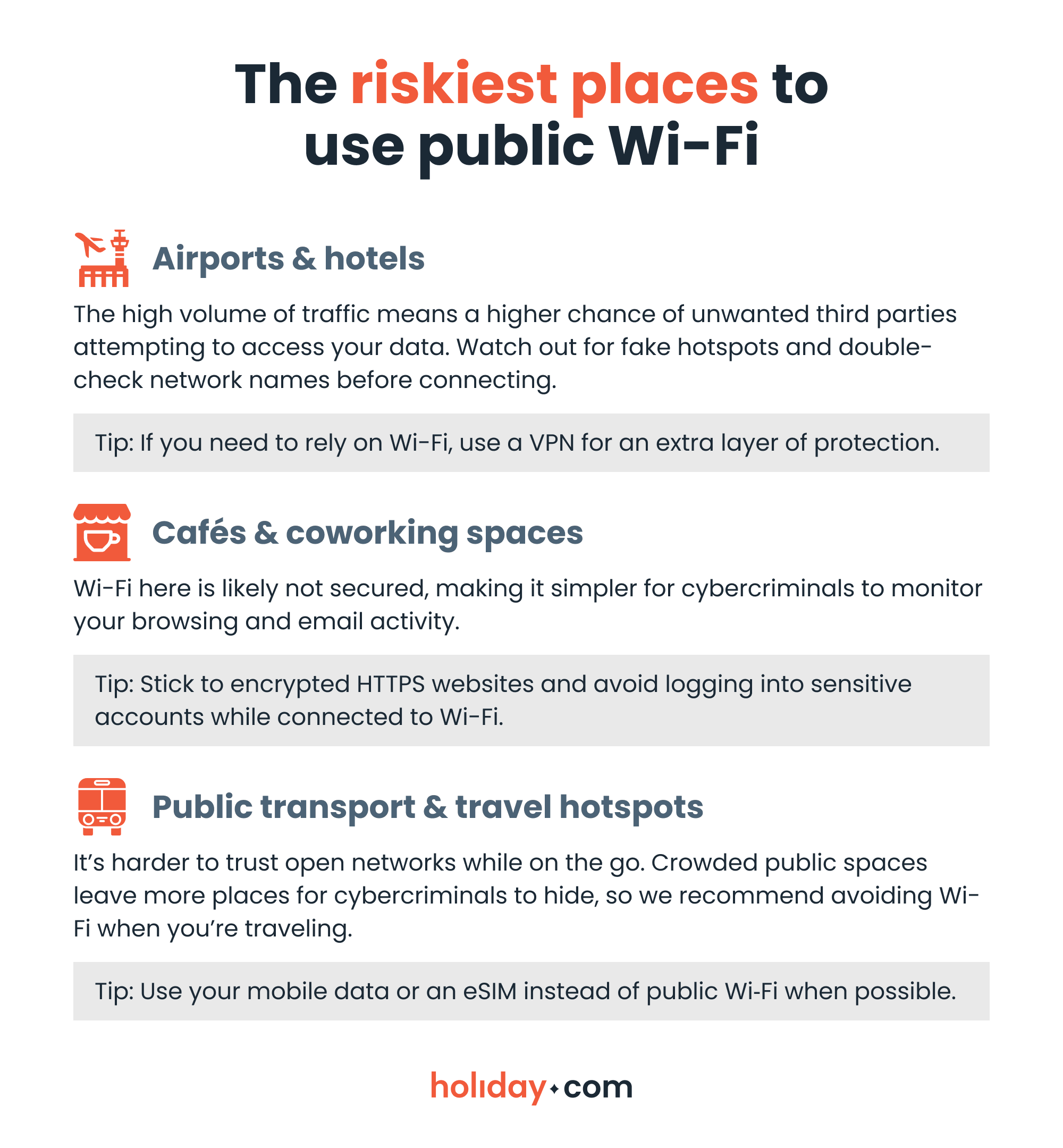
Best practices for public Wi‑Fi safety
A few simple precautions can go a long way to staying safe on public Wi-Fi.
- Use a VPN to encrypt your connection. A quality VPN creates a secure tunnel for your data, making it virtually impossible for others on the same network to see what you’re doing. Make sure it’s turned on before connecting to any public Wi‑Fi.
- Verify network names before connecting. Fake networks can trick you into sharing data. Always confirm the exact name of the Wi‑Fi with staff or signage and steer clear of networks with generic or suspicious names.
- Disable auto-connect and file sharing. Your device may automatically join networks or share files with nearby devices. Turn these features off to prevent unwanted access.
- Keep devices and apps updated. Updates fix security holes that cybercriminals can use to access your data. Turn on automatic updates or check regularly to make sure your apps and devices are current.
- Enable two-factor authentication (2FA). Even if a cybercriminal gets your password, 2FA adds a second layer of protection. Use it on banking and social accounts whenever possible.
What are the alternatives to public Wi-Fi when traveling?

Public Wi-Fi isn't your only choice when you're out and about. If you want to avoid the risks of open networks entirely, take a look at these secure options:
Mobile data and local SIM cards
Using your mobile data or creating a personal hotspot is usually much safer than connecting to public Wi-Fi. Your connection stays private and encrypted while it ties directly to your own device. However, data roaming can get costly if you’re traveling internationally.
To save on roaming fees, you can purchase a local SIM card to temporarily replace your usual SIM. It’s often cheaper than roaming through your home carrier, but it can be difficult to plan ahead of time. You’ll need to seek out a SIM vendor when you arrive at your destination and you might be stuck without service until you find one.
Having a second physical SIM card also brings the risk of damage or loss. Unless your phone has two card slots, you’ll have to keep track of your home SIM while abroad. Swapping SIMs often can also wear down the card or tray, which is why eSIM technology is rising in popularity.
Travel eSIMs
Travel eSIMs let you access mobile internet abroad without the need to swap physical SIM cards. You can install your eSIM before you leave home, then activate it once you land. They provide a secure and encrypted connection that works anywhere you have cellular coverage.
holiday.com eSIM offers unlimited data and partners with local networks in 150+ destinations, making it a convenient and affordable alternative to physical SIM cards and roaming fees. It's a seamless way to maintain your digital security across borders.
Stay safe while you stay connected
Most of us will connect to free Wi-Fi without thinking twice if it’ll help us check map directions or share photos. Public networks can be useful in a pinch, but they often fall short in terms of security. This is especially notable when you’re traveling, as the risks and stakes are both higher.
There are safer ways to access the internet when you’re abroad and need to rely on Wi-Fi, such as using a VPN to protect your personal info. Mobile data solutions like travel eSIMs are even better, letting you avoid crowded, unsecured hotspots altogether. Whichever option works best for you, be mindful of our safety advice when using the internet on the go.
FAQ
-
Can public Wi‑Fi infect my device with malware or viruses?

Yes, but usually only if you click a bad link or visit a compromised site. Stick to trusted networks and keep your device updated to reduce the risk of malware.
-
Is hotel or airport Wi‑Fi safer than café Wi‑Fi?
No, not really. Even if a hotel or airport requires a password, the network is still public and could be vulnerable. It’s always safer to use an encrypted method or a VPN, especially when you’re banking or accessing sensitive information.
-
Do I need a VPN for public Wi‑Fi?
Yes, it’s the best way to ensure your online safety. A VPN encrypts all your traffic, adding an additional layer of protection, including on sites that don’t use HTTPS. Turn it on before logging in or browsing sensitive accounts.
-
Is mobile data or a personal hotspot safer than public Wi‑Fi?
Yes. Mobile data and personal hotspots create private, encrypted connections tied to your device, making it much harder for anyone nearby to intercept your information.
-
How are eSIMs safer than Wi-Fi when traveling?
Travel eSIMs, like holiday.com, offer direct connections to encrypted mobile networks in other countries. It’s safer than using unsecured public hotspots. You can stay online through local networks and stay off risky sources of Wi-Fi.
-
Can public Wi‑Fi be used safely for online banking or shopping?
Yes, but only with care. Stick to HTTPS websites, use a VPN, and always log out of all your accounts when you’re done. For maximum safety, consider using mobile data or a personal hotspot for sensitive transactions.
About our author

You might also be interested in...
-
 Safety
1 in 5 visa search results are traps: How are users exposed?
Key findings Eighty-two percent of search results appearing in the top position are official, but this drops to 37% by the fourth result. Queries for Canada eTA are the riskiest: Only 55% of results ...
 Aishah Mustapha
 07.08.2026
 -
 Safety
SIM swapping fraud: How to protect your digital identity
When you’re in a foreign country, a sudden loss of mobile signal might seem like an international roaming glitch or a network issue. But it could be one of the red flags that someone has just hijack...
Aishah Mustapha
07.03.2026 -
 Safety
How to stay safe while traveling: A practical guide for 2026
Traveling puts you in unfamiliar environments where many things can go wrong. A stolen bag or a compromised digital account can quickly derail your trip. Many travelers assume safety means avoiding ri...
Sarah Kirton
05.26.2026 -
 Safety
Is hotel Wi-Fi safe? What you should know and real-world risks
Travelers commonly log into hotel Wi-Fi without giving a second thought to the potential security risks. Public sources of Wi-Fi, including at hotels, can be vulnerable to cyberattacks. This could exp...
Chené Murphy
05.26.2026 -
 Safety
Is airport Wi-Fi safe? Avoid common scams in 2026
When you’re stuck in an unexpected layover or need to book a ride to the hotel, connecting to the free airport Wi-Fi seems like the fastest solution. The truth is that public networks can put your d...
Ivana Shteriova
05.21.2026 -
 Safety
30+ common travel scams to watch out for abroad
Travel scams can be hard to spot. Scammers often operate out of sight, or greet you with a warm smile as they present an offer that sounds too good to miss. They take advantage of the fact that you’...
Aishah Mustapha
05.15.2026