


You’ve just settled into your seat and started thinking about the destination ahead. Then comes the inevitable request from the flight crew: Ensure that all your devices are set to airplane mode.
Airplane mode disables cellular connectivity, and you can turn it on with a single tap on most modern smartphones. It doesn’t sound like much fun, and most of the time it feels like an unwanted digital disconnect. You might dread the boredom of a long flight or fear missing an important message.
But being in the air doesn’t mean you have be bored or completely disconnected. Knowing how to adjust your settings to safely use Bluetooth or work offline can improve your flight experience.
We’ll explore what airplane mode does and whether it’ll affect your favorite apps. Beyond your flight, we’ll also show you how you can use airplane mode to preserve battery life and control how your device connects for a smoother journey.
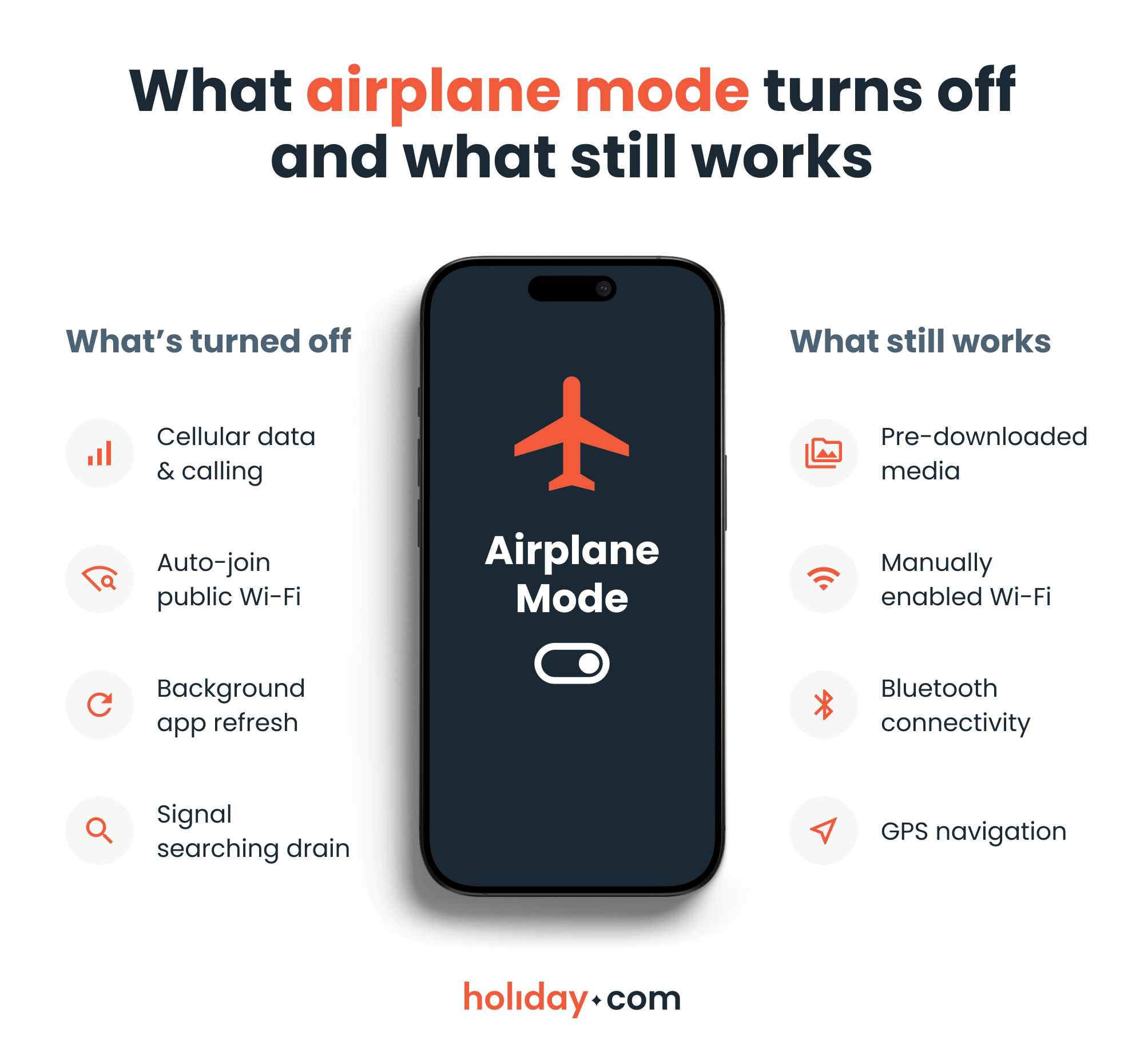
How to turn airplane mode on and off
Airplane mode works on nearly all smartphones, tablets, laptops, e-readers, and connected wearables, like smartwatches and rings. While the steps vary slightly by brand, the process is usually straightforward.
On smartphones and tablets
Activating airplane mode is straightforward on most mobile devices. When activated, an airplane icon typically replaces your cellular signal bars.
On iOS
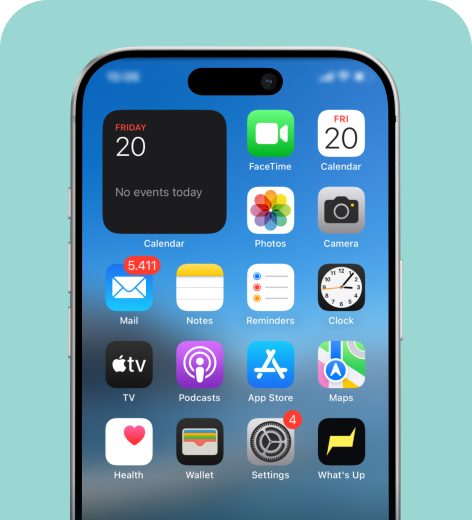
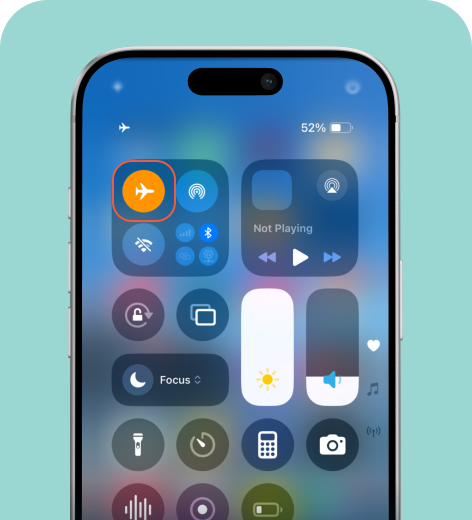
You can also navigate to Settings > Airplane Mode. When you turn airplane mode on, Bluetooth stays active.
On Android
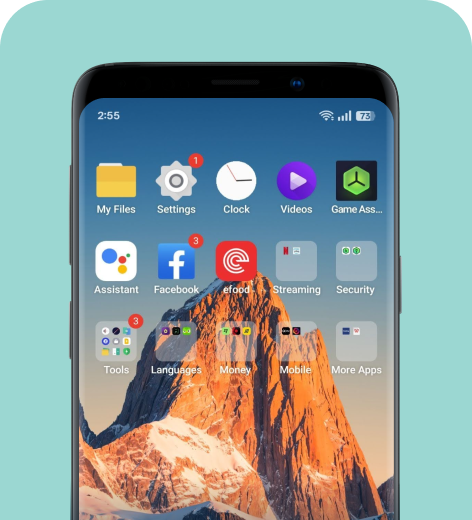
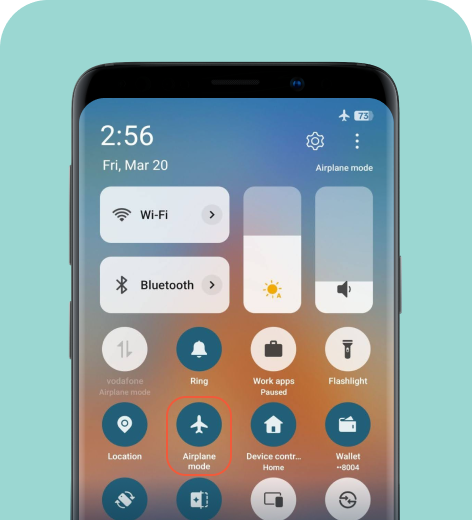
You can also navigate to Settings > Airplane mode. Most Android models won’t automatically deactivate Bluetooth if a device is already connected.
On other devices
Devices without cellular connectivity don't always have a dedicated airplane mode setting because they rarely interfere with aircraft systems.
- MacBooks. Apple laptops lack an airplane mode button. Turn off Wi-Fi and Bluetooth from your top menu bar or Control Center.
- Windows laptops. Click the network icon in your bottom taskbar to open quick settings, then toggle Airplane mode. Alternatively, navigate to Settings > Network & Internet > Airplane Mode.
- E-readers. Swipe down from the top of your screen to access quick actions, then tap the airplane or Wi-Fi icon.
- Smartwatches and wearables. Most wearables feature a flight mode that disables Bluetooth and other wireless connectivity. If yours doesn’t, simply turn off Bluetooth.
Note that airplane mode isn’t useful only for flying. Managing your connections helps preserve battery life and protect your privacy while traveling.
Why do airlines ask passengers to use airplane mode?
Airlines require airplane mode to prevent your devices from potentially interfering with aircraft communication and navigation systems.
On the ground, your smartphone reaches your carrier’s cellular network by “pinging” nearby cellular towers. Once you’re thousands of feet in the air, maintaining a stable link becomes difficult. Instead of accepting the disconnect, your phone will keep trying to reach distant towers, rapidly draining its battery in the process.
In the past, passengers had to shut down their mobile devices from takeoff to landing. Airplane mode changed the rules, allowing you to stay productive or entertained throughout your flight.
What are the benefits of airplane mode?
Beyond flight safety, airplane mode offers several practical advantages for travelers. It makes travel easier by speeding up your device’s charging time and helps you control data use.
The battery lasts longer
Airplane mode is your best defense against rapid battery drain. When your phone constantly searches for a signal in dead zones, the battery exhausts itself. Switching to airplane mode stops this cycle, keeping your device cool and ready for long days of sightseeing.
You won’t use data passively
Airplane mode can reduce data usage by stopping your phone from downloading large files in the background. You’ll also avoid surprise data roaming fees by blocking connections to foreign networks abroad. If you want to stay connected abroad without the stress of monitoring data, consider a holiday.com eSIM. You’ll get unlimited data for the days you choose, so you won’t need to keep turning airplane mode on and off.
Your personal data can’t reach bad actors
Treat airplane mode as a manual firewall. It blocks your device from automatically joining unsecure Wi-Fi networks in busy hubs like airports and train stations. You decide exactly when to transmit your data, ensuring a safer travel experience.
HOT TIP
If you’re in a hurry to start exploring, try charging your phone with airplane mode turned on. You’ll notice it charges significantly faster, especially if you’re using an older tablet or phone.
How to prepare for your flight
Take a few minutes to prepare your devices for offline use before boarding.
- Download any movies, games, music, e-books, or audiobooks you want so they’re available offline.
- If you plan to work during the flight, save important documents directly to your local storage rather than a cloud drive.
- Fully charge your devices at the terminal and pack a power bank to ensure your battery lasts the entire trip.
Airplane mode can be useful even after you land
Airplane mode is more than an in-flight requirement. It’s a strategic tool for managing your devices and how they interact with wireless networks.
By understanding how it works, you can manage how your devices connect on your own terms. It helps you conserve battery power on long sightseeing days and prevents accidental data charges while traveling. You can turn on Wi-Fi or Bluetooth for the services you actually need while keeping cellular connections disabled.
Once you know how to use it effectively, airplane mode becomes a powerful digital tool for smarter travel.
FAQ
-
Why does airplane mode save battery on flights?

Your device works overtime to find a stable cellular connection, which quickly drains your battery. Turning airplane mode on stops this search and preserves battery life.
-
Does airplane mode turn off all wireless connections?
Activating this setting shuts down your cellular signal, Wi-Fi, and Bluetooth. However, modern operating systems let you toggle Wi-Fi and Bluetooth back on.
-
What happens if you forget to turn on airplane mode during a flight?
Forgetting to turn on this setting can cause technical interference for the pilots, resulting in a rhythmic buzzing in their headsets. Additionally, your phone will likely be dead upon landing after spending the entire flight struggling to find a signal.
-
When should you use airplane mode instead of Do Not Disturb?
Airplane mode is best when you need to stop all cellular communication or maximize battery life while traveling. Use Do Not Disturb to block notifications while still keeping your phone functional for background tasks (e.g., during a meeting).
-
Do you need airplane mode when using an eSIM?
Yes. An eSIM relies on a cellular connection, just like a physical SIM card. You must enable airplane mode during a flight to comply with safety regulations. Once you land, turn it off to activate your eSIM and connect to local networks.
About our author

YOU MIGHT ALSO BE INTERESTED IN
-
 Glossary
What is data roaming and how does it work?
You step off the plane in a new country, open Google Maps or check your messages, and everything works like normal. What you may not see is how quickly those small actions can add up to big expenses w...
 Ana Marković
 06.09.2026
 -
 Glossary
What is a nano SIM card? Features and compatibility
If you’re buying a new phone or getting a new SIM card for any reason, using the correct size is vital for proper functionality. SIM cards come in multiple sizes like standard and micro, but these c...
Ivana Shteriova
06.08.2026 -
 Glossary
eKYC verification: What is it, when you need it, and how to do it
Seeing “Verification Failed” on your phone screen can be a major disruption to your plans. If you have to complete a facial scan to activate an eSIM or access international funds, an unsuccessful ...
Sarah Kirton
06.04.2026 -
 Glossary
What is a SIM card? How SIM technology works
A subscriber identity module (SIM) card is inside almost every mobile phone, yet most people never think about what it does or what it contains. Simply put, it keeps your device connected to a mobile ...
Jelena Relić
06.04.2026 -
 Glossary
What is GSM? Everything travelers need to know
If you’re a frequent international traveler, you’ve probably encountered GSM before. Whether you knew it, GSM plays an important role in keeping you connected when you travel abroad. But what exac...
Dawn Prevete
06.01.2026 -
 Glossary
What is an APN and how to fix connection errors
There’s nothing more frustrating than seeing full signal bars on your phone while your internet refuses to load. You might be able to make calls or send texts, but your browser, maps, and apps remai...
Jelena Relić
06.01.2026