



Deleting an eSIM on Android isn’t complicated, but you might worry about removing the wrong profile or disrupting your main phone number. Menu labels vary between devices, and it’s natural to feel a little hesitant before hitting the final delete button.
The good news is that most Android phones keep these settings in a single, accessible menu. Once you know exactly where to look, clearing out an old travel plan or an expired carrier profile only takes a minute.
Below, we'll walk you through the steps to safely remove an eSIM. We’ll also provide a checklist before you start and give you tips on how to troubleshoot common eSIM deletion issues.
What should you check before deleting an eSIM?
You don’t need much preparation, but a few quick checks can help avoid headaches later.
- Confirm it’s the right SIM. Make sure you’re selecting the eSIM you want to remove and not your primary number.
- Review your plan. Deleting an eSIM doesn’t cancel any active mobile plan tied to it.
- Update two-factor authentication. If you’ve linked the eSIM to a banking or email account, switch to another line or an authenticator app first.
- Check your active SIM settings. If the eSIM you want to delete is currently set as your mobile data line, switch to another profile before you remove it.
These small steps help you avoid common issues like dropped service or login interruptions.
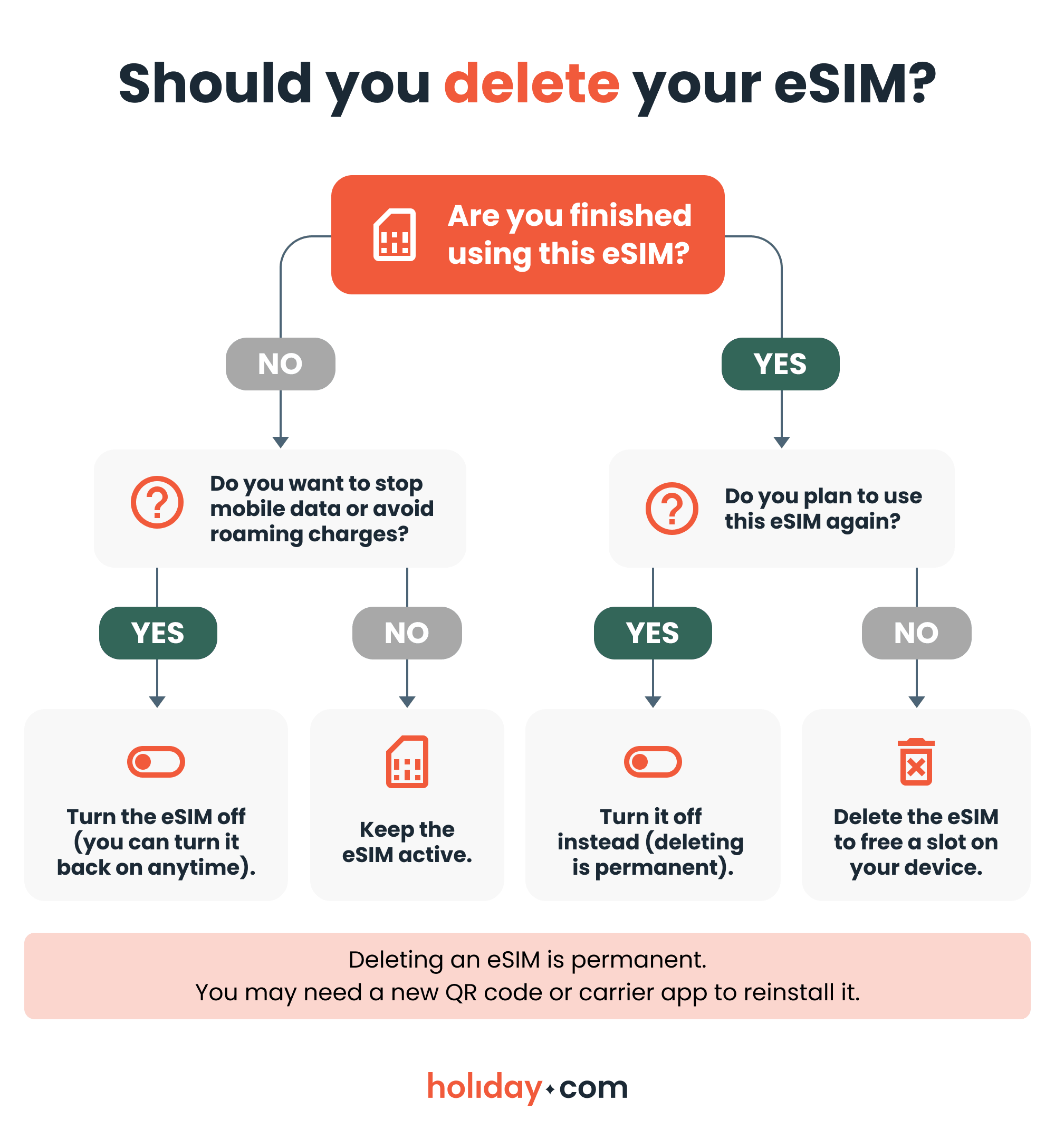
Step-by-step eSIM removal guide
Your menus may have different names depending on the make and model of your Android device, but the process is similar. If you get stuck, you can use the search bar in your Settings app to look for “SIM,” “eSIM,” or “Mobile Network.”
Samsung
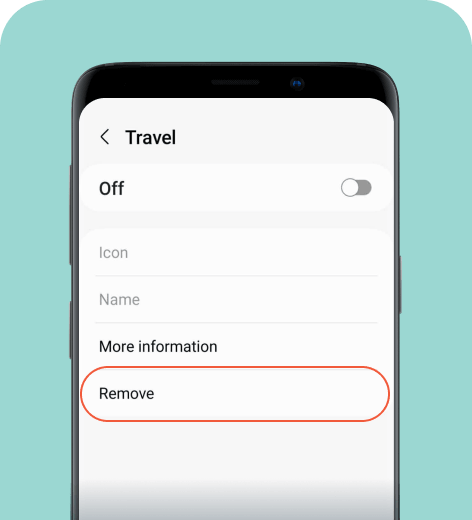
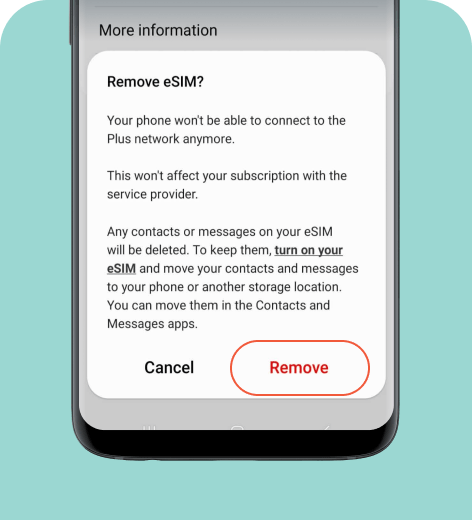
Here’s how to remove an eSIM from most Samsung phone models.
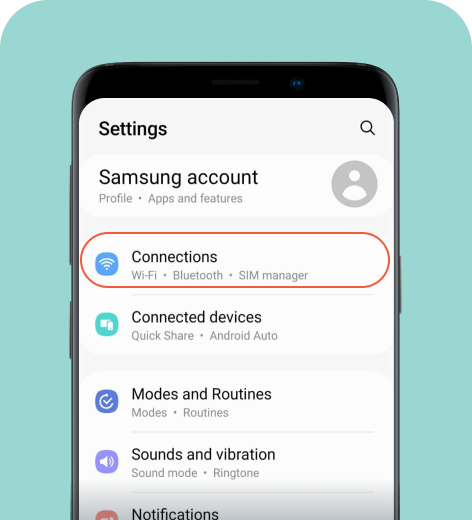
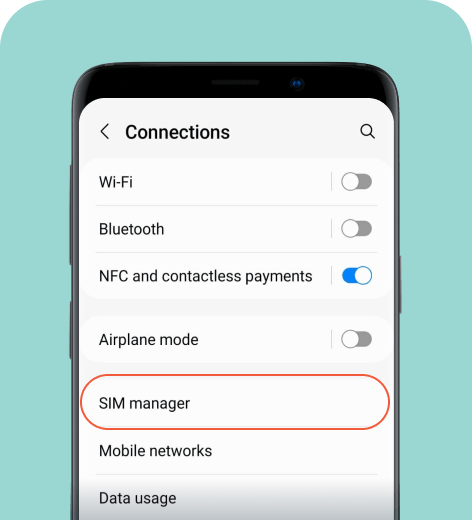
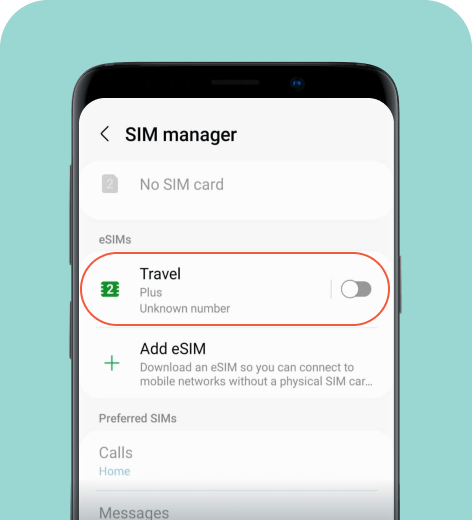
Pixel
To remove an eSIM on a Pixel phone:
- Go to Settings > Network & internet.
- Select SIMs.
- Choose the eSIM profile you want to delete.
- Tap Erase eSIM or Delete eSIM.
- Confirm eSIM removal when prompted.
Xiaomi
To delete an eSIM from a Xiaomi device:
- Go to Settings > SIM cards & mobile networks.
- Select Manage eSIM.
- Choose the eSIM profile you want to delete.
- Tap Delete eSIM or Delete mobile plan.
- Confirm eSIM removal when prompted.
Once you confirm the removal of your eSIM, you won’t be able to undo this action. Double-check the SIM name before you delete it.
What happens after you delete an eSIM?
Removing an eSIM erases that mobile profile from your device. The change takes effect immediately, and your phone may switch to another SIM or show “No service” if you don’t have a backup line.
A few things to keep in mind:
- Deleted eSIMs aren’t recoverable unless your carrier allows you to reinstall the eSIM from the app or issues a new QR code.
- Your plan remains active until you cancel it with the provider.
- Dual SIM settings may reset, so double‑check your call and data preferences.
- Your device ID (IMEI, EID) doesn’t change when you delete an eSIM.
If you ever need the same plan again, your carrier will need to reopen or reissue the profile.
HOT TIP
If you’re preparing for a new trip, deleting an old travel eSIM frees up space so you can install a fresh travel plan without issues. It’s a simple way to avoid activation errors when switching countries.
Troubleshooting eSIM deletion on Android
If something doesn’t look right, these quick fixes usually help:
- Settings menus don’t match your device. Use the search bar in Settings and type “eSIM” or “SIM cards.”
- The delete button isn’t there. Your eSIM may still be the active data line. Switch your main SIM first.
- You can’t access any of the eSIM settings. Only the carrier can remove some corporate or prepaid profiles.
- The phone won’t delete the eSIM. Try restarting your device, then repeat the steps.
- You want a clean slate. A factory reset removes eSIMs on certain models, but this wipes your entire device. Do this as a last resort.
HOT TIP
If you’re preparing for a new trip, deleting an old travel eSIM frees up space so you can install a fresh travel plan without issues. It’s a simple way to avoid activation errors when switching countries.
What to remember when removing an eSIM
Removing an eSIM from your Android phone only takes a moment and the steps look similar across most devices. With the tips and checks above, you can delete an eSIM fairly easily and avoid issues with your data settings or plan.
If you’re preparing for a trip, you can follow our steps to remove an old or unused eSIM to keep your plans organized. You can install a travel eSIM like holiday.com via the app before you fly and activate it after you land. It’s the most convenient way to stay connected without juggling physical SIM cards.
FAQ
-
Can I recover a deleted eSIM?

No. Once you remove an eSIM from your device, the profile is erased forever. If you want to use that service again, your carrier will need to issue a new QR code or activation link.
-
Does deleting an eSIM cancel my mobile plan?
No. Removing an eSIM only deletes the profile from your phone. Your plan will continue to renew until you cancel it directly with your carrier, so it’s worth checking your account if you don’t need that line anymore.
-
How many eSIMs can an Android phone store?
Most Android phones can hold multiple eSIM profiles at once. This is typically 5-10 profiles, though the exact number varies by model. Only one or two profiles can be active at a time, depending on your device.
-
Should I delete an eSIM or just turn it off?
If there’s any chance you’ll need the eSIM again, turning it off is usually the better option. Deleting is irreversible and you’ll need a new activation code if you want to reinstall it later.
-
What if I delete my travel eSIM before the trip ends?
Your connection will stop immediately, and the plan won’t work again unless the provider issues a replacement profile. If you still need data, you’ll have to reinstall the eSIM or purchase a new one.
-
Can I delete an eSIM without affecting my other data?
Yes. Removing an eSIM doesn’t impact your apps, contacts, or settings. It only erases the mobile profile tied to that specific line.
About our author

You might also be interested in...
-
 eSIM
eSIMHow to turn off an eSIM: Quick guide and tips in 2026
Turning off your eSIM can be helpful in many situations. You may want to disable a travel data plan, switch to another SIM, or avoid roaming charges. The process is quick and you can do it from your p...
 Ana Marković
 06.16.2026
 -
 eSIM
eSIMWhat is an ICCID number and why does it matter?
Knowing how to find your integrated circuit card identifier (ICCID) number makes it easier to manage devices that use SIM cards and eSIMs. When things are going smoothly, you hardly have to think abou...
Sarah Kirton
06.16.2026 -
 eSIM
eSIMeSIM vs. data roaming: Which is better for international travel?
Staying connected while traveling is easier than ever, but the way you access mobile data can make a big difference in your experience and costs. Two popular options are purchasing a travel eSIM or re...
Dawn Prevete
06.09.2026 -
 eSIM
eSIMeSIM vs physical SIM: Pros, cons, and which one is right for you?
An eSIM (embedded SIM) is the digital equivalent of a physical SIM card built into your device. It allows you to activate and manage cellular plans entirely through software, meaning there’s nothing...
Ivana Shteriova
06.08.2026 -
 eSIM
eSIMHow to delete data usage history in 2026: A step-by-step guide
You can erase the data usage counters on your phone, but you can’t permanently erase your carrier’s system-level logs. Deleting your local statistics so the counter returns to zero takes only a fe...
Ana Marković
06.08.2026 -
 eSIM
eSIMDoes an eSIM drain your battery? Fact versus fiction
While eSIMs use the same hardware as physical SIM cards and consume virtually the same power, there are times when you might notice your device’s battery draining faster than usual. Most often, itâ€...
Sarah Kirton
06.08.2026