


Troubleshooting a connection issue and support asks for your EID number? If you don’t know what that is, you aren’t alone. The embedded identity document (EID) is a critical component for connecting your device to a mobile network without a physical SIM card.
This guide explains what an EID number is, why it matters for your eSIM, and how to find it on your iPhone or Android device.
Common EID number uses
The EID is the bridge between your device and the mobile network. Because you can’t physically swap a chip to change carriers, the EID allows this process to happen virtually.
Here are its three main functions:
- Remote provisioning (activation). When you buy an eSIM plan, the network uses your EID to verify your device and “download” the SIM profile to the embedded chip. This process, called remote provisioning, replaces the need to insert a plastic card.
- Security and authentication. The EID is unique to your specific device hardware and duplications aren’t possible. This creates a secure, encrypted link between your phone and the carrier, preventing SIM cloning and fraud.
- Multi-profile management. A single EID can store multiple eSIM profiles simultaneously. This allows you to switch between a home plan and a travel plan via your phone settings. You don’t need to swap physical cards.
The EID handles the technical heavy lifting in the background, allowing you to switch plans digitally rather than manually.
IMEI vs. ICCID vs. EID: What's the difference?
It’s easy to confuse these technical acronyms because cell phone providers use these identifiers for eSIM provisioning. Here is a quick breakdown of how they differ:
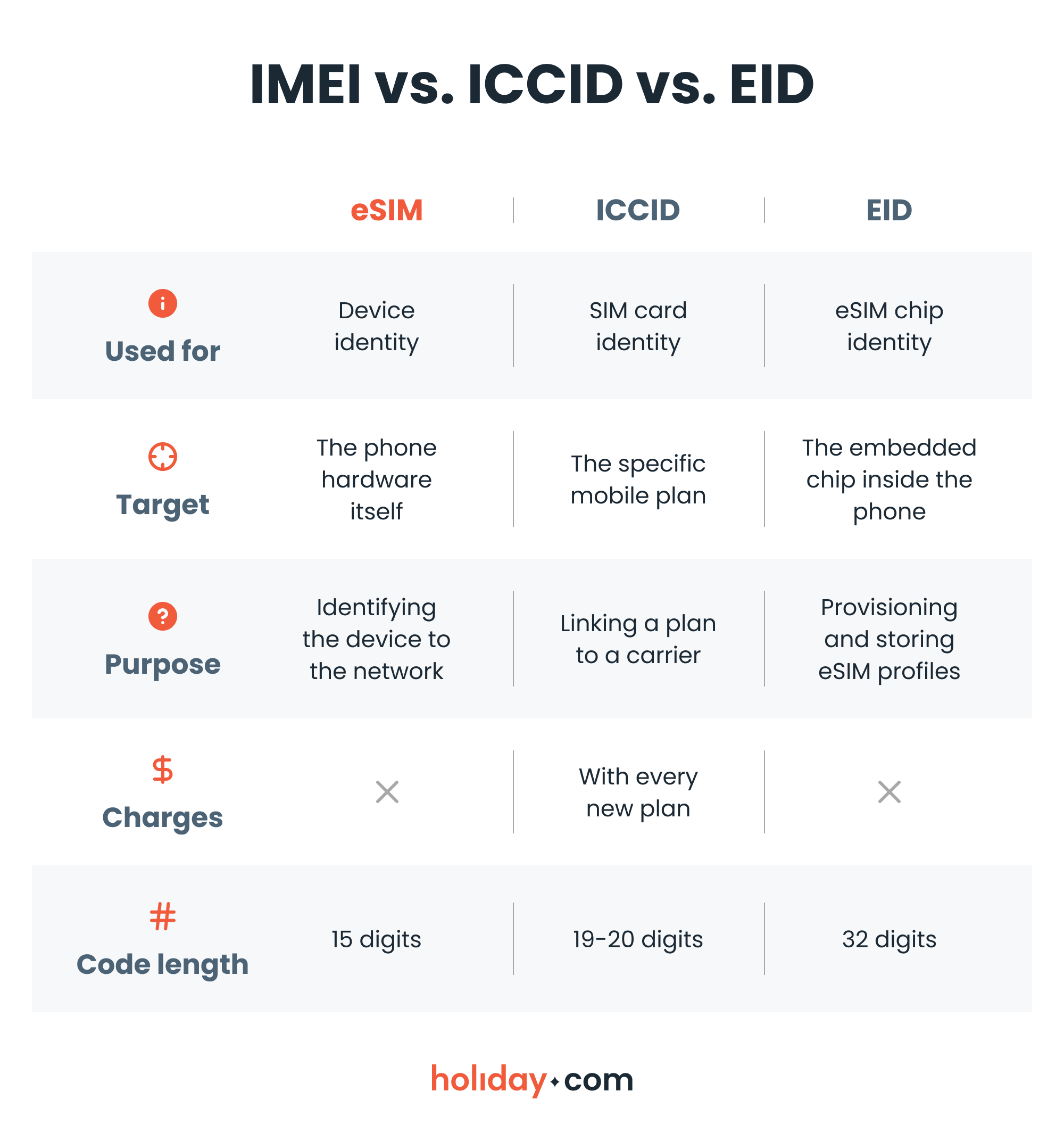
Understanding this distinction is helpful if technical support asks for your device details during troubleshooting. Knowing which number is which saves time.
How to find your EID number
Finding your EID number is straightforward. The fastest way to view it on any device (iPhone or Android) is to open your phone keypad and dial *#06#. A screen will pop up displaying your device information, including the EID.
If that doesn’t work, you can find it in your settings.
On iPhone
Here’s how to find the EID on an iPhone:
- Go to Settings > General > About.
- Scroll down to the bottom of the page.
- Your 32-digit number appears next to EID.
On Android
Here’s how to find your EID number on these common Android phones.
Samsung
- Go to Settings.
- Tap About phone.
- Select Status or Status information and look for your EID number.
Pixel
- Go to Settings.
- Tap About phone.
- Select SIM status and find your EID number.
Xiaomi
- Go to Settings.
- Tap About phone.
- Find Detailed info and specs.
- Navigate to Status and select EID to find your number.
On your device box
If you can’t turn on your phone, you can often find the EID printed on the original retail packaging. Look for the sticker with the barcodes on the side or back of the box. The EID is usually listed near the IMEI and Serial Number.
Do you need an EID number with holiday.com?
If you use the holiday.com app to install your eSIM, you generally don’t need to find or enter your EID number manually. Our system checks your device's compatibility and performs EID verification in the background during setup.
You’ll only need to provide this number when troubleshooting a complex connection issue with our support team.
The EID number is your key to eSIM connectivity
While the EID number sounds technical, it’s simply the digital serial number that allows you to ditch physical SIM cards. By uniquely identifying your eSIM chip, it enables you to switch carriers and activate data plans instantly.
Now that you know where to find it, you can troubleshoot connection issues faster and get back to enjoying your trip.
FAQ
-
What does EID stand for?

EID stands for Embedded Identity Document. It’s the 32-digit serial number hard-coded into your device’s eSIM chip.
-
Can you transfer your EID number to a new device?
No. The EID number ties to the specific hardware (the eSIM chip) inside your phone. If you get a new phone, it will have its own unique EID number. You transfer your plan, not the EID itself.
-
What is the purpose of the EID number?
The EID allows mobile networks to remotely identify your device’s built-in SIM chip. This secure identification allows carriers to “download” and activate your cellular plan without needing a physical card.
-
Is EID the same as a SIM number?
No. The “SIM number” normally refers to the Integrated Circuit Card Identifier (ICCID), which identifies your specific mobile plan or profile. The EID identifies the physical hardware (the chip) that holds that profile.
-
Are EID and IMEI the same?
No. The IMEI identifies the device itself (the phone), while the EID identifies the embedded SIM chip inside that phone.
About our author

You might also be interested in...
-
 Glossary
What is data roaming and how does it work?
You step off the plane in a new country, open Google Maps or check your messages, and everything works like normal. What you may not see is how quickly those small actions can add up to big expenses w...
 Ana Marković
 06.09.2026
 -
 Glossary
What is a nano SIM card? Features and compatibility
If you’re buying a new phone or getting a new SIM card for any reason, using the correct size is vital for proper functionality. SIM cards come in multiple sizes like standard and micro, but these c...
Ivana Shteriova
06.08.2026 -
 Glossary
eKYC verification: What is it, when you need it, and how to do it
Seeing “Verification Failed” on your phone screen can be a major disruption to your plans. If you have to complete a facial scan to activate an eSIM or access international funds, an unsuccessful ...
Sarah Kirton
06.04.2026 -
 Glossary
What is a SIM card? How SIM technology works
A subscriber identity module (SIM) card is inside almost every mobile phone, yet most people never think about what it does or what it contains. Simply put, it keeps your device connected to a mobile ...
Jelena Relić
06.04.2026 -
 Glossary
What is GSM? Everything travelers need to know
If you’re a frequent international traveler, you’ve probably encountered GSM before. Whether you knew it, GSM plays an important role in keeping you connected when you travel abroad. But what exac...
Dawn Prevete
06.01.2026 -
 Glossary
What is an APN and how to fix connection errors
There’s nothing more frustrating than seeing full signal bars on your phone while your internet refuses to load. You might be able to make calls or send texts, but your browser, maps, and apps remai...
Jelena Relić
06.01.2026