

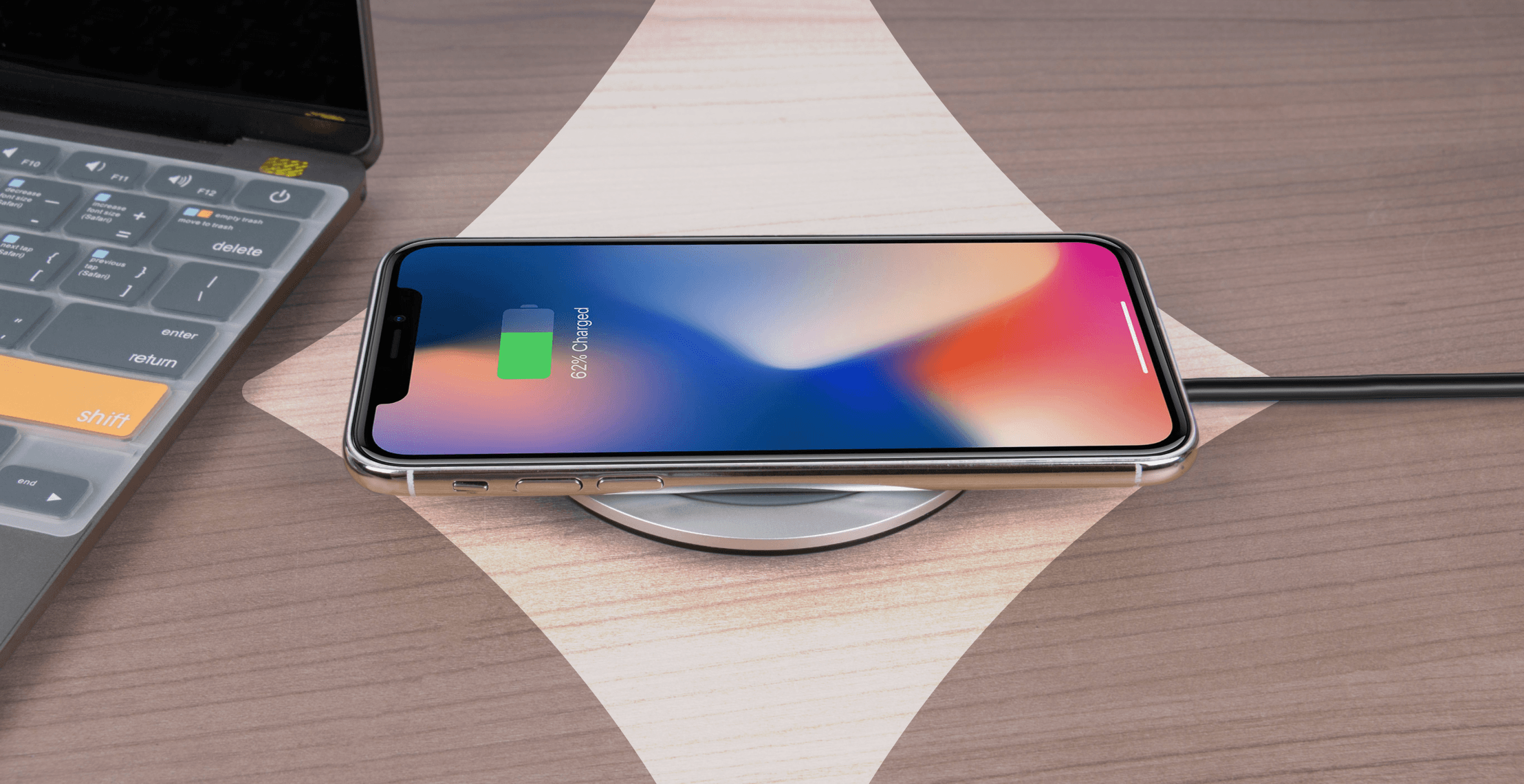
While eSIMs use the same hardware as physical SIM cards and consume virtually the same power, there are times when you might notice your device’s battery draining faster than usual.
Most often, it’s due to your SIMs working harder to stay connected, especially when you’re traveling or managing multiple active lines. In these cases, your modem works overtime to find the fastest nearby data network. It's these background activities that cause your battery percentage to drop.
Here’s why this happens and the settings you can change to manage your phone’s power more efficiently.
The science of eSIM technology
From an engineering standpoint, an eSIM is just as energy-efficient as a physical SIM card. Network conditions and your phone’s settings influence battery drain far more than the eSIM hardware itself.
Here’s a closer look at how an eSIM's underlying hardware compares to a physical SIM:
- Permanent integration: Manufacturers solder the eSIM (called an eUICC chip) directly onto the logic board of your phone. This eliminates the need for a removable SIM tray, simplifying the internal design.
- Passive power use: Both eSIM and physical SIM chips use negligible energy while idle. It’s your phone’s cellular modem that consumes the most energy by maintaining network connections, not the SIM hardware.
- Engineering efficiency: Because your phone has a built-in eSIM, it doesn’t rely on physical contact from the small metal pads found on physical SIM cards. This eliminates the risk of poor contact or slight connection losses, allowing the modem to maintain a stable connection without additional power overhead.
- System-level optimization: Modern smartphones dynamically manage cellular connections by switching between network types and balancing performance with power consumption. This process works the same way for both eSIMs and physical SIMs.
What to expect during activation

Activating your eSIM can briefly increase power use, especially if your phone struggles to find a supported network.
The initial setup spike
Your device might use more power while configuring the new digital line. This process involves background communication with the local network to authenticate your profile. You may notice a short-term dip in your battery percentage, but power usage will stabilize once the configuration is complete.
Activate your travel eSIM on arrival
Travel eSIM packages only work within their specific geographic regions. For example, an Argentina eSIM won't find a signal while you’re on your couch in London.
Wait until you arrive at your destination to activate your line. Otherwise, your phone will drain its power to search for a nonexistent network. Activating early might also trigger your plan’s validity period, meaning you could waste days you’ll need for your actual trip.
What are some common causes of battery drain?
Even with efficient hardware, everyday travel scenarios can affect your battery without your knowledge. Here’s what to look out for.
Weak signals
When your phone struggles to reach distant towers in low-signal areas, it cranks up its power output. This continuous signal search consumes far more energy than maintaining a stable connection. To save battery, switch to Airplane Mode in tunnels or dead zones, and use Wi-Fi when possible to stay connected without taxing your modem.
5G polling and background syncing
Phones search for 5G signals, even when a stable 4G/LTE connection is available. Modern modems prioritize the fastest available network, even if it requires more power. This can overheat your device and cause your battery percentage to drop.
Updates running in the background will also silently sap your power.
How to reduce battery drain
On iPhone
Here are two ways to reduce battery drain on your iPhone.
Low Data Mode
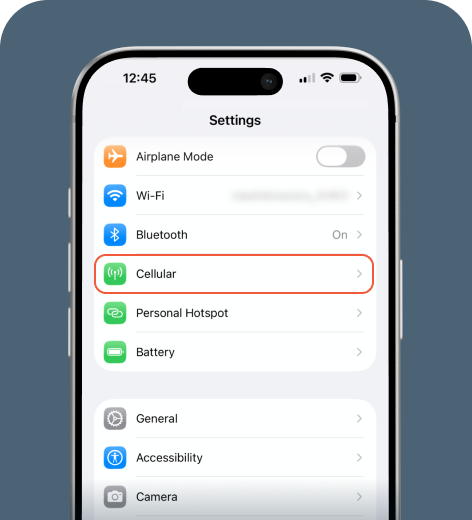
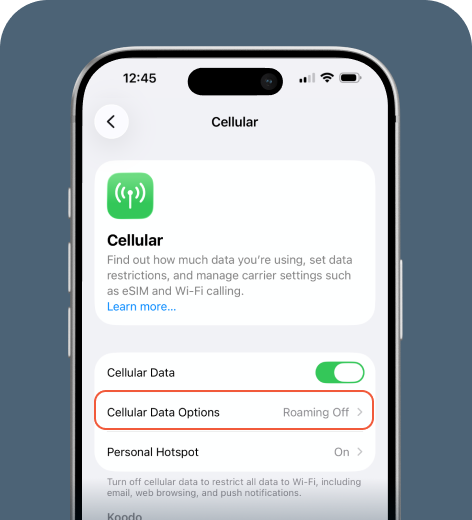
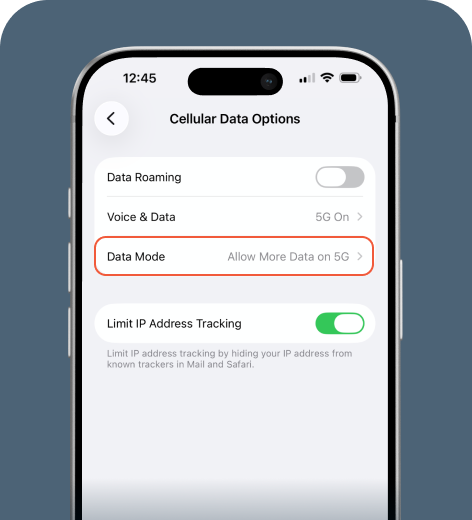
To reduce 5G battery drain and disable unnecessary background processes, enable Low Data Mode.
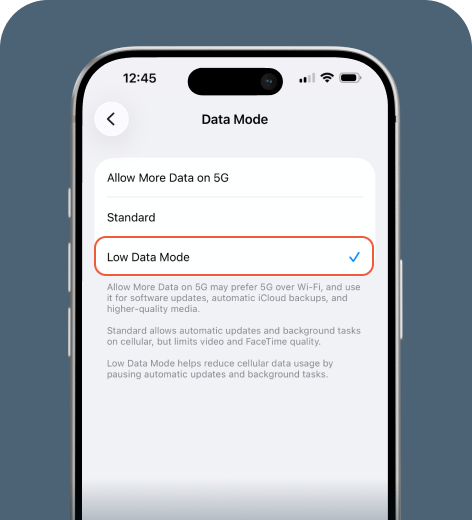
5G Auto
You should also consider keeping the 5G Auto setting, which switches to LTE when 5G isn’t required. Most iPhones have this enabled by default.
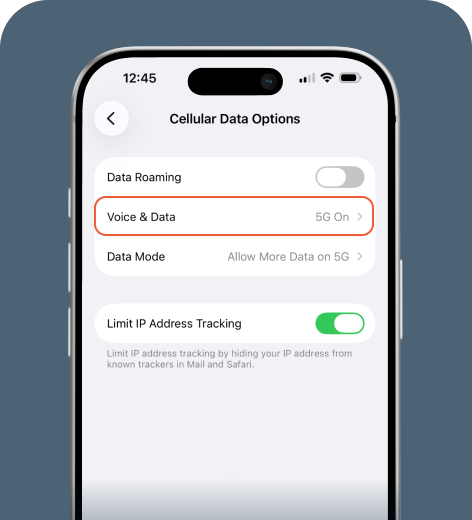
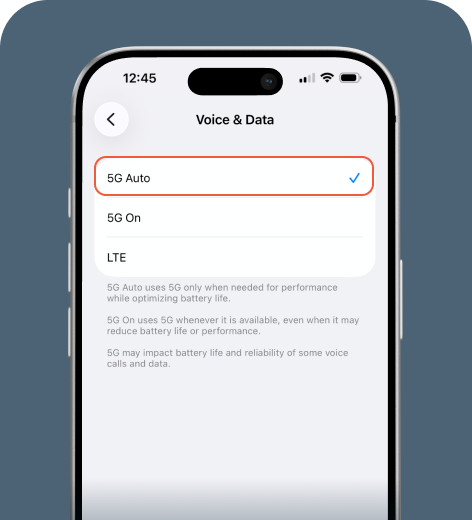
By controlling your connection this way, your phone stops hunting for high-power signals and saves power in areas with weak coverage.
On Android
Use Android’s built-in settings to reduce battery drain.
Preferred network type
Most Android phones allow you to set your network type (LTE-only or 4G/LTE) in your settings.
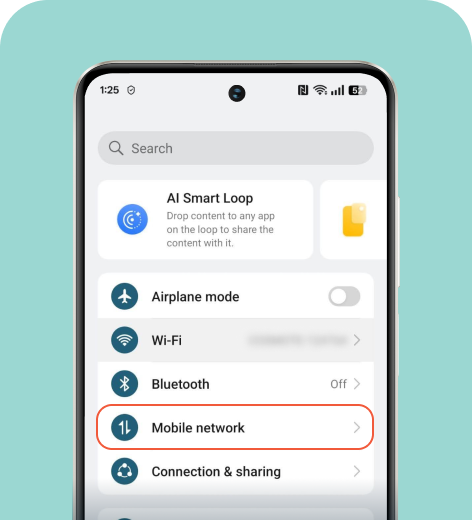
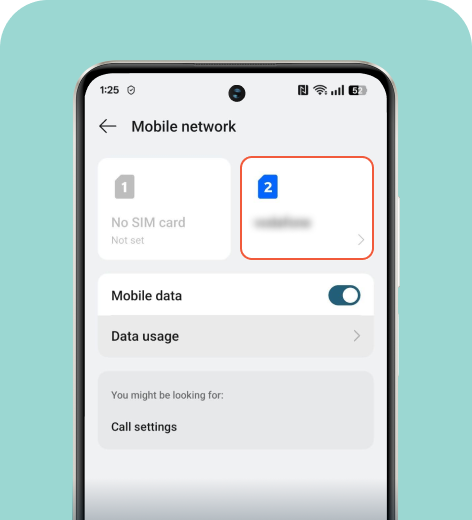
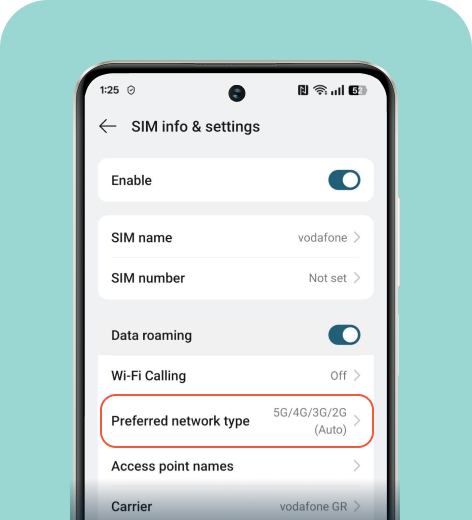
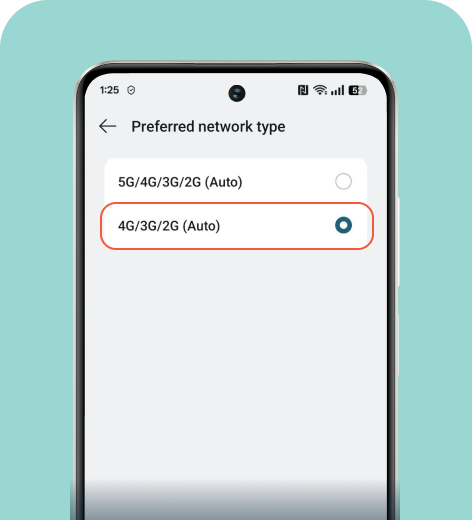
The Android settings menu varies by model. To find this setting on your device, tap the search bar and type “network type.”
Data saver
This setting limits background syncing and automatic app updates, both of which can drain the battery without you noticing.
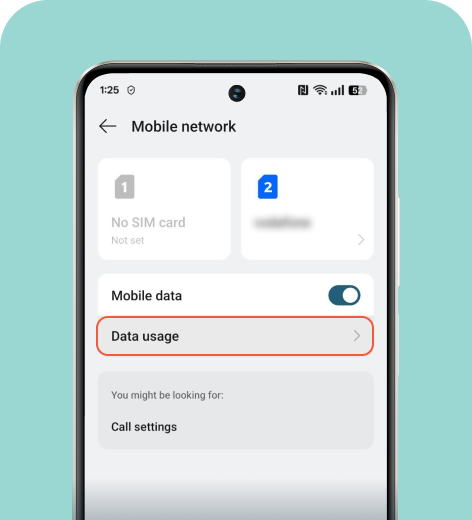
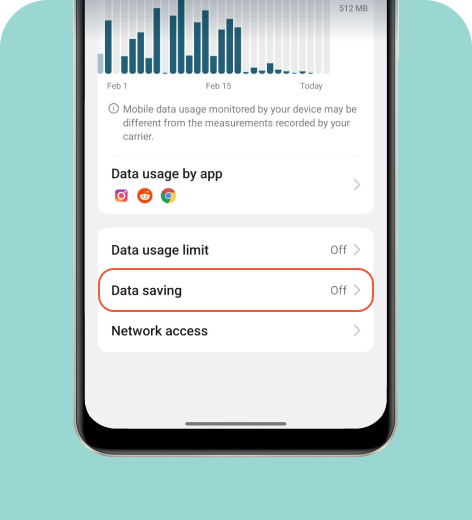
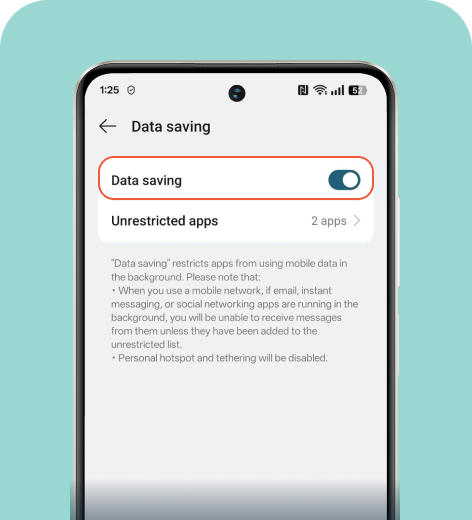
You can search for “data saving” or “data saver” to find this option on your Android device.
Dual lines
Standby power is the energy your phone uses while it’s on but not in use. Keeping two lines active (like a physical SIM and an eSIM) forces your modem to maintain both connections, which can boost standby power drain.
Check your status bar at the top of the screen. If you see two signal icons, both networks are active and drawing power. To conserve battery while traveling, keep your travel eSIM active and turn off your home SIM so the modem focuses on a single connection.
eSIMs don’t drain battery
eSIMs are very efficient. While running a dual-SIM setup or navigating a dead zone can cause a slight power dip, the digital chip itself doesn’t cause these issues.
Simple adjustments, such as turning off secondary lines when not in use and limiting background syncing, can significantly reduce unnecessary energy consumption. With a few tweaks to your settings and network habits, your battery should last until you return home or to your hotel for the evening.
FAQ
-
Will using an eSIM drain my battery faster than a physical SIM?

No. An eSIM uses the same cellular hardware as a physical SIM. Since it sits directly on the phone’s logic board, this integrated design actually improves energy efficiency.
-
Does keeping two SIMs active at once impact battery life?
Yes. Running two lines forces your modem to communicate with two networks simultaneously. This dual-signal struggle can increase your standby power drain by 5% to 10%.
-
Why does my battery drop faster when I’m traveling abroad?
The culprit is usually a weak signal. Your phone cranks up its power output to stay connected to distant towers, which drains your battery much faster than usual. This applies to both physical SIMs and eSIMs.
-
Does 5G usage affect my eSIM battery performance?
Yes. Your phone often pings for 5G even when it isn’t available. Switch to LTE-only mode or enable Low Data Mode in your settings.
About our author

You might also be interested in...
-
 eSIM
eSIMHow to turn off an eSIM: Quick guide and tips in 2026
Turning off your eSIM can be helpful in many situations. You may want to disable a travel data plan, switch to another SIM, or avoid roaming charges. The process is quick and you can do it from your p...
 Ana Marković
 06.16.2026
 -
 eSIM
eSIMWhat is an ICCID number and why does it matter?
Knowing how to find your integrated circuit card identifier (ICCID) number makes it easier to manage devices that use SIM cards and eSIMs. When things are going smoothly, you hardly have to think abou...
Sarah Kirton
06.16.2026 -
 eSIM
eSIMeSIM vs. data roaming: Which is better for international travel?
Staying connected while traveling is easier than ever, but the way you access mobile data can make a big difference in your experience and costs. Two popular options are purchasing a travel eSIM or re...
Dawn Prevete
06.09.2026 -
 eSIM
eSIMeSIM vs physical SIM: Pros, cons, and which one is right for you?
An eSIM (embedded SIM) is the digital equivalent of a physical SIM card built into your device. It allows you to activate and manage cellular plans entirely through software, meaning there’s nothing...
Ivana Shteriova
06.08.2026 -
 eSIM
eSIMHow to delete data usage history in 2026: A step-by-step guide
You can erase the data usage counters on your phone, but you can’t permanently erase your carrier’s system-level logs. Deleting your local statistics so the counter returns to zero takes only a fe...
Ana Marković
06.08.2026 -
 eSIM
eSIM11 benefits of eSIMs every traveler should know
You shouldn’t have to put up with inconveniences or pay a small fortune to stay connected while traveling. Yet for years, travelers have had to deal with roaming charges, unreliable Wi-Fi, and the h...
Ana Marković
06.01.2026