

If you’re researching eSIM security, you’re likely worried about something specific. You might wonder whether switching from a physical SIM card to an eSIM makes you more vulnerable to remote cyberattacks. Maybe you’ve received suspicious password reset notifications or strange carrier alerts and want to know if your eSIM is to blame.
While a cyberattack can involve an eSIM, the eSIM chip itself is rarely the target of the hack. Most of the time, SIM swapping fraud and other carrier account issues are the real culprits. You can be the target of phishing attacks and malware infections no matter what kind of SIM card you have.
Compared to physical SIM cards, eSIMs are generally more secure due to their strong encryption and hardware protections. Still, they can’t insulate you from identity-based cyberattacks that involve stealing credentials.
Learn about the true threats to eSIM security in simple terms. We’ll compare physical SIM and eSIM risks so that you know what to expect and how to protect yourself. But it doesn’t stop here. We’ll also show you ways to keep your mobile carrier account and private data secure.
What does eSIM hacking actually mean?
When thinking about eSIM hacking, you may imagine someone remotely bypassing your device’s encryption and taking control of the chip inside the phone. However, eSIM hacking usually refers to problems outside the chip itself.
Here are the most common situations:
- Carrier account takeover. A cybercriminal pretends to be you and convinces your mobile carrier to transfer your number to a new SIM or eSIM profile. Once they have your number, they can intercept SMS authentication codes.
- Stolen login credentials. If someone gains access to your email or banking app, they can reset passwords and bypass security checks. This isn’t someone hacking the eSIM chip, but a case of identity theft.
- Malware. Malicious apps can steal login data and capture SMS codes. This is a phone-level problem, not an eSIM hardware vulnerability.
- QR code misuse. The way you activate an eSIM is often via a QR code. If someone gains access to the activation data before you use it, they could potentially install the profile on another device. It’s rare but possible if there’s a security breach.
In nearly all cases, eSIM cyberattacks are actually account security failures rather than chip-level breaches.
What are some common SIM cyberattacks?
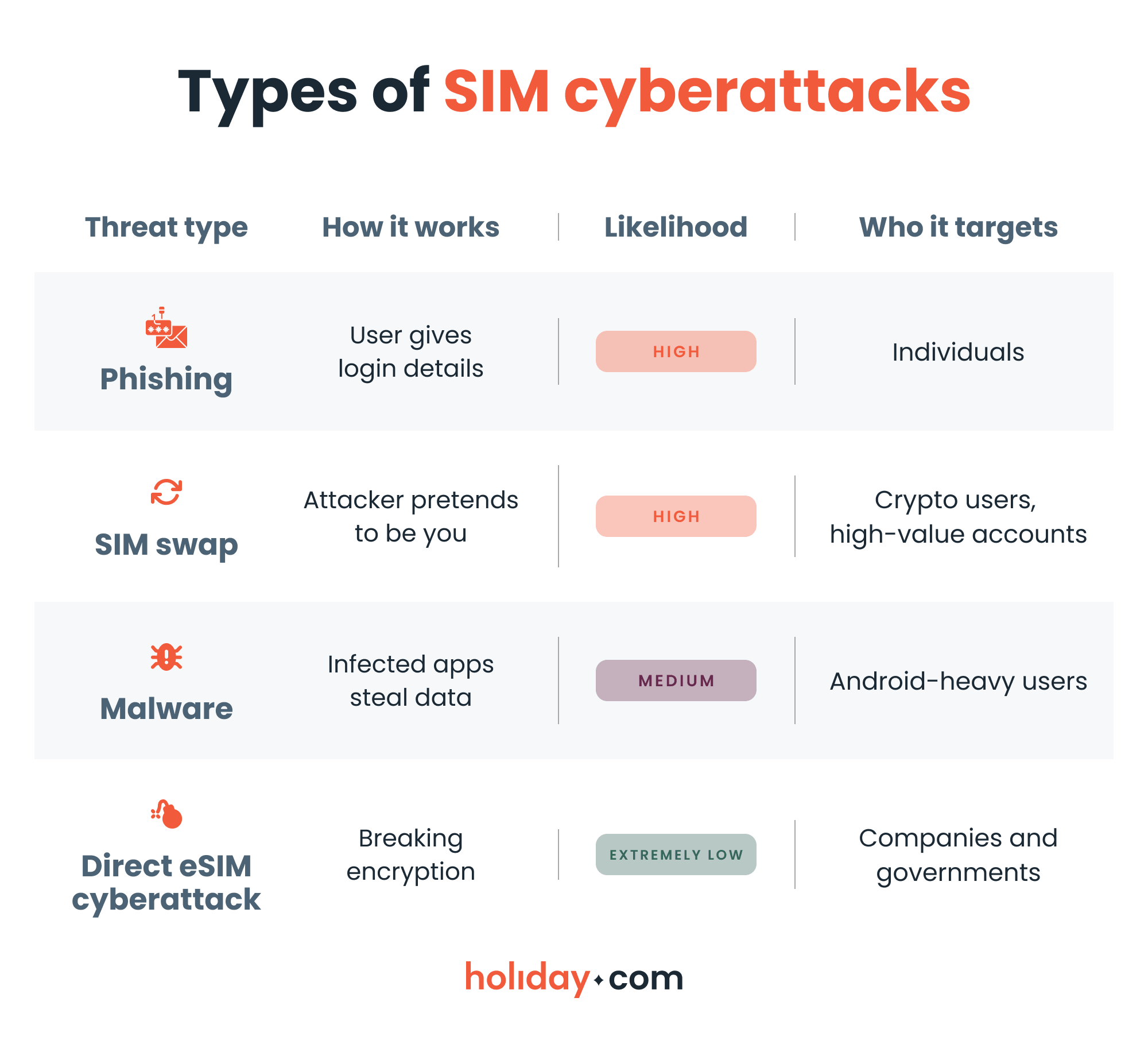
Let’s break down the most common cyberattack methods that affect both eSIM and physical SIM users.
Phishing attacks
Phishing attacks are especially dangerous because they bypass encryption entirely by tricking you into voluntarily giving away sensitive information. You may receive an email that looks like it came from your bank or carrier. The message may claim that unusual activity is detected and your account needs verification.
If you click the link and enter your credentials, you hand cybercriminals direct access to your account. From there, they may start a SIM swap or change your recovery email address.
SIM swap fraud
This is likely the most serious threat because it allows someone to take control of your phone number. They can then intercept SMS verification codes you use for logging into banking apps, email, and social media accounts, among other things.
The fraud typically starts with information gathering. Someone collects personal details from phishing emails or social media. Then, they contact your mobile carrier pretending to be you. If they successfully convince customer service to transfer your number, your phone will suddenly lose signal. Meanwhile, the cybercriminal receives your calls and messages. With authentication codes, they can reset passwords to your online accounts.
Malware and spyware
Malware can infect your phone through fake apps or malicious downloads, such as a modified Android Package Kit (APK) file. It can also access your phone through compromised websites. Once installed, spyware can monitor activity on your device.
Some advanced malware can read incoming text messages, including one-time authentication passcodes. If someone has already stolen your password through phishing, malware allows them to bypass SMS-based two-factor authentication.
SS7 network vulnerabilities
Signaling System No. 7 (SS7) is a global signaling system used to route calls and messages between networks. In rare cases, more sophisticated cybercriminals can use weaknesses in this system to intercept messages. These cyberattacks require advanced technical capabilities and usually involve high-value targets.
Carrier data breaches
This is a broader cybersecurity issue. If a mobile carrier suffers a data breach, personal customer information may leak. Cybercriminals can use that information for identity fraud or to pass verification checks during a SIM swap attempt.
eSIM vs. SIM: Which one is safer?
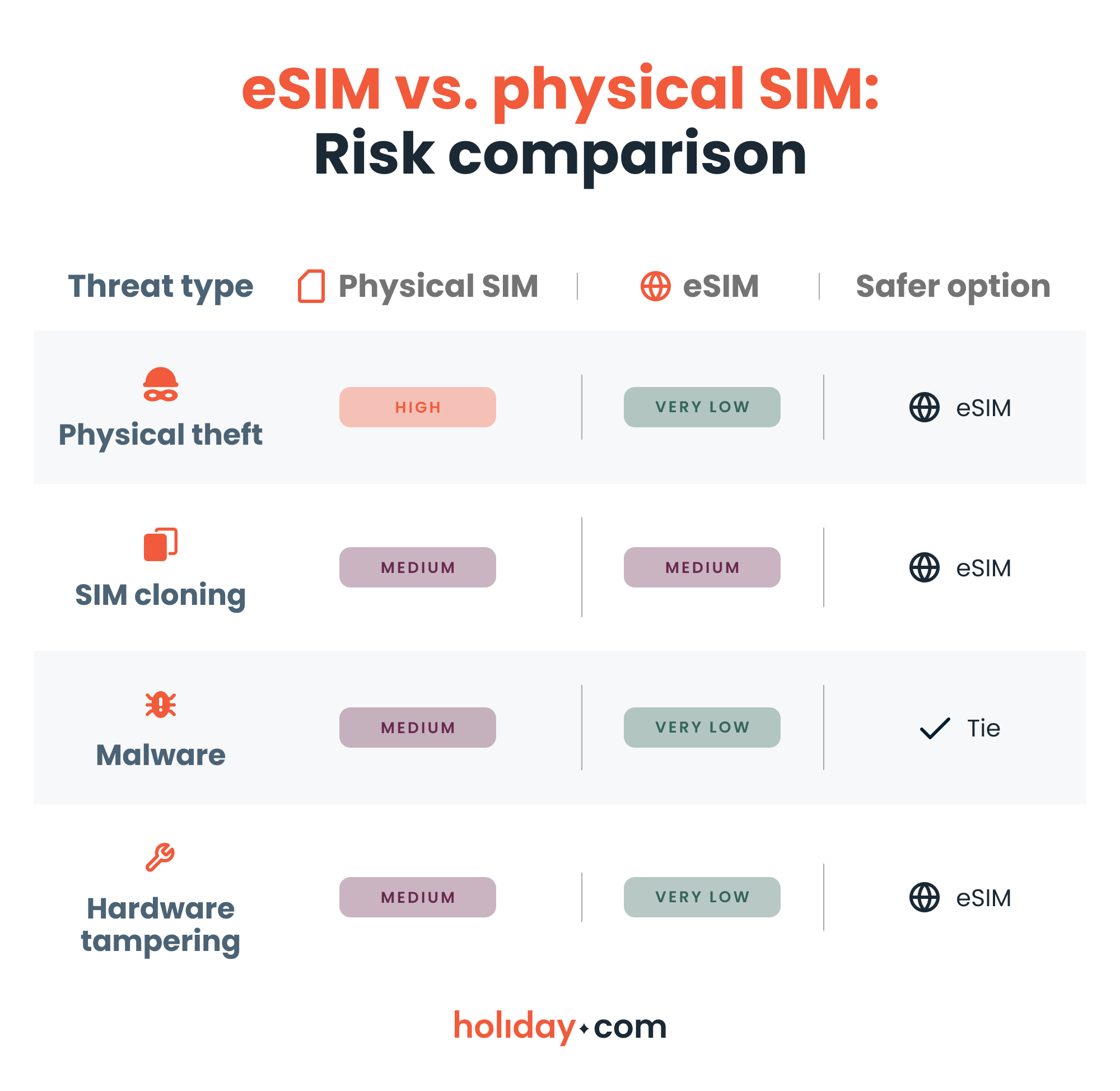
Here’s how common phone security threats affect eSIMs and physical SIMs:
Travel eSIM security: What actually protects you abroad
Tourists are common targets for phone theft and phishing scams, so bear in mind that safety risks increase when traveling internationally. Luckily, travel eSIMs like holiday.com come with all the security benefits of eSIM technology. In particular, these features are why eSIMs are the safest way to access the internet on the road:
- You can stay off Wi-Fi. Public Wi-Fi is one of the most common places where phishing and account data theft can happen. When you land in a new country and activate your travel eSIM, you’ll immediately connect to a local network. You don’t have to risk connecting to unsecured airport Wi-Fi.
- Theft prevention. Someone can easily steal a physical SIM card, especially if you remove it to swap between your home SIM and a local one. Someone would have to swipe your whole phone in order to take your eSIM.
- Lost phone handling. If you do end up losing your phone abroad, many eSIM providers allow you to remotely deactivate your profile. This shortens the window of opportunity for misuse.
HOT TIP
Travel security depends less on the type of SIM you have and more on the account protections you have in place. When choosing an eSIM provider for your trip, make sure they offer secure authentication methods and account protection.
How to recognize SIM cyberattacks
Here are some common signs of online scamming attempts:
Sudden loss of service and SIM errors
If you’re in a high-coverage area and your signal bars vanish suddenly, it could mean someone has ported your number to a new device. Check whether you can send/receive calls and texts and look for “No service” or “SOS only” alerts. These may indicate that your carrier has deactivated the SIM card because they believe you’ve "upgraded" to a new one (which the cybercriminal now holds).
Suspicious account notifications
If you start getting carrier account change notifications, it’s usually the first sign someone is talking to your service provider or trying to change your PIN. Unrequested password resets may indicate that someone is using your phone number to trigger “Forgot Password” links. If they receive the SMS recovery code, they can lock you out of your own accounts.
It’s important to pay attention to your email alerts, too. If you see a login notification from a different city or device type, take steps to confirm whether the access is unauthorized or malicious.
Financial red flags
If you’re receiving two-factor authentication codes you didn’t ask for, someone may be trying to break into your accounts with your username. Another warning is an unauthorized carrier charge. If you see "equipment installment" charges or international roaming fees when you haven’t traveled, it may mean someone is using your credit line with the carrier.
Unusual bank activity is the ultimate red flag. Cybercriminals move quickly to drain accounts or change your digital wallet settings before you can call the bank.
What to do if your eSIM is compromised
Acting fast is essential, especially if you suspect SIM swapping:
- Call your mobile carrier. Contact your carrier using a different phone and ask if anyone initiated a SIM transfer. If yes, ask for immediate reversal and add or reset your account PIN.
- Contact your bank. You can place a temporary freeze on your credit and bank transfers.
- Change passwords. Prioritize your email account because it controls password resets for many other services. You should regularly update your passwords for banking and financial accounts as well.
- Switch to authenticator apps. Switch from SMS-based two-factor authentication to app-based authentication whenever possible. Tools like Google Authenticator are more secure because they don’t rely on your phone number.
- Check for malware. Scan your phone for malware and remove suspicious apps. You can also do a factory reset after backing up essential data.
How to protect your private information online
Account and phone security breaches are always a possibility, but here are some best practices you can adopt to minimize the risks:
- Add a carrier account PIN. This is one of the most effective steps you can take. It requires anyone asking for SIM changes to provide an additional secret code.
- Keep your device updated. Installing the latest software updates ensures that you patch any security vulnerabilities. Delaying updates can expose your phone to issues that have fixes.
- Avoid sharing eSIM codes. You shouldn’t share eSIM QR codes or activation codes. It’s best to treat these as sensitive information. Also, avoid using suspicious QR codes. You should only activate eSIM profiles from official sources.
- Protect your email. Your email account should have the strongest protection possible, including a unique password and multi-factor authentication. Since most password resets go through your email, it’s the primary target in many cyberattacks.
- Use a password manager. It can help you create strong passwords for every account. Remember that reusing passwords increases your potential exposure.
- Avoid public Wi-Fi. Be cautious on public Wi-Fi networks, especially when traveling. If possible, rely on mobile data or use a trusted VPN.
- Avoid oversharing on social media. It’s always a good idea to limit the amount of personal information available on your social media profiles. It means fewer chances for cybercriminals to try and impersonate you.
- Monitor your carrier account. Regularly reviewing your carrier account for unexpected changes like strange alerts and charges helps you detect suspicious activity early.
Account safety comes first
You can hack an eSIM, but not in the way most people think. Strong encryption protects the eSIM chip, so most security issues stem from identity-based cyberattacks rather than vulnerabilities with the eSIM itself.
Compared to physical SIM cards, eSIMs minimize the chances of theft and hardware tampering. Having said that, both SIM types are vulnerable if you haven’t taken the proper security measures with your email or carrier account.
You shouldn’t have to worry about how secure your SIM card is. It’s more effective to focus on creating strong passwords and not sharing sensitive information. You’ll also want to monitor your carrier account and act fast if you notice something is off.
FAQ
-
Are there any security issues with eSIMs?

eSIMs themselves are highly secure, but risks exist at the account and your phone’s operational system levels. Most issues involve SIM swap fraud, phishing, stolen credentials, or malware infecting your phone. Identity verification is most often the weak point.
-
Are eSIMs easily hacked?
No, eSIM chips are not easily hacked. Most eSIM cyberattacks are actually carrier account takeovers or phishing attacks. Breaking the embedded hardware encryption is very rare.
-
Can eSIMs be hacked on iPhone?
Yes, but not by breaking the eSIM hardware. If someone steals your Apple ID or carrier credentials, they may trigger a SIM swap. The risk comes from an account issue, not the iPhone’s eSIM chip.
-
Can eSIMs be hacked on Android?
Yes, but not by tampering with the eSIM chip itself. Security threats usually involve phishing, malware, or unauthorized SIM swapping.
-
How do I know if my eSIM has been hacked?
Sudden loss of service is a major warning. You may also see unexpected password reset emails or carrier alerts. If the cybercriminal transferred your number, you should contact your provider immediately.
-
Can an eSIM be tracked when the phone is off?
In most cases, no. If you turn off your phone, it can’t transmit location data. Tracking requires the device to be on and connected to a network.
-
Are eSIMs safe for travel?
Yes, eSIMs are a safer travel option than physical SIMs. In addition to reducing theft and cloning risks, they also offer instant connection to local data networks, so you don’t have to rely on unsecure airport Wi-Fi. That said, strong account protection is still essential while traveling.
About our author

You might also be interested in...
-
 eSIM
eSIMHow to turn off an eSIM: Quick guide and tips in 2026
Turning off your eSIM can be helpful in many situations. You may want to disable a travel data plan, switch to another SIM, or avoid roaming charges. The process is quick and you can do it from your p...
 Ana Marković
 06.16.2026
 -
 eSIM
eSIMWhat is an ICCID number and why does it matter?
Knowing how to find your integrated circuit card identifier (ICCID) number makes it easier to manage devices that use SIM cards and eSIMs. When things are going smoothly, you hardly have to think abou...
Sarah Kirton
06.16.2026 -
 eSIM
eSIMeSIM vs. data roaming: Which is better for international travel?
Staying connected while traveling is easier than ever, but the way you access mobile data can make a big difference in your experience and costs. Two popular options are purchasing a travel eSIM or re...
Dawn Prevete
06.09.2026 -
 eSIM
eSIMeSIM vs physical SIM: Pros, cons, and which one is right for you?
An eSIM (embedded SIM) is the digital equivalent of a physical SIM card built into your device. It allows you to activate and manage cellular plans entirely through software, meaning there’s nothing...
Ivana Shteriova
06.08.2026 -
 eSIM
eSIMHow to delete data usage history in 2026: A step-by-step guide
You can erase the data usage counters on your phone, but you can’t permanently erase your carrier’s system-level logs. Deleting your local statistics so the counter returns to zero takes only a fe...
Ana Marković
06.08.2026 -
 eSIM
eSIMDoes an eSIM drain your battery? Fact versus fiction
While eSIMs use the same hardware as physical SIM cards and consume virtually the same power, there are times when you might notice your device’s battery draining faster than usual. Most often, itâ€...
Sarah Kirton
06.08.2026