


Turning off your eSIM can be helpful in many situations. You may want to disable a travel data plan, switch to another SIM, or avoid roaming charges. The process is quick and you can do it from your phone’s settings.
Turning off the eSIM won’t affect your profile as turning off an eSIM isn’t the same as deleting it. When you turn it off, the eSIM stays on your phone but it stops connecting to the network.
We’ll show you the easiest way to turn off an eSIM on Android and iPhone. We’ll also explore the main reasons you might want to deactivate your eSIM.
The fastest way to disable your eSIM
The steps vary slightly depending on whether you’re using an Android or an iPhone, but both let you turn the eSIM off in your settings menu.
On iPhone
You’ll find this under your phone’s settings.
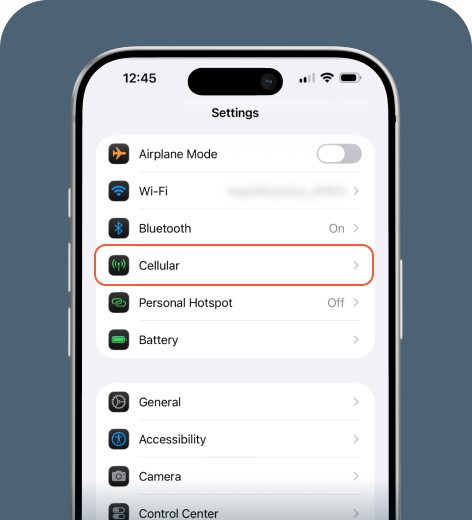
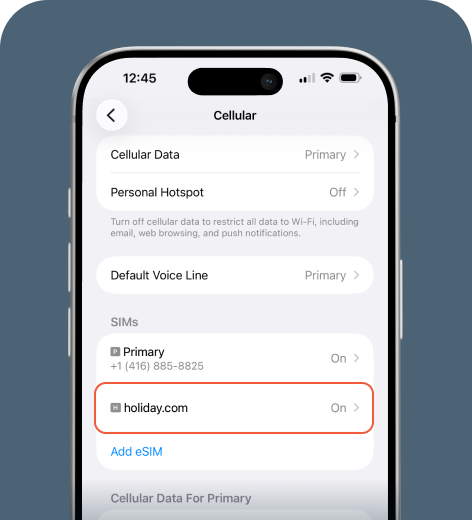
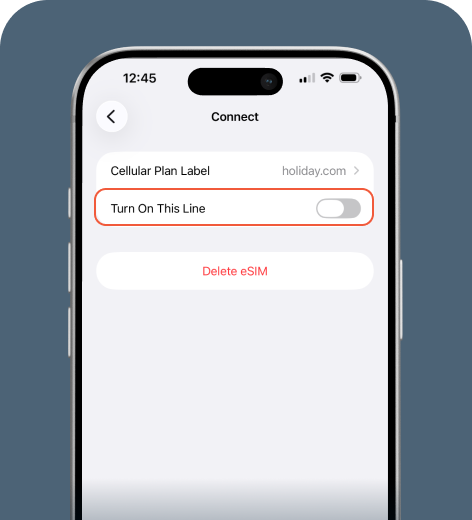
And that’s it! If you want to turn your eSIM back on, just follow the same steps in your Settings and toggle the switch on.
On Android
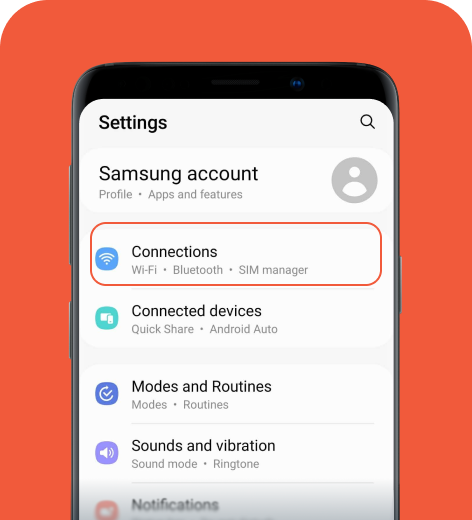
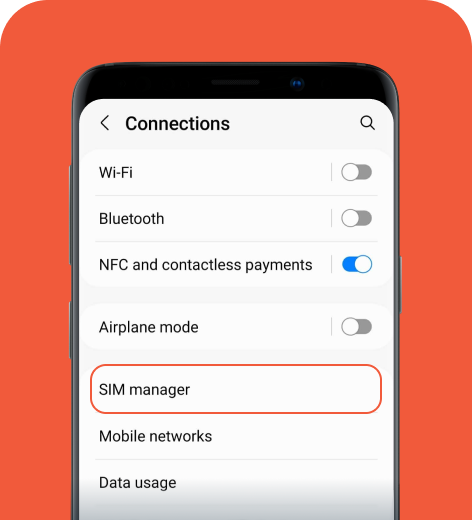
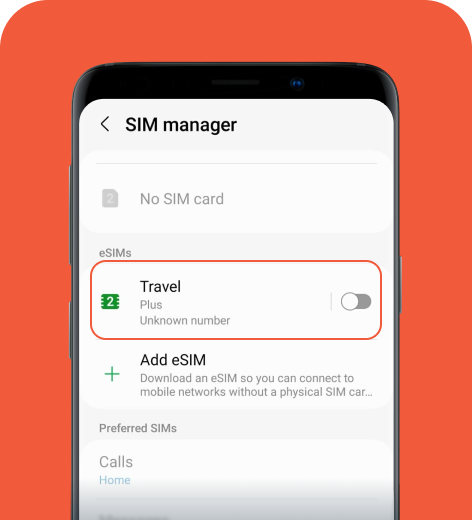
Follow these quick steps to deactivate your eSIM.
Samsung
Pixel
- Go to Settings > Network & internet > SIMs.
- Select the eSIM you want to turn off.
- Turn off the toggle next to Use SIM.
Xiaomi
- Go to Settings > SIM cards & mobile networks.
- Select the eSIM you want to disable.
- Toggle the switch next to Use SIM off.
Once you turn off the eSIM, your phone will stop using it for mobile data, calls, and messages. If you have another SIM available, your phone may automatically switch to that line.
Disabling vs. deleting an eSIM
When you disable an eSIM, your phone stops using that line. The eSIM profile stays saved on your device, and you can turn it back on at any time.
Deleting an eSIM removes the profile from your phone entirely. If you do happen to hit “delete” on your profile, you’ll have to set up and activate your eSIM again. You’ll likely need to download the eSIM profile from your carrier. You may need to scan the QR code again or contact customer support. Only delete an eSIM if you no longer need to use that plan.
Why would you turn off your eSIM?
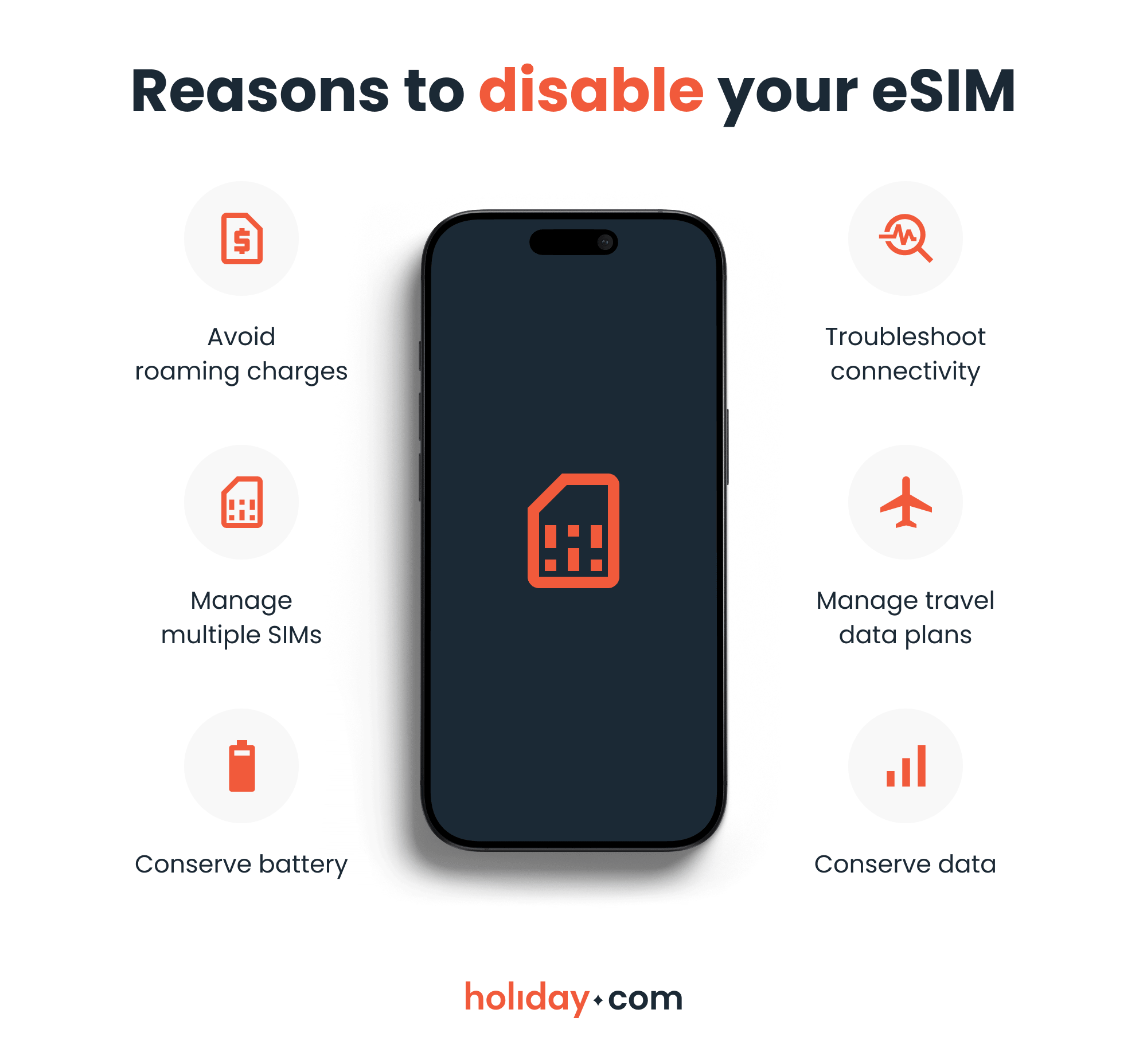
Turning off your eSIM is useful in several situations, particularly when traveling. Here are the cases where you might want to disable your eSIM:
- To avoid roaming charges: If you travel to another country, your main carrier may charge roaming fees for using mobile data abroad. Turning off your primary eSIM can prevent these charges.
- To manage multiple SIMs: You might use one number for work and another for personal calls. Turning one eSIM off helps you avoid confusion when making calls or sending messages.
- To conserve battery: Disabling unused eSIMs reduces the number of network connections. It may improve battery life, especially when traveling between areas with weaker signals.
- To manage travel data plans: Turning off your travel eSIM (rather than deleting it) when you return home makes it easy to reactivate the plan if you visit the same country or region later.
- To troubleshoot connectivity: Switching between carriers or moving between regions can cause network issues. Temporarily turning off the eSIM can help reset the connection.
- To conserve data: If you have a prepaid travel plan with a data cap, you may want to turn off your eSIM in areas with reliable Wi-Fi to ensure you don’t run out of data during your trip.
HOT TIP
With an eSIM like holiday.com, you can get unlimited data plans so you can browse, message, and use all your favorite apps without worrying about data restrictions or caps while traveling.
Troubleshooting tips
If you run into problems turning off your eSIM, a few simple checks can help resolve the issue.
- SIM manager isn’t displaying the eSIM. If your eSIM profile isn’t showing in your settings, the phone may not be recognizing it. Restarting the device or updating the phone’s software can help.
- eSIM is still using data. In some cases, your device may still use data from the eSIM you turned off. Disabling data roaming ensures the device doesn’t continue to pull data from the eSIM.
- On iPhone: Go to Settings > Cellular or Mobile Service > SIMs to turn off data roaming.
- On Android: Settings > Connections > Mobile networks to turn off data roaming.
Knowing how to turn off an eSIM gives you more control
Once you know how to find the right settings, managing your eSIMs becomes straightforward. The SIM menu lets you switch networks, manage data usage, and adapt your phone to different situations as needed.
FAQ
-
Will an eSIM automatically turn off?

No, an eSIM stays active until you disable it in your phone’s settings. The only time it stops working automatically is if the carrier suspends the plan or the data package expires.
-
Can I turn my eSIM off and then back on?
Yes. You can disable your eSIM under SIM or cellular settings, then enable it again later. Turning it off doesn’t delete the profile, meaning that you can easily reconnect anytime.
-
How do I switch from eSIM to a normal SIM?
Insert the physical SIM card into your phone and activate it in the SIM settings. Then go to your SIM or cellular settings and turn off the eSIM so your phone uses the physical SIM instead.
-
What happens if I disable my eSIM?
When you disable an eSIM, your phone stops using it for calls, texts, and mobile data. The eSIM profile is still stored in the device, so you can turn it back on whenever you want.
-
Do I need to turn off my eSIM when traveling?
It’s a good idea to turn off your main eSIM to avoid roaming charges when traveling abroad. If you plan to use a travel eSIM like holiday.com, disabling your primary eSIM and setting your travel eSIM as the primary data line ensures you’re using the right eSIM to connect to local networks.
About our author

You might also be interested in...
-
 eSIM
eSIMWhat is an ICCID number and why does it matter?
Knowing how to find your integrated circuit card identifier (ICCID) number makes it easier to manage devices that use SIM cards and eSIMs. When things are going smoothly, you hardly have to think abou...
 Sarah Kirton
 06.16.2026
 -
 eSIM
eSIMeSIM vs. data roaming: Which is better for international travel?
Staying connected while traveling is easier than ever, but the way you access mobile data can make a big difference in your experience and costs. Two popular options are purchasing a travel eSIM or re...
Dawn Prevete
06.09.2026 -
 eSIM
eSIMeSIM vs physical SIM: Pros, cons, and which one is right for you?
An eSIM (embedded SIM) is the digital equivalent of a physical SIM card built into your device. It allows you to activate and manage cellular plans entirely through software, meaning there’s nothing...
Ivana Shteriova
06.08.2026 -
 eSIM
eSIMHow to delete data usage history in 2026: A step-by-step guide
You can erase the data usage counters on your phone, but you can’t permanently erase your carrier’s system-level logs. Deleting your local statistics so the counter returns to zero takes only a fe...
Ana Marković
06.08.2026 -
 eSIM
eSIMDoes an eSIM drain your battery? Fact versus fiction
While eSIMs use the same hardware as physical SIM cards and consume virtually the same power, there are times when you might notice your device’s battery draining faster than usual. Most often, itâ€...
Sarah Kirton
06.08.2026 -
 eSIM
eSIM11 benefits of eSIMs every traveler should know
You shouldn’t have to put up with inconveniences or pay a small fortune to stay connected while traveling. Yet for years, travelers have had to deal with roaming charges, unreliable Wi-Fi, and the h...
Ana Marković
06.01.2026