


Knowing how to find your integrated circuit card identifier (ICCID) number makes it easier to manage devices that use SIM cards and eSIMs. When things are going smoothly, you hardly have to think about the long line of numbers on the back of your SIM card. But for certain activation issues or security concerns, the ICCID is vital.
An ICCID serves as the unique serial number for every SIM card or eSIM. While your phone number identifies your line, the ICCID allows mobile networks to recognize your SIM profile.
Carriers use it to activate service and link your SIM profile to your account. They also rely on it to troubleshoot connection problems or identify your SIM within their network. If the ICCID in your device doesn’t match the carrier’s records, the system blocks your activation and keeps your device offline.
The good news is that locating it only takes a few seconds. We’ll show you exactly how to find your ICCID on iPhone and Android so you can resolve connection issues quickly and get your device back online.
What does my ICCID number mean?
Understanding the structure of your ICCID number can help you make sense of what information it provides. Let’s break down the sequence and see how each segment helps secure your connection:
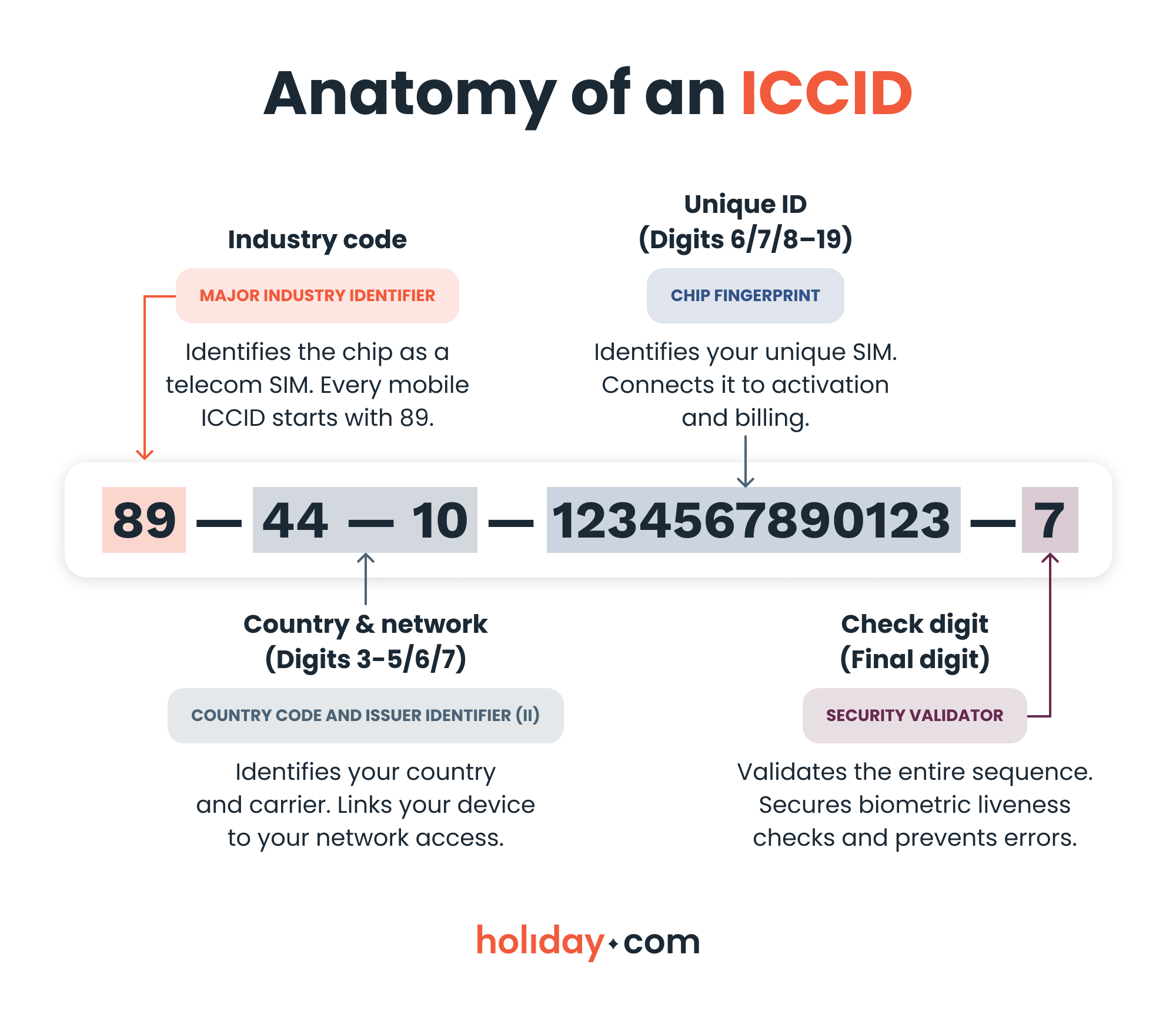
The length of the country code can vary, so the ICCID will have a different number of digits depending on its country of origin. In the example above, the country code 44 refers to the U.K. The U.S. has a shorter, single-digit code (1), while other countries like Ukraine have three-digit identifiers (380). Most ICCIDs are 18-22 digits long.
How to find your ICCID number
You don't need a SIM tool or a screwdriver to find these digits. Your device displays this information right in your settings for easy access.
On iPhone
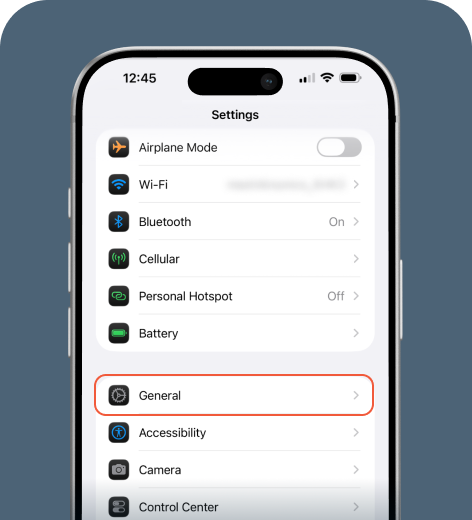
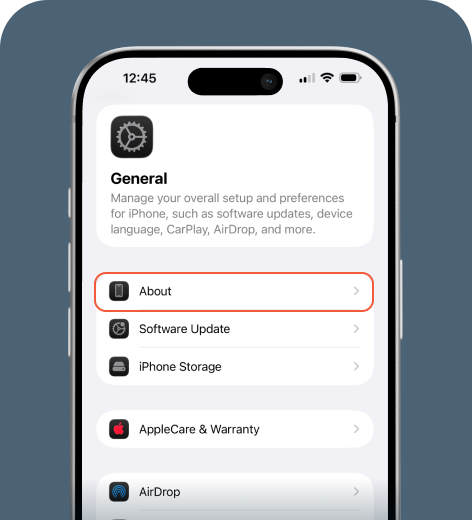
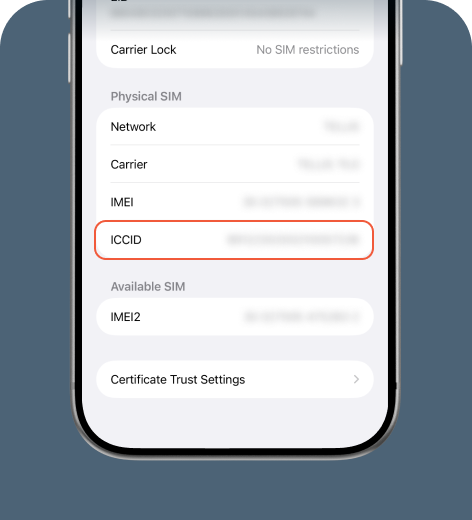
If you use an eSIM, enable it and you’ll see its information listed as a separate section below your primary line.
On Android
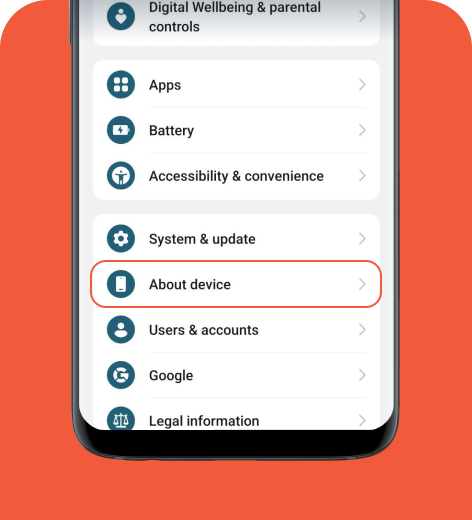
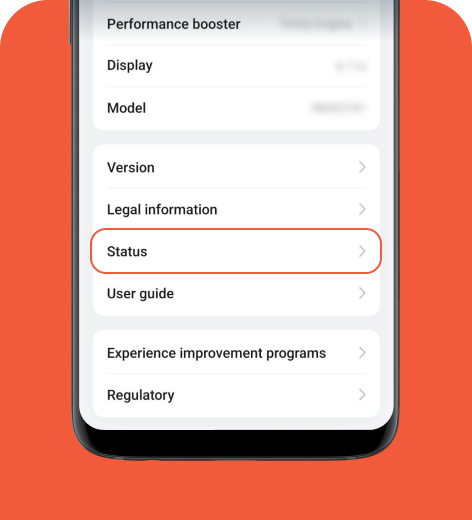
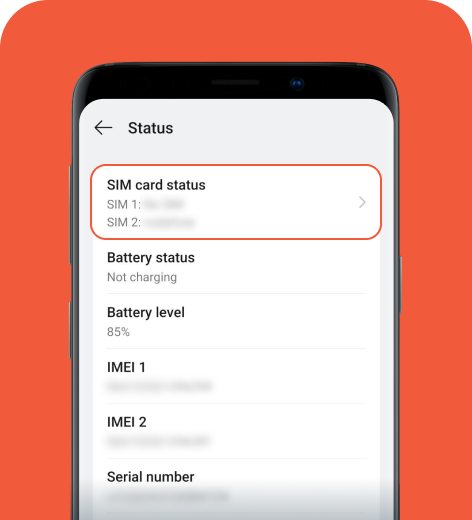
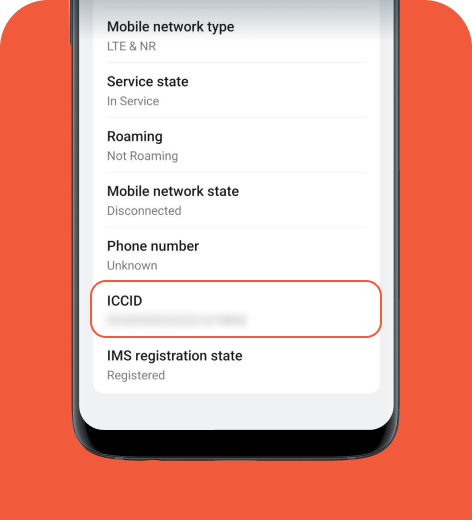
Android interfaces can vary by manufacturer and model. Find your ICCID number by typing “SIM card status” or “SIM status” in the search bar from the main Settings menu.
Troubleshooting ICCID issues
Here are some steps to try in case you encounter issues related to your ICCID:
- If the field appears blank: Toggle airplane mode on and off or restart your device to refresh the network. You can also try removing and reinserting your physical SIM.
- If the number looks wrong: Contact your carrier’s support team with your IMEI number so they can resync your account.
- If your device won’t turn on: For a physical SIM, pop the tray with a paperclip to read the number on the chip. For an eSIM, check your email for the original activation code or log in to the carrier’s website.
ICCID vs. IMEI vs. IMSI
Your device uses several sets of numbers to manage your connection and security. While they may all look like random sequences, they serve very distinct purposes for your carrier.
How these work together
In a nutshell, the network uses these digits to verify your identity:
- International mobile equipment identity (IMEI): Identifies your physical phone hardware.
- ICCID: Identifies the SIM or eSIM profile and links it directly to your plan.
- International mobile subscriber identity (IMSI): Identifies your mobile account to the network and enables authentication so your device can access service.
Key differences at a glance
| Identifier | Identifies | Primary location | Use case |
| IMEI | Physical device | Internal hardware | Checking unlock status Reporting theft |
| ICCID | SIM Profile | SIM or eSIM chip | Activating service Linking to account Billing |
| IMSI | Subscriber | Network database | Authenticating user identity |
When you’ll need your ICCID
Your ICCID isn’t just a technical detail. It's the key to keeping your device connected, whether you’re at home or traveling abroad. Here are some real-world examples of how an ICCID makes your life easier:
- Streamline activation. You can set up most eSIMs via QR code or carrier app. If this process fails, support agents use your ICCID to find your profile and restore your connection.
- Support travelers. This identifier becomes vital when you visit another country and replace your SIM or activate a travel eSIM like holiday.com.
- Speed up repairs. Providing your ICCID alongside your IMEI helps technical teams verify your device and resolve signal issues much faster.
- Distinguish between plans. ICCID allows you to manage multiple eSIM profiles on a single device. Because each profile carries a unique number, the network can recognize exactly which plan you have active.
HOT TIP
You don’t need to write down or type out the entire ICCID. On most iPhones and Android devices, you can hold down the ICCID number bar and a copy option will pop up. Copy and paste it into a support chat or email.
ICCID is your key to seamless travel
Your ICCID number does more than hang out in your settings. It actively identifies the SIM card or eSIM profile linked to your mobile plan. Carriers use it to activate service and troubleshoot your connection whenever needed.
Knowing what your ICCID is and how to find it can save a lot of time and energy. We recommend keeping it accessible for travel or when switching devices. Even if your phone number changes, each ICCID remains tied to its specific SIM or eSIM profile, letting you resolve technical issues or verify your SIM with your carrier.
FAQ
-
Can I use the same ICCID on multiple devices?

No, ICCIDs are unique to each specific SIM or eSIM profile. It’s impossible to share one ID across two different physical chips or digital profiles.
-
Does my ICCID change if I switch carriers or travel?
Yes, each SIM or eSIM has a unique ICCID number. If you buy a new travel eSIM or switch to a different provider, you’ll receive a brand new ICCID number for that account.
-
Why do carriers ask for my ICCID number during support calls?
It identifies your specific chip and helps the carrier verify your account. Providing this number allows them to run ID verification checks to ensure you’re the authorized user.
-
Can I share my ICCID number?
No. You should keep this number confidential to prevent unauthorized access to your mobile plan. If a stranger has both your ICCID and IMEI, they could compromise your account security.
-
Can I activate an eSIM without knowing my ICCID?
Yes. Most QR codes or carrier apps handle the activation behind the scenes. However, knowing your ICCID is vital if the automatic setup fails or if you need to manually check your identity verification status.
-
What’s the difference between my ICCID and my phone number?
The ICCID identifies the hardware of the SIM itself, while your phone number is the address people use to call or text you. Think of the ICCID as the serial number of your digital ID card and the phone number as your name.
About our author

You might also be interested in...
-
 eSIM
eSIMHow to turn off an eSIM: Quick guide and tips in 2026
Turning off your eSIM can be helpful in many situations. You may want to disable a travel data plan, switch to another SIM, or avoid roaming charges. The process is quick and you can do it from your p...
 Ana Marković
 06.16.2026
 -
 eSIM
eSIMeSIM vs. data roaming: Which is better for international travel?
Staying connected while traveling is easier than ever, but the way you access mobile data can make a big difference in your experience and costs. Two popular options are purchasing a travel eSIM or re...
Dawn Prevete
06.09.2026 -
 eSIM
eSIMeSIM vs physical SIM: Pros, cons, and which one is right for you?
An eSIM (embedded SIM) is the digital equivalent of a physical SIM card built into your device. It allows you to activate and manage cellular plans entirely through software, meaning there’s nothing...
Ivana Shteriova
06.08.2026 -
 eSIM
eSIMHow to delete data usage history in 2026: A step-by-step guide
You can erase the data usage counters on your phone, but you can’t permanently erase your carrier’s system-level logs. Deleting your local statistics so the counter returns to zero takes only a fe...
Ana Marković
06.08.2026 -
 eSIM
eSIMDoes an eSIM drain your battery? Fact versus fiction
While eSIMs use the same hardware as physical SIM cards and consume virtually the same power, there are times when you might notice your device’s battery draining faster than usual. Most often, itâ€...
Sarah Kirton
06.08.2026 -
 eSIM
eSIM11 benefits of eSIMs every traveler should know
You shouldn’t have to put up with inconveniences or pay a small fortune to stay connected while traveling. Yet for years, travelers have had to deal with roaming charges, unreliable Wi-Fi, and the h...
Ana Marković
06.01.2026