


A subscriber identity module (SIM) card is inside almost every mobile phone, yet most people never think about what it does or what it contains.
Simply put, it keeps your device connected to a mobile network, holds the identity data that proves who you are to your carrier, and enables calling, texting, and mobile data use.
Even with newer technology like the embedded SIM and integrated SIM, the basic job of a SIM has stayed the same: it links you to the network quickly and securely.
This guide explains the ins and outs of SIM technology, including how it works and where the technology stands today. We’ll also explore the pros and cons of SIM cards, including their security limitations.
What does a SIM card store?
Your SIM card isn’t for general storage. It’s a small smart card with a secure integrated circuit designed for identity, authentication, and basic network settings. It holds only the data your mobile network needs to identify you.
Network identity (IMSI, Ki, ICCID)
The core of the subscriber identity module is your international mobile subscriber identity (IMSI), the secret authentication key (Ki), and the Integrated Circuit Card Identifier (ICCID) printed on the physical SIM card. Together, these tell your carrier who you are so you can make calls, send texts, and access the internet on your phone.
Carrier settings
Your SIM holds small configuration files that tell the cellular network how to route your traffic. It helps the phone register to the correct carrier when you switch carriers or activate a new SIM card on the same device.
Why contact/SMS storage a legacy
Older phone models saved contacts and texts on the original SIM card, which is why many people still think SIM cards work like tiny hard drives. But SIM storage was never designed to hold photos, apps, or files. Instead, your contacts and messages stay in the cloud or on the phone’s internal memory, not on the physical card.
Today’s SIM technology focuses only on identity and network access.
How does SIM authentication work?
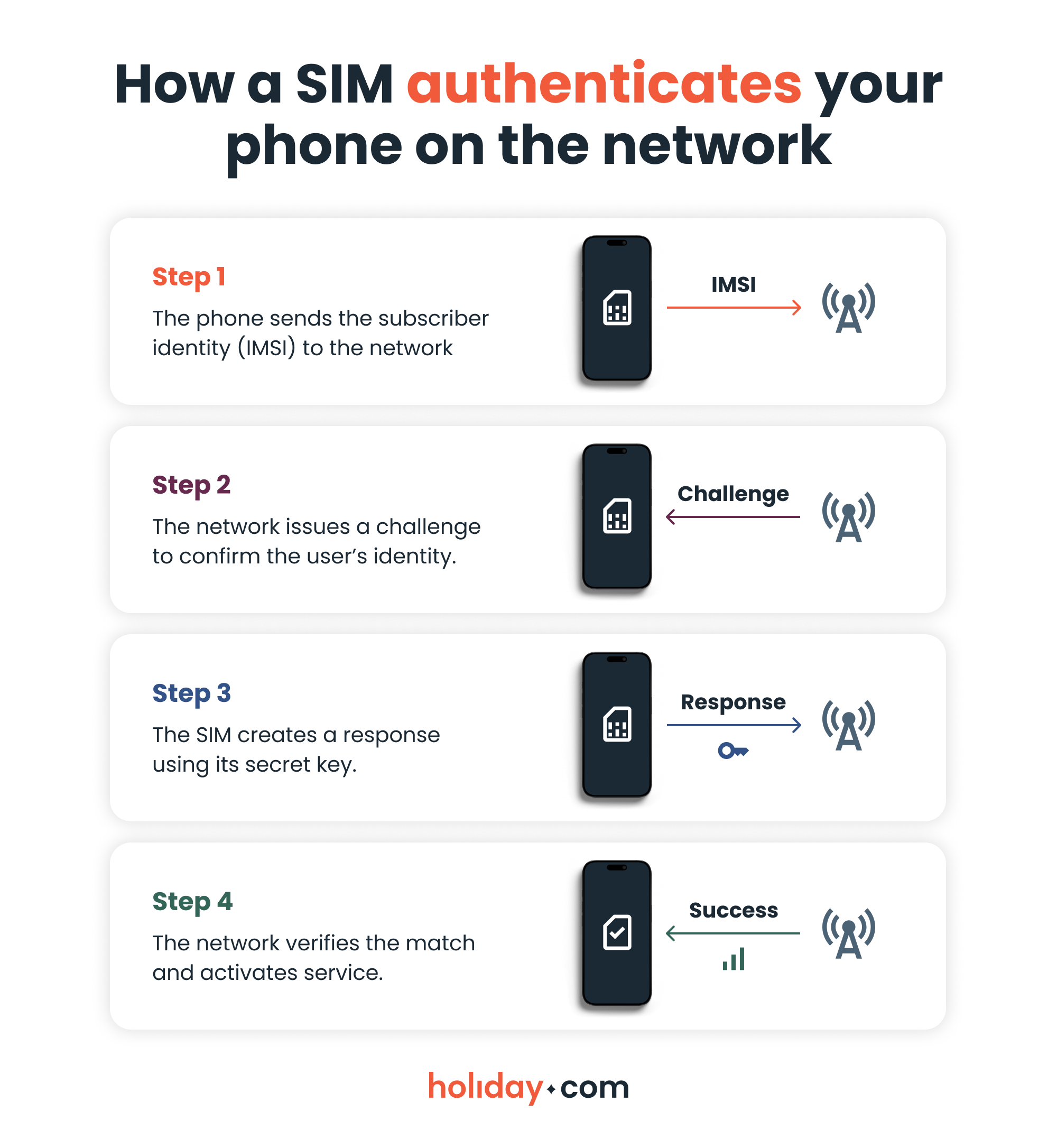
When your mobile device connects to a mobile network, the SIM card and the network complete a quick identity check. The network issues a challenge, the SIM responds using the secret key linked to your IMSI, and the network verifies it.
This process prevents impersonation and keeps your connection tied to your verified identity. It also ensures that your carrier can confirm your access without exposing the secret key stored inside the SIM. No matter the SIM card format, this silent exchange happens every time your phone attaches to a cellular network.
SIM card types and sizes
SIM cards may come in a few shapes and sizes depending on your device, but they all do the same job.
Full-size, mini, micro, and nano
Introduced in the early 1990s, the first generation of SIMs were full-size SIMs. They were almost the size of a credit card and used in the very first mobile phones, long before modern smartphones existed. As devices became smaller, manufacturers no longer had space for a card that big, so the industry moved to the standard SIM (also called the mini-SIM).
This size became common in everyday mobile phones during the late 1990s and 2000s. When smartphones arrived, engineers needed even more internal space, so the micro SIM was born. It kept the same chip but removed most of the plastic around it.
By 2012, phone designs pushed further, leading to the nano SIM card. This trimmed the card down to almost nothing, leaving only the chip itself.
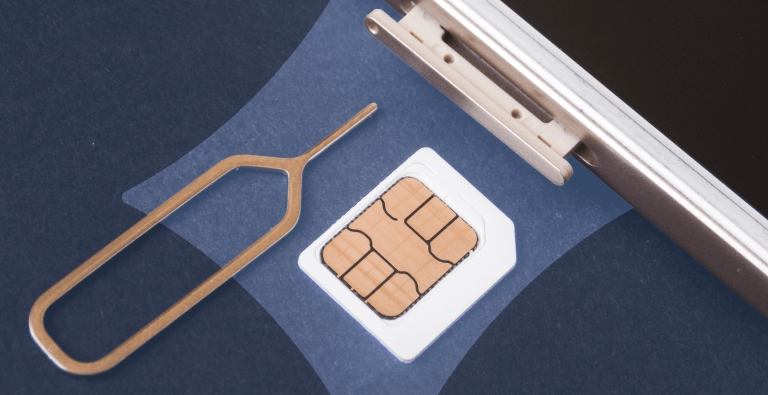
A physical SIM card is easy to move between phones. You take it out of the SIM tray, place it in another mobile device, and your number follows you. The drawback is that you can lose or damage physical SIM cards. It’s not the most convenient way to manage connectivity, especially if you’re a frequent traveler who often switches carriers.
eSIM
An embedded SIM (eSIM) works like a regular SIM card, but it isn’t a physical card you insert into the phone. It’s a small chip built into the device. Instead of opening a SIM card tray, you can activate it via your carrier’s app, by scanning a QR code, or by manual setup in your settings.
The function is the same as that of a traditional SIM card: it identifies you to the mobile network.
iSIM
An integrated SIM (iSIM) goes one step further by integrating the SIM technology directly in the phone’s main processor. Instead of being a separate chip that requires a SIM slot, an iSIM saves even more space and uses less power. It makes connectivity a built-in feature for phones and Internet of Things (IoT) devices.
Which one works for you?
Here are a few pointers to help you determine which SIM type is best for you:
- Travel: Digital SIMs are better. You can add a plan instantly without replacing your physical SIM or using a prepaid SIM card from a local carrier.
- Dual use: Many phones support dual SIM, often one physical and one digital, so you can keep your main number and add data plans as needed.
- Long-term plans: Physical SIMs work fine, but digital SIMs avoid wear-and-tear and don’t require swapping.
How secure are SIMs?
Your SIM card ties your identity to a mobile network. If someone gains control of it, they can redirect calls, capture verification codes, or access accounts linked to your number.
Understanding the risks and simple protection steps helps keep your mobile device safe, whether you use a physical, embedded, or integrated SIM.
The danger of SIM swapping
The most direct risk is physical theft. If a thief steals your phone or removes your physical SIM card, they can insert it into another device and use your number to make calls or receive your messages.
A SIM swap is harder to spot because it happens remotely. A scammer uses stolen personal details to impersonate you and trick your carrier into porting your number to a SIM card they control. Once this transfer is complete, your phone loses service, and the attacker receives your calls and verification codes on their device.
How a digital SIM reduces threats
Digital formats eliminate physical vulnerability. Because the chip is part of the device, a thief cannot remove it and insert it into another phone to intercept your calls.
This design stops direct attacks completely, though you must still rely on your carrier to prevent remote account takeovers. eSIM providers like holiday.com partner with trusted local networks to ensure safe data transmission while traveling.
Basic protection steps
Follow these steps to protect yourself against vulnerabilities:
- Set strong authentication with your carrier
- Avoid using SMS alone for sensitive logins when alternatives are available
- Watch for signs like sudden signal loss on your mobile device while you’re in a well covered area
- Keep your physical SIM card safe
- Do not share personal details that can help someone impersonate you
- Contact your provider immediately if you suspect a number transfer you did not request
SIM technology is evolving as connectivity needs change
From the original full-size cards to today’s digital “chips,” the SIM has always been about one thing: securely identifying you to your carrier. While this authentication process is still essential for making calls and using mobile data, the physical card itself is becoming a thing of the past.
You still need a SIM to use cellular data, but choosing an eSIM provides a more secure and travel-friendly experience than relying on a vulnerable piece of plastic.
If you need stress-free internet access while traveling, explore holiday.com eSIM plans for fast, secure, and limitless connectivity worldwide.
FAQ
-
What exactly does a SIM card do?

A SIM card proves your identity to a mobile network so your device can make calls, send texts, and use mobile data. It holds your subscriber information and connects you to your carrier. This allows the network to know which account to activate each time your phone turns on.
-
Can a phone still work without a SIM card?
Yes. A mobile phone without a SIM card can still run apps, stream content, and browse the web over Wi-Fi. What you lose is access to the cellular network, which means you won’t be able to take or make calls or receive SMS.
-
What is stored on your SIM card?
A SIM card stores authentication information. This includes your international mobile subscriber identity, the secret key used for verification, and basic carrier settings that help your device attach to the right network. It no longer holds photos, apps, or most messages, and modern phones rarely save contacts on the SIM.
-
How long does a SIM card last?
A SIM card can last for many years (10 or more) because it is a simple smart card that experiences minimal wear and tear. Most people replace it only when they switch carriers, move to a new phone with a different SIM card size, or upgrade to an eSIM. Physical damage to the physical SIM card is the main reason it might fail, not age.
-
Can a SIM card cause phone problems?
Yes. A faulty or poorly seated SIM card can cause no service issues, dropped connections, or failure to read the physical SIM in the SIM tray. Dirt and damage or using the wrong SIM card size for the device can also cause errors. Re-inserting the SIM or activating a new SIM card usually fixes the problem.
-
What are the benefits of having a SIM card?
A SIM card authenticates your device on a network. It lets you move your number between phones, use prepaid cellular plans, and connect to a carrier while traveling. Without it, a phone can operate on Wi-Fi only and cannot join a cellular network.
-
What has replaced SIM cards?
Digital formats are replacing traditional SIM cards. The main successor is the embedded SIM (eSIM), built directly into the device. Rather than switching SIM cards, you can activate your eSIM via carrier app, QR code, or manually through your phone’s settings.
About our author

You might also be interested in...
-
 Glossary
What is data roaming and how does it work?
You step off the plane in a new country, open Google Maps or check your messages, and everything works like normal. What you may not see is how quickly those small actions can add up to big expenses w...
 Ana Marković
 06.09.2026
 -
 Glossary
What is a nano SIM card? Features and compatibility
If you’re buying a new phone or getting a new SIM card for any reason, using the correct size is vital for proper functionality. SIM cards come in multiple sizes like standard and micro, but these c...
Ivana Shteriova
06.08.2026 -
 Glossary
eKYC verification: What is it, when you need it, and how to do it
Seeing “Verification Failed” on your phone screen can be a major disruption to your plans. If you have to complete a facial scan to activate an eSIM or access international funds, an unsuccessful ...
Sarah Kirton
06.04.2026 -
 Glossary
What is GSM? Everything travelers need to know
If you’re a frequent international traveler, you’ve probably encountered GSM before. Whether you knew it, GSM plays an important role in keeping you connected when you travel abroad. But what exac...
Dawn Prevete
06.01.2026 -
 Glossary
What is an APN and how to fix connection errors
There’s nothing more frustrating than seeing full signal bars on your phone while your internet refuses to load. You might be able to make calls or send texts, but your browser, maps, and apps remai...
Jelena Relić
06.01.2026 -
 Glossary
What is mobile internet? A traveler's guide to staying connected
When you check Google Maps in a new city, send WhatsApp messages, or scroll through Instagram Reels on the go, you’re using mobile internet. Mobile internet (also called mobile or cellular data) con...
Sarah Kirton
05.13.2026