


When you check Google Maps in a new city, send WhatsApp messages, or scroll through Instagram Reels on the go, you’re using mobile internet. Mobile internet (also called mobile or cellular data) connects your smartphone to the web through your carrier’s cellular network, keeping you online wherever coverage is available.
Reliable internet access matters, whether you're navigating unfamiliar streets or messaging friends on your commute. You probably understand how your home Wi-Fi works, but staying online outside your home is a little more complicated.
Just as a router powers your home network, nearby cellular towers connect your device when you step outside. And unlike home Wi-Fi, mobile connections are often metered. Everyday things you do on your phone can burn through your data, leading to overage charges.
Learn how mobile data works and how it compares to Wi-Fi. We’ll also share practical tips to help you stay safe online and avoid unexpected expenses when accessing your favorite apps away from home.
Mobile data vs. Wi-Fi vs. mobile internet

Let’s take a closer look at these definitions.
- Mobile internet: This umbrella term refers to any wireless internet access on any device. It usually includes both mobile data and Wi-Fi.
- Mobile data: Your carrier delivers this connection through a SIM or eSIM linked to your mobile plan. Cellular networks provide coverage wherever cell towers reach, letting you stay online away from home. Because mobile data relies on cellular networks, it’s normally metered, meaning you pay for a set data allowance.
- Wi-Fi: A router or hotspot broadcasts wireless internet across a localized area, such as a home, hotel, or café. Because it connects to a fixed broadband line, Wi-Fi is typically unmetered, allowing for unlimited browsing. While it can deliver fast speeds, public hotspots can easily become overwhelmed and slow down as a result.
HOT TIP
Public Wi-Fi is unreliable. In this situation, modern 4G or 5G mobile data often delivers better speeds. Use Wi-Fi for streaming when you want to save data and mobile data when you need a more reliable connection.
How to make the most of mobile internet
Mobile internet gives you the freedom to navigate new cities and stay in touch anywhere in the world. When traveling, you should use public Wi-Fi sparingly and instead rely on a physical local SIM card or a travel eSIM for most of your data needs. Here are some options that travelers can consider.
Wi-Fi and its risks
Public networks in airports or cafes may be convenient, but they’re likely slow and poorly secured. Many do not use encryption, leaving your information vulnerable to cybercriminals on the same network. Avoid entering banking details or other sensitive information and use mobile data or a secure VPN for sensitive activities like banking or online shopping.
Local SIM cards
Buying a physical SIM in a new country gives you access to local data packages. Most people are familiar with these, but finding a store or waiting in a SIM kiosk queue isn’t the best way to start your trip. If your device doesn’t support dual SIM, frequent card swapping can damage the SIM tray, leaving you unable to use your phone until you return home.
Travel eSIMs
This option offers convenience, security, and affordability. You can download a local or international plan to your phone and connection is instant when you land at your destination. Travel eSIMs connect to local data networks like they would at home, making this a safer choice over public Wi-Fi. On top of this, you can set your eSIM as the primary data line to avoid roaming fees from your home carrier.
Which apps use the most mobile data?
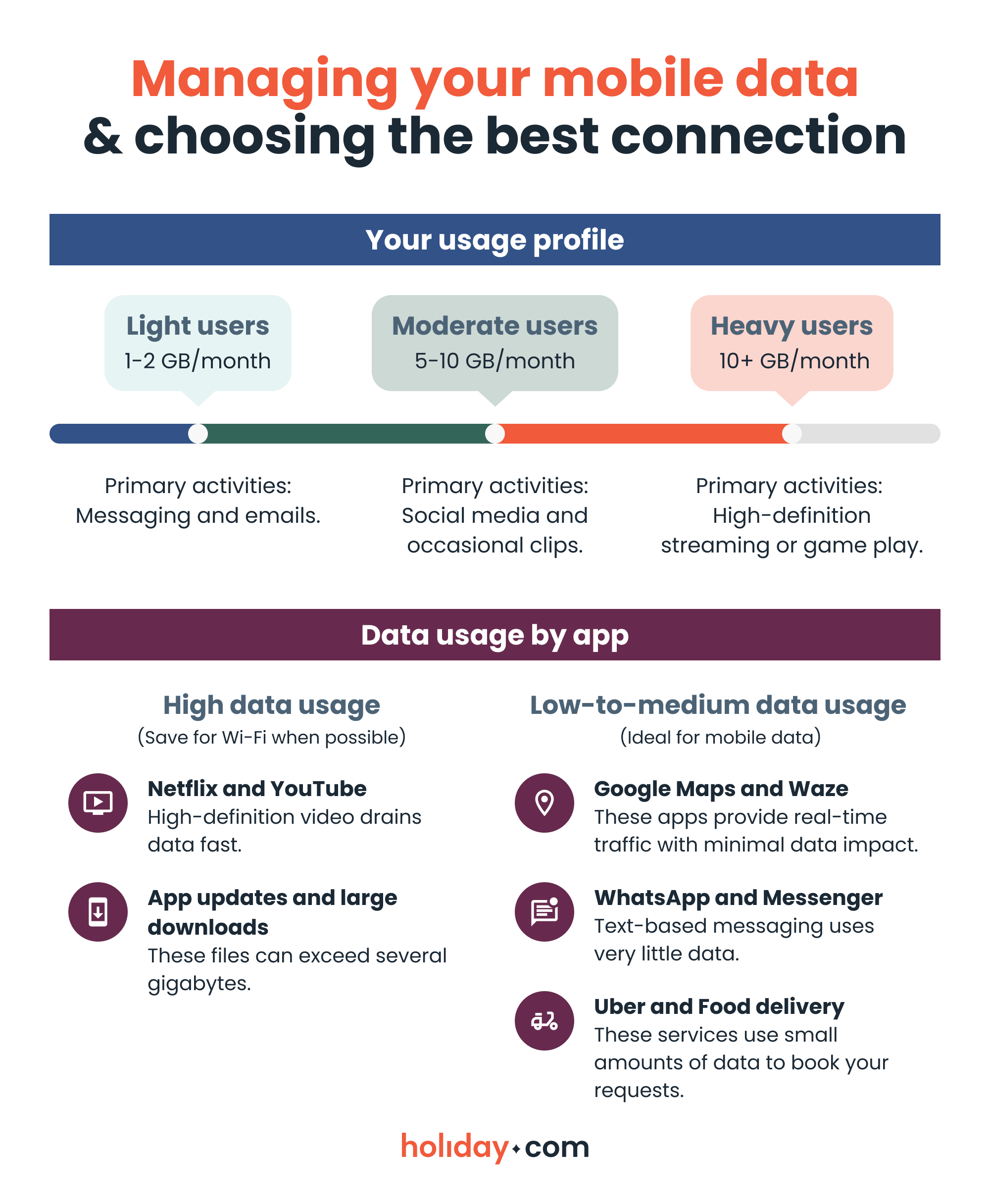
Understanding which activities use the most data is the easiest way to make your data allowance last longer. While text-based messaging and navigation apps barely make a dent in your daily allowance, high-definition video streaming or background updates can burn through gigabytes in a matter of hours.
Use the quick reference guide below to identify your usage profile and see which apps you should save for a secure Wi-Fi connection.
Tips to manage your mobile data usage
Stay in control of your mobile data with a few simple tricks that help prevent overages and keep your device running efficiently:
- Track your usage. Check your phone’s built-in data tracker or carrier app to monitor your allowance and avoid unexpected fees.
- Reduce consumption. Stream videos at lower quality or download content for offline use. Close apps running in the background to stop them from consuming data without your knowledge.
- Adjust phone and app settings. Enable data saver modes and turn off auto-downloads for photos or updates. You should also limit background app refresh so that services only consume data when they’re open.
Take the guesswork out of staying online
Understanding how mobile internet works is your best defense against unexpected costs. Once you track your background usage and sidestep unsecure public Wi-Fi, managing your mobile data is one less thing to worry about on the road.
For travel, to avoid paying your home carrier’s steep international roaming fees, you can install a holiday.com eSIM before you depart. It connects to fast and secure local networks and offers unlimited data plans so you can explore new destinations and share unique moments from your trip.
FAQ
-
How do I turn mobile data off?

On iPhone, go to Settings > Cellular or Mobile Service > Cellular Data and toggle it off. On Android, navigate to Settings > Connections > Mobile Network > Mobile Data and turn it off. If your Android interface is slightly different, search for “mobile data” under your settings.
-
Can I use mobile internet while traveling abroad?
Yes, there are several options. You can use roaming through your home carrier, but this can be costly. Other options include buying a local SIM or installing a travel eSIM, like holiday.com, to access mobile internet safely and securely.
-
What apps and services use the most mobile data?
Streaming video and music, social media with auto-play videos, video calls, and cloud backups consume the most data. Browsing or using messaging apps uses less data.
-
How can I avoid using too much mobile data?
You can lower your usage by enabling data saver modes, downloading content for offline use, closing background apps, and lower streaming quality to reduce consumption. Keep track of your data use to make sure you’re aware of how much you’re using per app.
-
Do I have to pay extra for mobile internet abroad?
Yes, you may incur extra fees if you rely on your home carrier’s default international plan. To avoid unnecessary charges, get a local prepaid SIM or an unlimited data eSIM.
-
Why is my mobile internet not working, even with a signal?
This can happen when your carrier experiences network issues, your data plan runs out, your device settings block mobile data, or you enter an area with poor coverage. Restarting your phone or checking your data roaming settings often fixes the problem.
About our author

You might also be interested in...
-
 Glossary
What is data roaming and how does it work?
You step off the plane in a new country, open Google Maps or check your messages, and everything works like normal. What you may not see is how quickly those small actions can add up to big expenses w...
 Ana Marković
 06.09.2026
 -
 Glossary
What is a nano SIM card? Features and compatibility
If you’re buying a new phone or getting a new SIM card for any reason, using the correct size is vital for proper functionality. SIM cards come in multiple sizes like standard and micro, but these c...
Ivana Shteriova
06.08.2026 -
 Glossary
eKYC verification: What is it, when you need it, and how to do it
Seeing “Verification Failed” on your phone screen can be a major disruption to your plans. If you have to complete a facial scan to activate an eSIM or access international funds, an unsuccessful ...
Sarah Kirton
06.04.2026 -
 Glossary
What is a SIM card? How SIM technology works
A subscriber identity module (SIM) card is inside almost every mobile phone, yet most people never think about what it does or what it contains. Simply put, it keeps your device connected to a mobile ...
Jelena Relić
06.04.2026 -
 Glossary
What is GSM? Everything travelers need to know
If you’re a frequent international traveler, you’ve probably encountered GSM before. Whether you knew it, GSM plays an important role in keeping you connected when you travel abroad. But what exac...
Dawn Prevete
06.01.2026 -
 Glossary
What is an APN and how to fix connection errors
There’s nothing more frustrating than seeing full signal bars on your phone while your internet refuses to load. You might be able to make calls or send texts, but your browser, maps, and apps remai...
Jelena Relić
06.01.2026