


Travelers commonly log into hotel Wi-Fi without giving a second thought to the potential security risks. Public sources of Wi-Fi, including at hotels, can be vulnerable to cyberattacks. This could expose your information to unwanted third parties, but how serious is the risk?
Most hotels use password-protected networks, which is safer than open public Wi‑Fi but still less secure than a private connection. If you’re traveling for business, the average hotel network may not offer a high enough level of security for important transactions. The same is true for anyone who has to access sensitive information while traveling.
Is hotel Wi-Fi safe to use at all? It can be, but it ultimately depends on what you’re doing online. Hotel networks are shared connections. That doesn’t make them dangerous, but it does mean they aren’t the most private option for certain kinds of tasks. In this guide, we’ll break down what’s safe, what’s risky, and when using mobile data might be the smarter choice.
What makes hotel Wi-Fi less secure?
Hotel Wi‑Fi works like any shared public network. Multiple guests connect to the same internet source, which introduces a few trade-offs.
Crowded public networks
When dozens of guests connect to the public network, everyone is using the same local infrastructure. While you can’t see other people’s activity by default, shared environments create more potential exposure than a private connection.
Outdated equipment and weak passwords
Not every hotel regularly updates its routers or changes its passwords. Older equipment may not support the latest security standards.
Some hotels also use simple passwords that are widely shared among guests, which lowers the barrier for unauthorized access.
Fake hotspots
In busy areas, cybercriminals sometimes create fake Wi‑Fi networks with names that look similar to the hotel’s official connection. If you connect to the wrong one, they can monitor your traffic.
Always confirm the correct network name with the front desk before connecting.
HOT TIP
Before joining a hotel network, turn off auto‑connect in your phone’s Wi‑Fi settings. This prevents your device from automatically connecting to similarly named networks in airports or nearby buildings.
What can you safely do on hotel Wi‑Fi?
Not all online activity carries the same level of risk. Here’s a simple breakdown:
| Activity | Risk level | Recommendation |
| Checking weather | Low | Safe |
| Browsing news | Low | Safe |
| Streaming movies | Low-medium | Depends on the platform |
| Using maps in your room | Low | Safe |
| Online banking | High | Avoid |
| Entering credit card details | High | Avoid |
| Accessing work dashboards | High | Use private connection |
For casual browsing inside your room, hotel Wi‑Fi is usually low risk. For anything involving financial details or sensitive accounts, it’s better to switch to a more secure connection.
What’s safer: Hotel Wi‑Fi or mobile data?
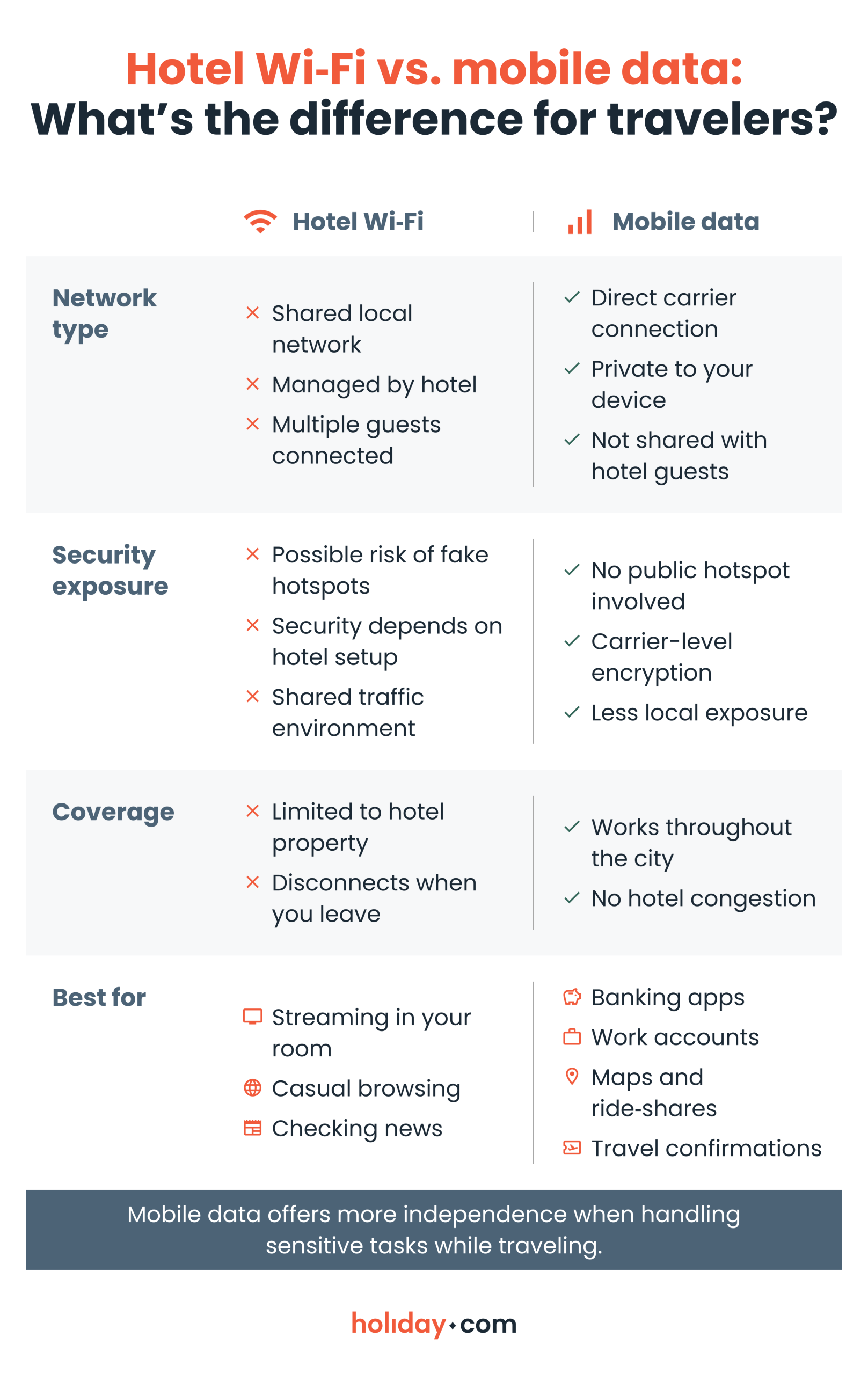
While both options keep you connected, the main difference is control. Hotel Wi‑Fi is convenient inside the property, but it’s a shared network. On the other hand, mobile data connects to a local carrier, giving you more independence and privacy. This is something you want when accessing financial apps or work accounts.
When should you choose mobile data instead?
Hotel Wi‑Fi is convenient, but there are situations where cellular data makes more sense.
Handling work or business accounts
If you’re accessing confidential documents or company systems, a direct mobile connection reduces reliance on shared infrastructure.
Using banking or financial apps
Checking your bank balance or entering credit card details is best done on a private network.
Navigating throughout the day
Hotel Wi‑Fi only works inside the building. If you’re using maps or accessing digital tickets while exploring, mobile internet keeps you connected wherever you go. Using public Wi-Fi can leave you vulnerable in airports and other transit hubs where shared networks are often more crowded.
Avoiding constant Wi‑Fi switching
Relying solely on hotel Wi‑Fi often means waiting until you return to your room to complete tasks. A mobile connection lets you stay online throughout the day without having to plan around network access.
The bottom line for travelers
Hotel Wi‑Fi is convenient and okay to use for casual browsing, but it isn’t the best option for banking or sensitive work tasks.
Mobile data provides more privacy and flexibility, especially if you’re frequently on the move. An eSIM like holiday.com is a convenient solution if you’re traveling. It connects directly to trusted local data networks. And with unlimited data plans, you won’t need to track your usage or rely on shared hotel Wi‑Fi throughout your trip.
For most travelers, the safest approach is simple. Use hotel Wi‑Fi for light tasks and switch to a private mobile connection for anything important.
FAQ
-
Can hotels see what you browse on Wi‑Fi?

Yes. Hotels can see general network activity, such as which domains you access, but they typically can’t see the specific content of secure websites. Still, shared networks aren’t as private as mobile connections.
-
Is hotel Wi‑Fi safe with a VPN?
Yes, it can be. A VPN adds an extra layer of encryption, which improves privacy on shared networks. But it doesn’t eliminate all risks, so it’s still wise to be cautious when handling sensitive information.
-
Is it safe to use hotel Wi‑Fi for banking?
No, it’s not recommended. Banking apps and financial transactions are best handled on a private mobile connection.
-
Is hotel Wi‑Fi safer than airport Wi‑Fi?
Sometimes. Hotel Wi‑Fi is usually password-protected, which can make it slightly more controlled than open airport networks. However, they’re still shared public environments.
-
Is mobile data more secure than public Wi‑Fi?
In general, yes. A data plan connects directly to a carrier network rather than a shared local hotspot, which reduces exposure.
About our author

You might also be interested in...
-
 Safety
How to stay safe while traveling: A practical guide for 2026
Traveling puts you in unfamiliar environments where many things can go wrong. A stolen bag or a compromised digital account can quickly derail your trip. Many travelers assume safety means avoiding ri...
 Sarah Kirton
 05.26.2026
 -
 Safety
Is airport Wi-Fi safe? Avoid common scams in 2026
When you’re stuck in an unexpected layover or need to book a ride to the hotel, connecting to the free airport Wi-Fi seems like the fastest solution. The truth is that public networks can put your d...
Ivana Shteriova
05.21.2026 -
 Safety
30+ common travel scams to watch out for abroad
Travel scams can be hard to spot. Scammers often operate out of sight, or greet you with a warm smile as they present an offer that sounds too good to miss. They take advantage of the fact that you’...
Aishah Mustapha
05.15.2026 -
 Safety
Hotel safety tips: The ultimate guide in 2026
Staying in a hotel should feel relaxing and serve as a main highlight of your trip. But even the best properties can pose safety risks. It’s not just theft that can turn the perfect getaway into a s...
Sarah Kirton
05.12.2026 -
 Safety
Is public Wi-Fi safe? The risks you need to know
Public Wi-Fi feels convenient, but it’s not always safe to use. The biggest problem with most public networks is that they use weak security or no encryption at all. Encryption protects the data tra...
Sarah Kirton
04.27.2026 -
 Safety
Solo travel safety tips for worry-free adventures
If you’re planning a solo trip to an unfamiliar destination, safety should be at the top of your mind. People traveling alone, especially women, are more likely to be targets for theft or harassment...
Ivana Shteriova
04.27.2026