

Traveling puts you in unfamiliar environments where many things can go wrong. A stolen bag or a compromised digital account can quickly derail your trip.
Many travelers assume safety means avoiding risk completely, but that mindset creates unnecessary hesitation. In reality, staying safe comes down to preventative planning and situational awareness.
You need to safeguard your physical well-being while simultaneously securing your digital footprint. Covering these essentials prevents minor issues from turning into costly delays.
The goal is to build habits that minimize risk. We’ll show you exactly how to protect yourself on the ground and online, so you can focus on the journey.
How should you prepare before you leave?
Making sure your documents are in order and doing a bit of research helps prevent small oversights from turning into major headaches.
Research your destination
Before you go, take a few minutes to read up on your destination. For example, if you’re arriving in a busy city at night, knowing which taxi apps are reliable or which metro lines run late ensures a safe transit to your accommodation. Note down emergency numbers and familiarize yourself with common local scams to prevent a stressful start to your trip.
Organize travel documents and backups
Imagine losing your passport on a crowded street. Having a system in place means you can respond swiftly.
- Access: Organize your passport, travel confirmations, insurance details, and ID so they’re easy to grab.
- Copies: Keep both physical and digital copies of key documents.
- Offline backups: Double-check your flights, accommodation, and transportation reservations before departure. You should also have a way to access them without an internet connection.
Understand insurance and emergency preparedness
If things don’t go exactly as planned, knowing what to do will keep you calm and in control.
- Travel insurance: Review your policy before you leave to understand your coverage and how to contact support. If your insurance includes emergency evacuation, note the process and save the emergency number.
- Medical needs: Check local vaccination requirements and ensure you pack enough essential medication for the duration of your trip.
How can you stay safe on the ground?
Staying aware and building simple daily habits significantly reduces physical risks while you explore.
Stay aware of your surroundings
Act with confidence and trust your instincts if a situation feels off. Pay close attention to what’s happening around you, especially in busy transit hubs and popular tourist attractions. Avoid digital distractions when walking in unfamiliar areas to deter opportunistic thieves.
HOT TIP
Share your itinerary with a trusted contact, especially if traveling solo. They can check in with you and respond quickly if something unexpected happens.
Keep your belongings safe
Add an extra layer of security for your belongings by keeping these tips top of mind.
- Stay close. Keep your valuables within sight at all times.
- Carry smart. In crowded spaces, carry bags with secure zippers in front of you so you can feel any movement.
- Don’t leave items unattended. Never leave your phone or laptop alone, even for a moment.
- Separate and secure. Store passports, extra cash, payment cards, and electronics in separate compartments, and use a hotel safe whenever possible.
Manage money safely
Ensure you always have access to funds by diversifying your payment methods.
- Carry only what you need. Take only a limited amount of cash and keep a backup card in a separate bag or pocket.
- Use secure payment methods. Chip-and-PIN cards, contactless payments, and mobile wallets like Apple Pay or Google Pay reduce exposure of your card details. Keep in mind that some digital payments may require mobile data to work.
- Use ATMs strategically. Avoid displaying large amounts of cash. Choose well-lit locations and check the machine for unusual attachments to avoid skimming.
- Review your transactions regularly. Monitor your banking app to spot and report suspicious activity.
HOT TIP
Notify your bank about your travel plans in advance so they don’t block your cards while you’re using them abroad.
How can you protect your digital security while traveling?
Safeguarding sensitive data is as crucial as protecting your physical luggage. Controlling how you connect to the internet and locking down your devices is pretty straightforward.
The risks of public Wi-Fi
We don’t recommend checking your bank account on shared networks. Public networks are often unsecure, and that’s true for Wi-Fi at airports, hotels, cafés, and other public spaces. These connections often lack proper encryption, making them easier to intercept.
To stay safe online, never access personal accounts or banking apps on open networks, unless you’ve already installed a VPN on your device. Use your own mobile data when you can. If you’re worried about high roaming fees, there are a few alternatives to consider.
Mobile data and travel eSIMs
Cellular data is a lot safer. You have several options while traveling:
- Data roaming with your home carrier. It’s easy to use and doesn’t require setup, but it can get expensive.
- Local SIM. Often more affordable and widely available, but you’ll need to visit a store on arrival and swap physical SIM cards.
- Travel eSIM. This is by far the most convenient solution. You can install the eSIM before you leave home and activate it on arrival. holiday.com partners with top local carriers in 150+ destinations, allowing you to establish a secure cellular network connection the moment you land.
HOT TIP
Turn off automatic Wi-Fi and Bluetooth when you’re not using them so your device doesn’t connect to unfamiliar networks or stay discoverable in public places.
Lock your devices and accounts
It takes just a few minutes to activate the following measures, and it’s worth keeping them on even after your trip.
- Lock your hardware. Use a strong passcode or biometric authentication to prevent unauthorized access if your device goes missing.
- Turn on automatic updates. Keep your software up to date to patch security vulnerabilities that cybercriminals exploit.
- Enable remote tracking. Turn on built-in device protection features to locate, lock, or wipe your phone if it's lost or stolen.
- Protect your passwords. Use strong, unique passwords and enable two-factor authentication (2FA) for all email and financial accounts. Use a password manager instead of storing passwords in unprotected notes on your phone.
Avoid common online scams
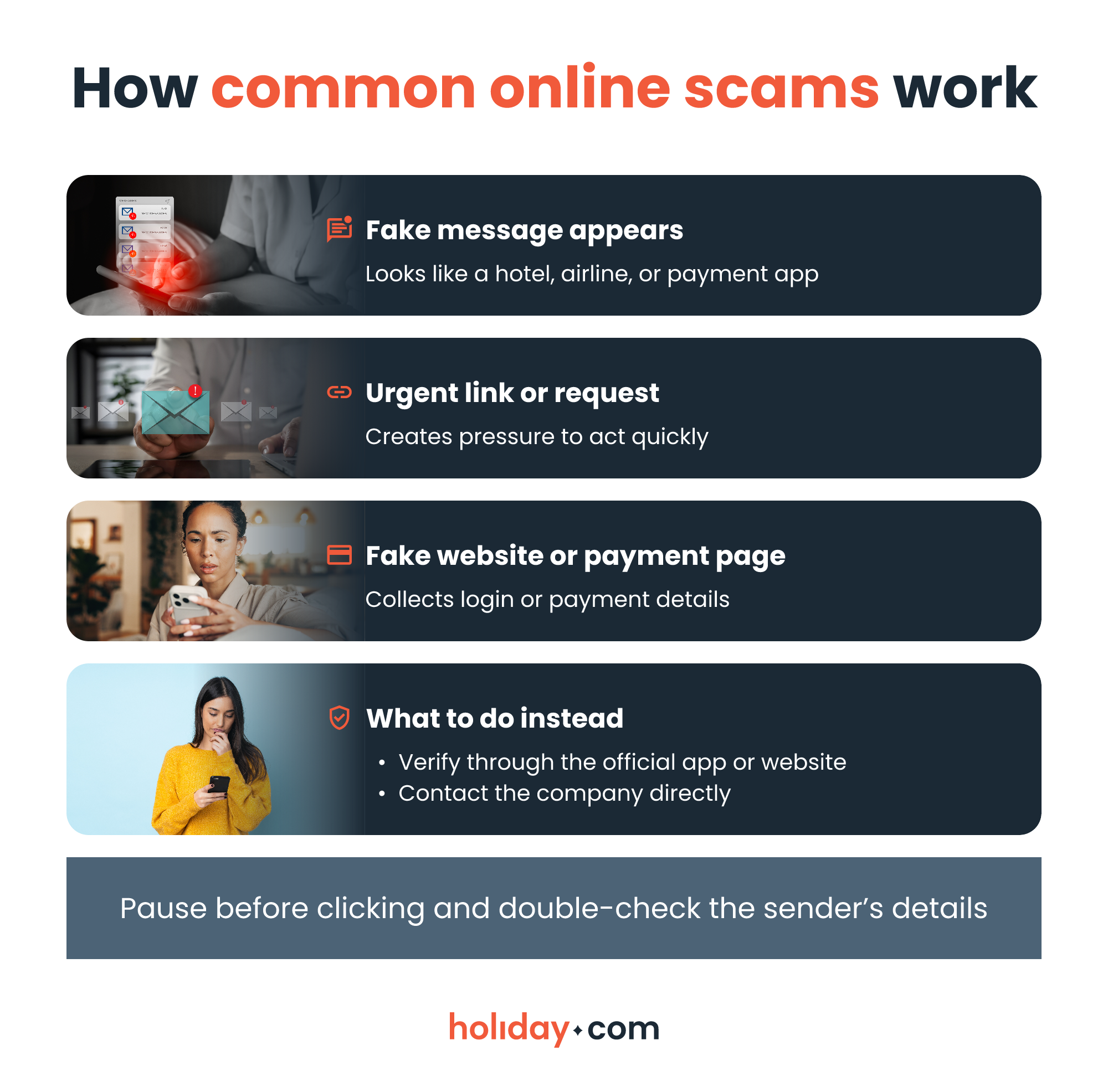
Cybercriminals frequently target travelers with fraudulent messages designed to steal login credentials or payment details. Watch out for the following:
- Fake bookings: Scammers sometimes hijack legitimate hotel or travel agency messaging portals to send fraudulent links. Even if a payment request appears inside a trusted booking app, be skeptical of sudden demands to re-enter your credit card details. Call the accommodation using the phone number from your original confirmation receipt to verify any payment issues.
- Unexpected payment requests. Bad actors masquerade as airlines or transit authorities demanding last-minute “unpaid luggage fees” or “city taxes.” Legitimate travel providers rarely ask for immediate payment via an unsolicited text message link.
HOT TIP
Inspect the sender’s email address for slight misspellings or random character strings. Ignore and delete messages from suspicious addresses (e.g., bookingcom@tickets09.randomsite.com), even if they bypass your spam filter.
Staying safe while traveling means being proactive
Safety starts before you leave home. Organize your documents, stay vigilant on the ground, and secure your devices with a private connection.
Follow our tips to remove guesswork from your trip and turn uncertainty into peace of mind. You can’t eliminate risk, but you can minimize it. Knowing you’re adequately prepared will allow you to focus on the adventure instead.
FAQ
-
Do I need travel insurance to stay safe?

Yes. Travel insurance protects you from unexpected medical costs, trip cancellations, lost luggage, or emergencies. Always review your policy's coverage and emergency contact procedures before purchasing.
-
How can I prepare for emergencies while traveling?
Save local service numbers in your phone before you leave. Keep copies of your key documents and confirm how your insurance provider handles urgent situations so you can act fast.
-
How do I know if a destination is safe before I book?
Research official travel advisories and reliable sources of information. Review current traveler experiences on reputable forums to cross-check local conditions.
-
What should I do if something goes wrong while I’m traveling?
Stay calm and assess the situation. Contact local authorities for physical emergencies, or reach out to your insurance provider for medical and logistical support.
-
How can I protect my data while using public Wi-Fi?
Use a VPN if you have to use public Wi-Fi, but opt for mobile data whenever possible to access your banking account or to make payments. Remember to disable automatic Wi-Fi connections.
-
Should I carry backup copies of my documents digitally or physically?
You should carry both. Keep secure digital backups and separate physical copies of essential documents. Store them in different locations so you can access important information even if your phone or bag gets lost.
-
Is solo travel safe?
Yes, solo travel is safe when you remain vigilant. Share your itinerary with trusted contacts and avoid walking alone in unfamiliar areas at night.
About our author

You might also be interested in...
-
 Safety
Is hotel Wi-Fi safe? What you should know and real-world risks
Travelers commonly log into hotel Wi-Fi without giving a second thought to the potential security risks. Public sources of Wi-Fi, including at hotels, can be vulnerable to cyberattacks. This could exp...
 Chené Murphy
 05.26.2026
 -
 Safety
Is airport Wi-Fi safe? Avoid common scams in 2026
When you’re stuck in an unexpected layover or need to book a ride to the hotel, connecting to the free airport Wi-Fi seems like the fastest solution. The truth is that public networks can put your d...
Ivana Shteriova
05.21.2026 -
 Safety
30+ common travel scams to watch out for abroad
Travel scams can be hard to spot. Scammers often operate out of sight, or greet you with a warm smile as they present an offer that sounds too good to miss. They take advantage of the fact that you’...
Aishah Mustapha
05.15.2026 -
 Safety
Hotel safety tips: The ultimate guide in 2026
Staying in a hotel should feel relaxing and serve as a main highlight of your trip. But even the best properties can pose safety risks. It’s not just theft that can turn the perfect getaway into a s...
Sarah Kirton
05.12.2026 -
 Safety
Is public Wi-Fi safe? The risks you need to know
Public Wi-Fi feels convenient, but it’s not always safe to use. The biggest problem with most public networks is that they use weak security or no encryption at all. Encryption protects the data tra...
Sarah Kirton
04.27.2026 -
 Safety
Solo travel safety tips for worry-free adventures
If you’re planning a solo trip to an unfamiliar destination, safety should be at the top of your mind. People traveling alone, especially women, are more likely to be targets for theft or harassment...
Ivana Shteriova
04.27.2026