


When you’re stuck in an unexpected layover or need to book a ride to the hotel, connecting to the free airport Wi-Fi seems like the fastest solution. The truth is that public networks can put your data at serious risk.
Evil twin networks that mimic official airport Wi-Fi, intercepted logins, and hidden malware are just a few of the tactics bad actors use to steal your private data. Even something as simple as checking email could expose your data, leading to financial losses or identity theft.
You don’t have to stay offline to avoid the risks. We’ll show you how to spot common airport Wi-Fi scams, the steps you can take to safeguard your devices, and what to do if your data is ever compromised. We also highlight safer alternatives that provide access to secure local networks wherever you go.
The dangers of airport Wi-Fi
From fake login pages to man-in-the-middle attacks, cybercriminals use public Wi‑Fi to track your online activity and steal data. Understanding these risks is the first step to staying safe while you travel.
- Fake airport network look-alikes: Bad actors can create Wi‑Fi networks, known as “evil twins,” that look like the airport’s official network. They mimic the legitimate network’s name to trick travelers into joining, allowing scammers to access unencrypted data. This can lead to unauthorized transactions, drained accounts, or even identity theft.
- Fraudulent networks: If you enable your phone’s auto-connect feature, devices may join fraudulent networks without your knowledge. Attackers exploit this by creating networks with familiar names, tricking your device into connecting and exposing your data without you realizing it.
- Fake login pages: Many airports need users to register before using Wi‑Fi. Cybercriminals set up fake login pages that demand personal information or credit card details, capturing sensitive data as soon as it’s entered.
- Man-in-the-middle (MITM) attacks: Scammers secretly position themselves between your device and the network, intercepting all the data you send and receive. If you access work emails or shared documents, attackers can steal confidential communications, resulting in business email compromise (BEC).
- Malware-infected pop-ups and downloads: Some Wi‑Fi networks display pop-ups or prompt users to download files claiming they’re needed to connect. Installing these can load malware on your device, giving attackers access to your private data.
- Packet sniffing attacks: Cybercriminals can monitor public networks to capture unencrypted traffic. These attacks allow bad actors to see messages, passwords, and payment information in real time. They can then use this exposed activity to launch targeted scams in the future.
How can you minimize airport Wi-Fi risks?

If you must use airport Wi-Fi, a few simple precautions can help protect your personal data and make public networks significantly safer.
- Verify the network with airport staff. Before connecting, confirm the official Wi-Fi network at an information desk. Spending a few minutes to double-check is far better than connecting to an “evil twin” network run by bad actors.
- Disable automatic Wi-Fi connections. Devices that automatically connect to known networks expose you to fraudulent hotspots that mimic saved connections. Turn off auto-connect on your phone, laptops, and tablets.
- Turn off Bluetooth and file sharing. Leaving Bluetooth or file sharing enabled makes your device easier to access. Cybercriminals may use these features to attempt unauthorized connections or transfer malicious files.
- Use a trusted VPN. A virtual private network (VPN) encrypts your internet traffic, making it much harder for scammers to intercept your data. When you connect through a VPN, your activity stays protected even if the Wi-Fi network itself is unsecure.
- Only visit websites with HTTPS. HTTPS encrypts the data exchanged between your browser and the site. Without this encryption, sensitive information may be visible to attackers monitoring the network.
- Avoid sensitive logins. You may want to check your balance after a duty‑free shopping spree or make an online purchase while killing time during a delayed flight. Don’t log into banking apps, payment platforms, or other sensitive accounts on airport Wi‑Fi.
- Enable two-factor authentication. Two-factor authentication (2FA) adds an extra security layer. Even if a cybercriminal obtains your password, they won’t be able to access your account without the second verification step.
- Keep software and security patches updated. Regular updates fix vulnerabilities that attackers can exploit. Keep your operating system, apps, and security software up to date to protect your device.
HOT TIP
Avoid public USB charging stations at airports. These ports can sometimes be used for “juice jacking,” where attackers install malware or access data through the charging connection. Use your own wall charger or a portable power bank instead.
What are safe alternatives to airport Wi-Fi?
You don’t have to rely on unsecured airport Wi‑Fi to stay connected. There are safer alternatives that let you browse and manage online payments without risking your personal data.
Cellular data or mobile hotspots
For domestic flights, using your cellular data or turning your phone into a mobile hotspot keeps you off public networks and reduces your exposure to scammers. A mobile hotspot lets you create a secure Wi-Fi connection for devices like laptops or tablets, but note that it’ll drain your phone’s battery.
You should avoid using your home carrier’s cellular data abroad. Unless you have a dedicated travel plan, you’ll likely incur roaming charges once you cross the border.
HOT TIP
Reset your data usage statistics at the start of your trip to track consumption and avoid unexpected overage fees. On iPhone, you can find this setting under Settings > Mobile Service (or Cellular) > Reset Statistics. On Android, the layout differs slightly by model. Type “data usage” into the Settings search bar to find this option.
eSIM travel data
If you’re traveling abroad, install a travel eSIM before you leave home. You’ll connect to a secure local network the moment you land, eliminating the need for airport Wi-Fi. Because an eSIM uses cellular data, it routes your traffic directly through encrypted local data networks rather than open public routers. This built-in security makes it harder for cybercriminals to steal your information.
Your connection will be as safe as using your home carrier’s network, but you’ll pay significantly less. Since you connect to local data networks, you’ll bypass your home provider’s roaming fees.
eSIMs also provide faster and more stable connections than overcrowded public networks, making them a reliable alternative to Wi-Fi for browsing, using maps, sending messages, and accessing social media. A few eSIM solutions, like holiday.com, offer unlimited data so you don’t have to keep track of your app usage.
Local SIM cards
Local SIMs can be a good choice if you need local calls and texting, or if you’re on an extended trip. That said, you’ll need to locate a kiosk at the airport to purchase a local SIM card (which isn’t always available) and physically swap the card in your device. It’s not as convenient as a travel eSIM, which gets you online the moment you land without any extra steps.
Pocket Wi-Fi
Pocket Wi-Fi (or Wi-Fi boxes) are compact devices that create a private, shareable Wi‑Fi network. However, they require a primary internet source to distribute (usually a local SIM card), which means you still have to track down a kiosk at the airport.
While they provide better stability and battery life than phone hotspotting, you need to set it up before you can get online and add another device to your luggage.
What should you do if you get hacked on airport Wi-Fi?
If you suspect something is wrong, look for warning signs like unexpected pop-ups or a sudden drop in device performance. It’s always best to take action even if you’re not 100% sure you’ve been hacked. Responding quickly limits the damage and protects your data.
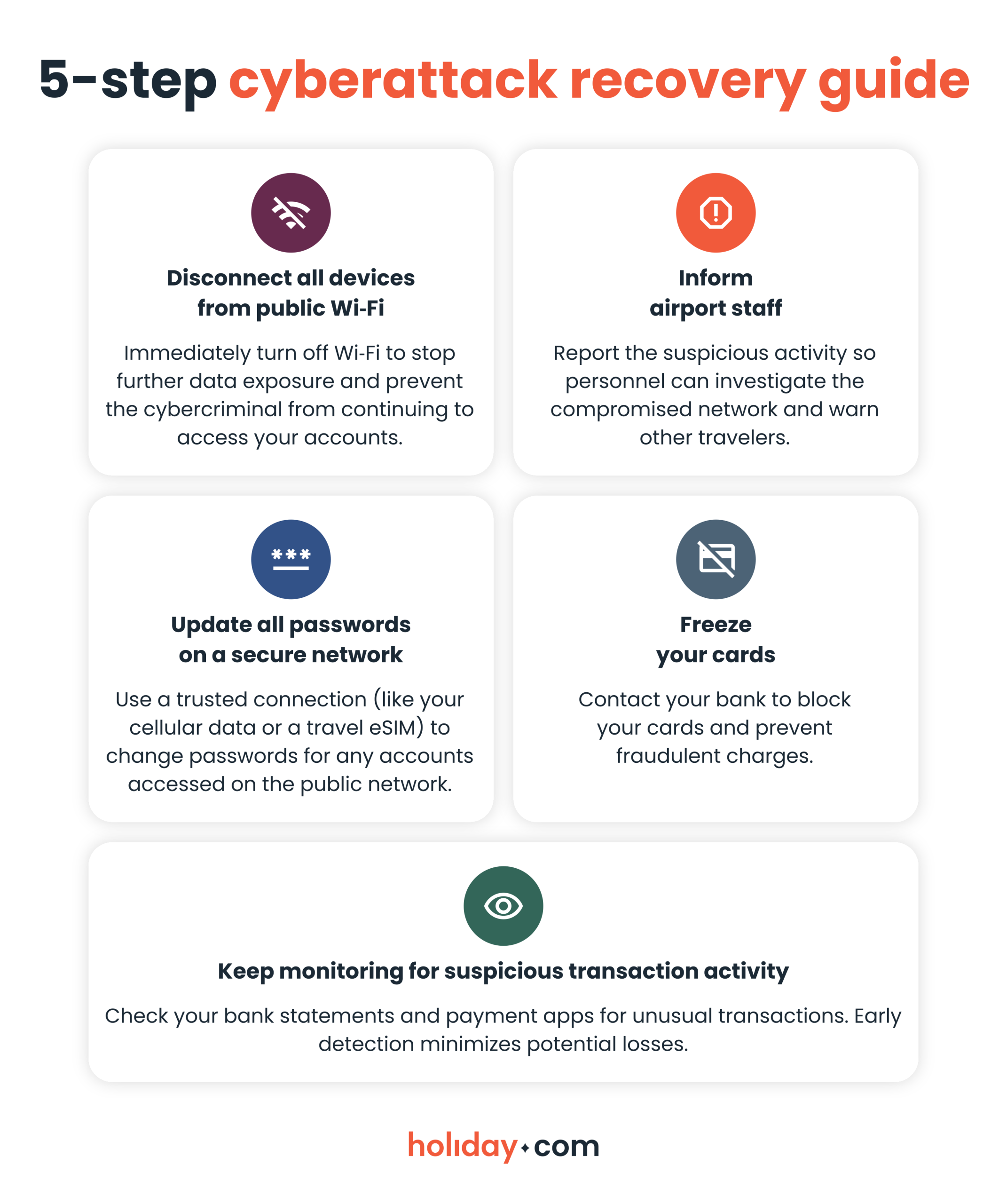
Stay securely connected while traveling
Airport Wi‑Fi may seem convenient, but it puts your personal data at risk. By taking smart precautions and choosing safer alternatives, you can keep your information secure.
For a reliable connection from the moment you land, a travel eSIM like holiday.com is the safest and most practical option. It provides easy access to secure local networks, and as a bonus, you won’t have to worry about roaming fees.
FAQ
-
Is it safe to use airport Wi‑Fi for banking?

No. Public airport Wi-Fi can expose your private details to cybercriminals. Stick with your home carrier’s connection, or use a travel eSIM if you’re traveling abroad.
-
Is it safe to connect to Wi‑Fi on a plane?
Not really. Airplane Wi-Fi carries the same security risks as airport Wi-Fi or any other public network. While it may be less crowded, the network itself can still be vulnerable to scammers. If you must use it, take precautions such as avoiding sensitive logins and using a trusted VPN.
-
What to use instead of airport Wi‑Fi?
Secure alternatives include your own cellular data, a local SIM card, or a travel eSIM. Roaming data can be expensive and finding a local SIMs kiosk is inconvenient, so a travel eSIM is often the most practical choice. It provides an encrypted connection to a trusted local data network at a predictable cost.
-
Can airlines tell if your phone is on?
No. Airlines generally can’t detect whether your phone is on or in airplane mode because they don’t have systems that track individual devices. But cabin crew may notice if you’re actively using your phone during takeoff or landing, and pilots can sometimes detect signal interference.
About our author

You might also be interested in...
-
 Safety
How to stay safe while traveling: A practical guide for 2026
Traveling puts you in unfamiliar environments where many things can go wrong. A stolen bag or a compromised digital account can quickly derail your trip. Many travelers assume safety means avoiding ri...
 Sarah Kirton
 05.26.2026
 -
 Safety
Is hotel Wi-Fi safe? What you should know and real-world risks
Travelers commonly log into hotel Wi-Fi without giving a second thought to the potential security risks. Public sources of Wi-Fi, including at hotels, can be vulnerable to cyberattacks. This could exp...
Chené Murphy
05.26.2026 -
 Safety
30+ common travel scams to watch out for abroad
Travel scams can be hard to spot. Scammers often operate out of sight, or greet you with a warm smile as they present an offer that sounds too good to miss. They take advantage of the fact that you’...
Aishah Mustapha
05.15.2026 -
 Safety
Hotel safety tips: The ultimate guide in 2026
Staying in a hotel should feel relaxing and serve as a main highlight of your trip. But even the best properties can pose safety risks. It’s not just theft that can turn the perfect getaway into a s...
Sarah Kirton
05.12.2026 -
 Safety
Is public Wi-Fi safe? The risks you need to know
Public Wi-Fi feels convenient, but it’s not always safe to use. The biggest problem with most public networks is that they use weak security or no encryption at all. Encryption protects the data tra...
Sarah Kirton
04.27.2026 -
 Safety
Solo travel safety tips for worry-free adventures
If you’re planning a solo trip to an unfamiliar destination, safety should be at the top of your mind. People traveling alone, especially women, are more likely to be targets for theft or harassment...
Ivana Shteriova
04.27.2026