


When you’re in a foreign country, a sudden loss of mobile signal might seem like an international roaming glitch or a network issue. But it could be one of the red flags that someone has just hijacked your number and is preparing to drain your bank and crypto accounts.
Fraudsters can port your number to their SIM in under 15 minutes without having to steal your phone or even make contact with you. No one is safe from a SIM swap attack, but it’s worse for travelers because it’s harder to reclaim numbers and lock down financial accounts from abroad.
In this guide, we explain how SIM swapping fraud works, including the signs and what victims should do, and we outline a plan to reduce the risk of an attack.
What is SIM swapping fraud?
SIM swapping fraud, also called SIM hijacking, happens when a malicious party transfers your phone number to their SIM, giving them control of your calls and text messages.
Using social engineering or databases bought on the black market, they gather enough of your personally identifiable information (PII), such as mobile number, email, birth date, and address, to impersonate you and convince your telephone company (telco) to swap SIMs.
Once the SIMs are swapped, the attacker can take over any account that relies on SMS-based two-factor authentication (2FA). For example, they could go to your bank’s website, input your username, and request a password change. The one-time passcode (OTP) will be sent to your hijacked number, which the fraudster can use to reset your password and then gain control of your bank account.
Using an eSIM (a downloadable, digital SIM stored as software on a chip inside your phone) offers the same protection as a physical SIM card because SIM hijacking can be done remotely. The crucial factor is whether a fraudster can deceive a mobile carrier into thinking they are the actual customer requesting a SIM swap.
Most SIM swapping attacks are financially motivated. Besides bank accounts, crypto accounts are a common target due to the decentralized, anonymous, and irreversible design of the blockchain network, which makes it difficult to recover funds and identify culprits.
Other motives include stealing personal data for further scams, blackmail, or doxxing (releasing sensitive documents or information). Attackers can also launch new attacks on a victim’s work network and systems to steal money or valuable data.
This table outlines common SIM fraud tactics:
| SIM-related fraud | How it works |
| SIM swapping | An attacker impersonates the target to convince their telco to swap SIMs. This can be done remotely and without physical access to the victim’s phone. The goal is usually to launch account takeovers (ATOs) to steal money, data, or both. |
| Number porting | Similar to a SIM swap, except the attacker ports out the victim’s number to a different mobile carrier. |
| SIM cloning | An attacker gains physical access to the victim’s SIM card, copies it, and then conducts identity fraud or data theft, or steals money. |
| Number spoofing | An attacker uses the victim’s number or an authority’s number as the caller ID by manipulating VOIP or telephony networks to launch phishing attacks or fraud. |
How to spot a SIM swapping attack
Many people only realize they’re a victim of a SIM swapping attack after noticing that their SIM has stopped working, sometimes hours after the fact. Hackers by that point have already had more than enough opportunity to empty out their bank and crypto accounts, or steal valuable data.
These are the tell-tale signs that your phone number may have been hijacked:
- Your phone loses network service or shows a “No Service” or “SOS Only” signal out of the blue.
- You receive an email notification that your number has been transferred.
- You’re locked out of your email, bank, or other personal accounts. You also don’t receive SMS verification codes when trying to reset passwords.
- You receive notifications on unusual activities like password reset requests, odd login locations, and suspicious withdrawals.
- Your friends and family receive messages that you didn’t send.
Tourists are more vulnerable to a SIM hijack because you can more easily miss the signs of an attack when you are jet-lagged or distracted. Network outages can seem normal due to roaming issues or being in remote areas. Perpetrators can also time the swap for when you’re on a plane or sleeping if they know your travel itinerary.
Some travelers rely solely on Wi-Fi for calls and messages and fail to immediately notice a hijack. Being in a different time zone and language barriers can also slow down the account recovery process.
For all of these reasons, you’ll want to take preventative measures before traveling so you’re less at risk of a SIM swapping attack. We cover this in a later section.
How SIM swapping works: The step-by-step process
Your mobile number forms part of your digital identity. It can be used as an identifier with your bank, in government services, on apps, as a second factor in MFA, and in an account recovery process. This is exactly why scammers want it, and these are the general steps of how they can run an attack.
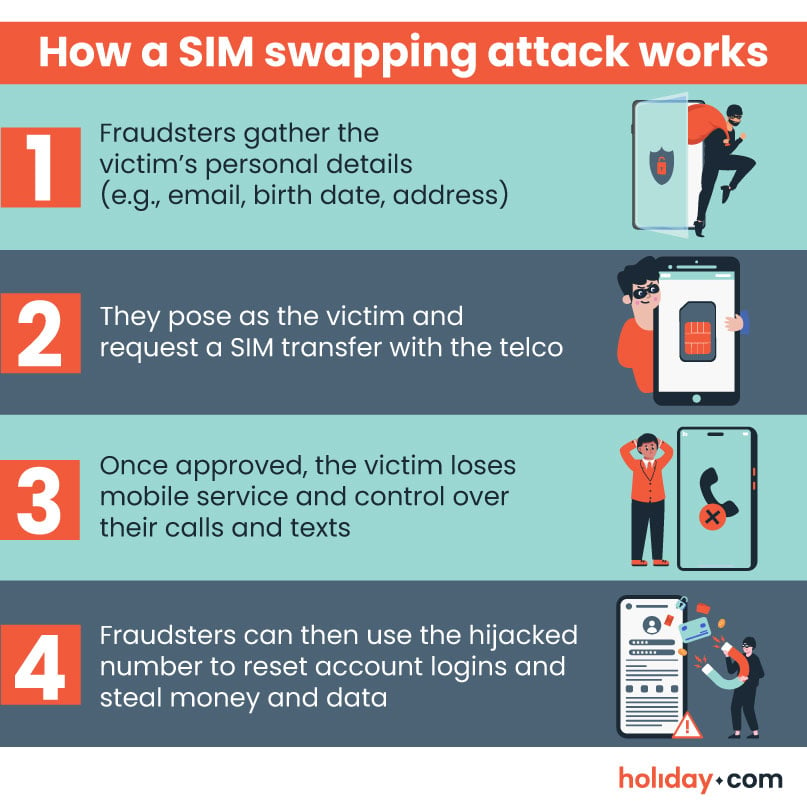
Step 1: Information gathering
Someone planning a SIM swap will usually need your mobile number, full name, email, birth date, and address, at the very least. They may also target answers to typical security questions, like your mother’s maiden name and national ID numbers such as a Social Security Number (SSN).
Scammers usually gather information about a target by:
- Phishing: Using fake sites, texts, emails, or phone calls to trick victims into sharing personal data, often by posing as an authority.
- Face-to-face manipulation: Gaining trust or creating a fake situation to convince someone to reveal their personal details.
- Digging through a target’s digital life: Scanning social media and online profiles for clues.
- Using OSINT or background check services: Open-source intelligence tools (OSINTs) and background checks pull data from public databases, news, and social media.
- Buying data on the dark web: Databases from breach cases are sold on the dark web (a part of the internet requiring special tools to access).
- Colluding with a telco employee: While rare, there have been cases in which insiders work with scammers to bypass standard SIM swap requests.
Step 2: Social engineering
The perpetrator will now try to move your mobile number to their SIM by impersonating you. They will either contact your telco and tell them they’ve lost their phone, or they’ll start a SIM swap request online. If they’re porting out the number, they simply open a new customer account with a different mobile carrier.
If your telco’s ID checks are weak (e.g., only asking for birthday, number, and address), or if the fraudster has a copy of your ID, then the request is likely to go through. And if you didn’t set a PIN for authorizing account changes, SIM swaps, or number port-outs, approvals will be easier.
Some providers have extra verification steps. In this case, the attacker may trick you into approving the SIM swap request by contacting you and posing as an authority. Some scammers will bombard your phone with spam calls to get you to turn off or mute your phone, making it easier to port your number without you noticing.
Step 3: Account takeover (ATO) attacks
Once the SIM swap is approved, your SIM is deactivated and you’ll lose mobile service. The attacker will launch several ATO attacks, starting with your email, bank, or crypto accounts. Armed with your PII, they can reset passwords using one-time passcodes (OTPs) sent to the newly hijacked number.
Alternative: Exploiting mobile network vulnerabilities
Hackers can also snoop in on calls and text messages by exploiting certain weak points of the Signaling System 7 (SS7), an international communication protocol used in older mobile network technologies. Newer technologies, such as 5G, use SS7 for backward compatibility and international roaming.
What to do if your SIM has been swapped
If you suspect a SIM swap, act immediately; the longer you wait, the bigger your losses could be. The main priority is to reclaim your mobile number and secure your financial accounts before the perpetrators can steal from them.
The steps outlined in this section can help you minimize your losses. You can also use them if you suspect your PII has been stolen through a phishing attack or discovered through social engineering, even if your number hasn’t been transferred yet.
Contact your banks
Contact each bank’s fraud department to freeze your accounts and cards and disable all purchases, withdrawals, and transfers. You can find their contact details on the back of your cards or on the bank’s website. Once done, check for any unauthorized transactions and raise a dispute.
Some crypto exchanges also allow you to lock your account in a suspected hijack. Read how to do so on major exchanges:
- Coinbase: You’ll need to sign in to lock your account; if that’s not possible, contact customer support.
- Kraken: You need to fill out a form to lock your account.
- Binance: Binance can implement a hard reset and remove all active sessions to allow the user to regain control of their account.
Additionally, check that you still have control over your payment accounts, such as Venmo or PayPal, and start an account recovery process if not.
Contact your mobile carrier
Contact your telco to explain the situation. You’ll need your mobile provider to either:
- Disable the fraudster’s SIM card if it is with your current provider, and then transfer the number to a new SIM you own.
- Request a new SIM and port your number back to it if the attacker transferred your account to a different provider.
- Get help in regaining your number, especially if it was transferred to a different telco and porting back isn’t straightforward.
Some telcos will also be able to flag your account as at risk for identity theft. After reporting to them, you may be asked to visit a branch.
Alternatively, head to a branch if one is nearby instead of chatting or calling, as it may be easier to receive assistance and verify your ID in person, and you can get a new SIM card if needed. Remember to bring important ID documents.
If you’re abroad, your only option may be to contact customer service. Find the right number from your telco’s “Contact Us” page or in your monthly invoices.
Some telcos provide a service to lock SIM swaps or number transfers with a PIN. If you’re successful in porting back your number, consider this option (which we outline in the next section).
Secure your email account
A hijacked number and email is a dangerous combination that allows scammers to do a lot of damage. That’s why email accounts are one of the first targets in a SIM swap fraud.
What to do if you can still log in to your primary email
If you still have access to your primary email, change the password and then remove the SMS-based MFA setting and replace it with another form of verification. Log out of all other sessions under your email provider’s settings.
Crucially, do all of this on a trusted device using a private connection; avoid using a public device on a public hotspot.
What to do if you’re locked out of your primary email
If the attacker has already changed your password, it’s unlikely you’ll be able to reset it by clicking on “Forgot password.” The OTP will be sent to your hijacked number, which will alert the attackers.
You’ll need to start an email recovery process with your provider. Here are how-to links for major email companies:
- Gmail: Go to Google’s Account Recovery page. This Google support page also tells you how you can secure your hacked account and strengthen your account security.
- Outlook: This Microsoft support page outlines how to recover a hijacked account. You’ll need to use the Sign-in Helper, which will guide you through the process or let you speak to an agent.
- iCloud Mail: Follow the instructions in this Apple support page for recovery.
Remember to do all this on the device you normally check emails on, as it’s logged as a trusted device. Also, turn off VPN so your IP address isn’t unfamiliar to the service provider. And once you’ve secured your email, you’ll need to strengthen the security, which we cover in the next section.
Tip:
If you also use Google, Microsoft, or Apple for payment, messaging, or cloud storage, recovering your email will secure those apps too because they share the same credentials.
Secure other important accounts
Next, secure non-financial accounts, such as government portals, work email, social media, cloud storage, messaging apps, and any services you rely on by repeating the same process that you did with your email account.
Cloud storage accounts are a high risk in identity fraud as they contain important documents. In the U.S., your SSN is a key piece of your identity, and scammers can use it to apply for loans, claim government benefits, or commit tax fraud.
This table lists official support pages from major service providers on how to recover a compromised account.
| Cloud storage | |
| Google Drive | How to recover your Google account |
| Microsoft OneDrive | How to recover a hacked or compromised Microsoft account |
| Apple iCloud | How to gain control of your Apple account |
| Dropbox | Dropbox support |
| Social media | |
| Meta (Facebook and Instagram) | Meta’s Account Recovery Hub |
| TikTok | TikTok support |
| X | Regain access to X |
| Snapchat | Snapchat support for compromised accounts |
| Messaging apps | |
| How to recover a compromised WhatsApp account | |
| Telegram | Telegram support |
Place a freeze on your credit report
A credit freeze locks your credit file from any access, which means fraudsters won’t be able to apply for a new loan or line of credit with your stolen identity. Do this with all three major credit bureaus, namely Experian, TransUnion, and Equifax, because lenders will check at least one of them in a new application. Just note that if you’re in the middle of applying for a credit card, mortgage, or loan, you may run into issues.
Other countries, such as the U.K. and many European nations, also offer credit freezes for free.
Report the incident
Before reporting to relevant authorities, jot down what you can remember, like the events leading up to the incident, what happened after the SIM swap, and any suspicious interactions or people.
You’ll likely need to file a local police report to establish an official record to recover funds, catch the culprits, and protect your identity. Then, depending on where you are, reach out to these authorities:
- The U.S.: Report to the FBI’s Internet Crime Complaint Center (IC3) for cybercrimes and to IdentityTheft.gov for identity thefts.
- The U.K.: People in England, Wales, or Northern Ireland can refer to Report Fraud while those in Scotland can report cybercrimes to the Scotland Police.
- Canada: File a complaint with the Canadian Anti-Fraud Center for fraud and identity thefts.
- The EU: Citizens of EU member states can report cybercrimes to their respective agencies listed on the Europol site.
Note that if the fraud happened on a local SIM or eSIM you bought while traveling, you’ll need to file a report in the country where the SIM was issued.
Monitor your accounts
Once your mobile number and accounts are secured, continue to monitor all accounts for suspicious activities, such as password change requests, new device logins, and strange transactions, until you’re confident things are back to normal. At the same time, add stronger safeguards on your SIM and personal accounts to prevent future hijacks.
How to prevent SIM swapping attacks
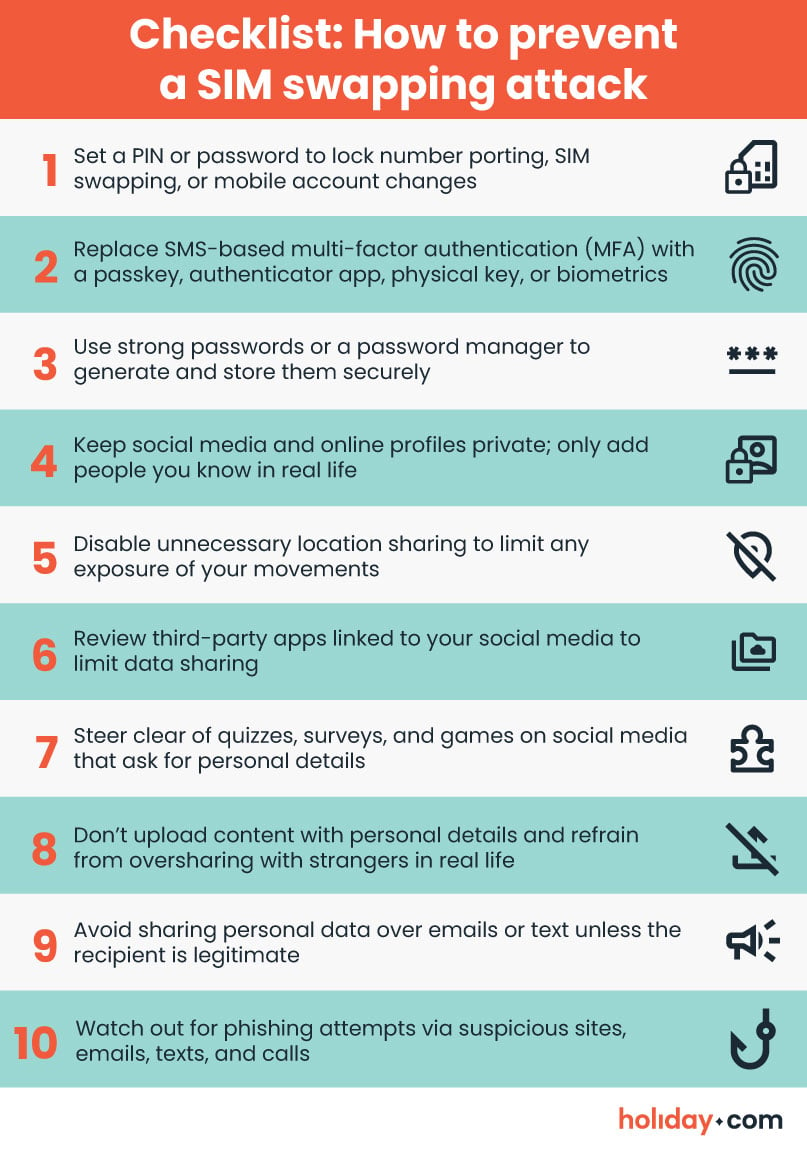
A SIM swapping attack can be a scary experience, but there are plenty of safeguards that make it much harder for fraudsters to scam you this way. These best practices are easy to set up and go a long way toward protecting your number.
Place a port freeze or lock
Most mobile carriers let you set a PIN or password for number transfers. Called a port freeze, port-out lock, or number lock, it prevents a SIM swap or number porting fraud because scammers can’t port out your number without the right PIN.
Note that a port freeze is different from a SIM lock. A SIM lock prevents unauthorized usage by requiring a PIN every time your phone resets and attempts to connect to the mobile network, or when a SIM is inserted into a new device.
These are the port freeze features offered by the three major telcos:
- Verizon: A SIM Protection feature requires a PIN for any SIM changes while a Number Lock feature secures number transfers with a PIN.
- AT&T: The Wireless Account Lock is a security feature that prevents unauthorized changes to your SIM, device, number, and account online.
- T-Mobile: The SIM Protection feature prevents unauthorized SIM swaps and number transfers.
Set up a PIN or password for your mobile account
Instead of a port freeze, some telcos offer a feature that allows customers to enable a PIN or password for any account changes. This can be done through the telco’s app or by contacting customer support. Just avoid using easy-to-guess PINs that use your birth date, address, or other personal information a scammer might already have.
Move away from SMS-based MFA
Replace text-based authentication with more secure forms of verification where possible, as some systems may only allow mobile numbers. Depending on the system, change your SMS-based authentication to:
- A passkey: A passkey uses a public-private cryptography key tied to your biometrics or PIN. Leading tech companies, such as Microsoft and Apple, support passkeys on their operating systems and apps.
- An authenticator app: This is a tool that generates time-sensitive OTPs via an app or browser.
- A physical security key: This is a device, usually a dongle, USB key, or smart card, that can generate OTPs, cryptographic keys, or other forms of identification.
- Biometric authentication: This can be your fingerprint or facial recognition.
Some systems allow a third layer of security. This is a more secure form of MFA because you need a username and password (first factor), an OTP, cryptographic key, or passkey (second factor), and biometric data (third factor) to access your account. However, this is cumbersome if you’re using the account daily.
Use strong passwords or a password manager
Create strong passwords for each account, one that’s between 8-12 characters long and uses a combination of numbers and special characters, as well as uppercase and lowercase characters. Another method is to use a memorable phrase along with special characters and numbers.
Alternatively, use a password manager that can generate, store, and secure all your passwords. You just need to remember the master password or PIN. Popular options include 1Password and BitWarden.
Protect your personal information
The online world can hold many clues to our personal lives. To protect your personal information, you should:
- Remove digital clues: Keep your profiles private, avoid sharing personal details, and only add people you know in real life.
- Be careful with photos: Avoid posting images that reveal number plates, driver’s license number, addresses, etc. Check tagged pictures before approving them.
- Don’t overshare: Turn off location sharing, skip quizzes and games on social media that ask for personal data, and think before posting publicly or sharing with strangers.
- Review third-party app access: Some apps link to your social accounts, so check what’s being shared and remove unnecessary apps.
- Be cautious with email and text: Avoid sharing your personal data in chat rooms, emails, and messaging apps. Although some messaging systems use end-to-end encryption, you’re still at risk if someone looks through your phone.
- Reduce the risk of phishing attacks: Don’t click suspicious links in emails and texts, check the sender’s address, and verify out-of-the-blue requests.
The long-term effects of SIM swapping attacks
The effects of a SIM swapping fraud can last long after you’ve regained your number. For starters, the culprits still have your personal data and can use it to launch another scam or identity fraud.
The psychological impact is also significant. Victims often suffer from psychological distress, especially if the perpetrator managed to wipe out their life savings or caused major disruption to their personal life. A 2025 Identity Theft Resource Center report found that 83% of identity fraud victims said they were worried or anxious, 79% felt violated, and 75% felt vulnerable.
Businesses are also impacted. Even one fraudulent port‑out creates a headache. And if scammers hijack a senior employee or a business owner’s number, they can launch corporate ATOs and network takeovers to inflict serious damage. The financial or intellectual property (IP) losses can be huge and the reputational damage long-lasting. There’s also the risk of regulatory fines and lawsuits.
One example is the ongoing court saga between crypto investor Michael Terpin and AT&T. In 2018, an AT&T staff member colluded with a 15-year-old to steal $24 million worth of crypto from Terpin through a SIM swapping attack. The dollar amounts involved in the case, as well as the time it’s taken to resolve in the courts, shows how damaging these issues can be.
Why SIM swapping fraud is an emerging threat
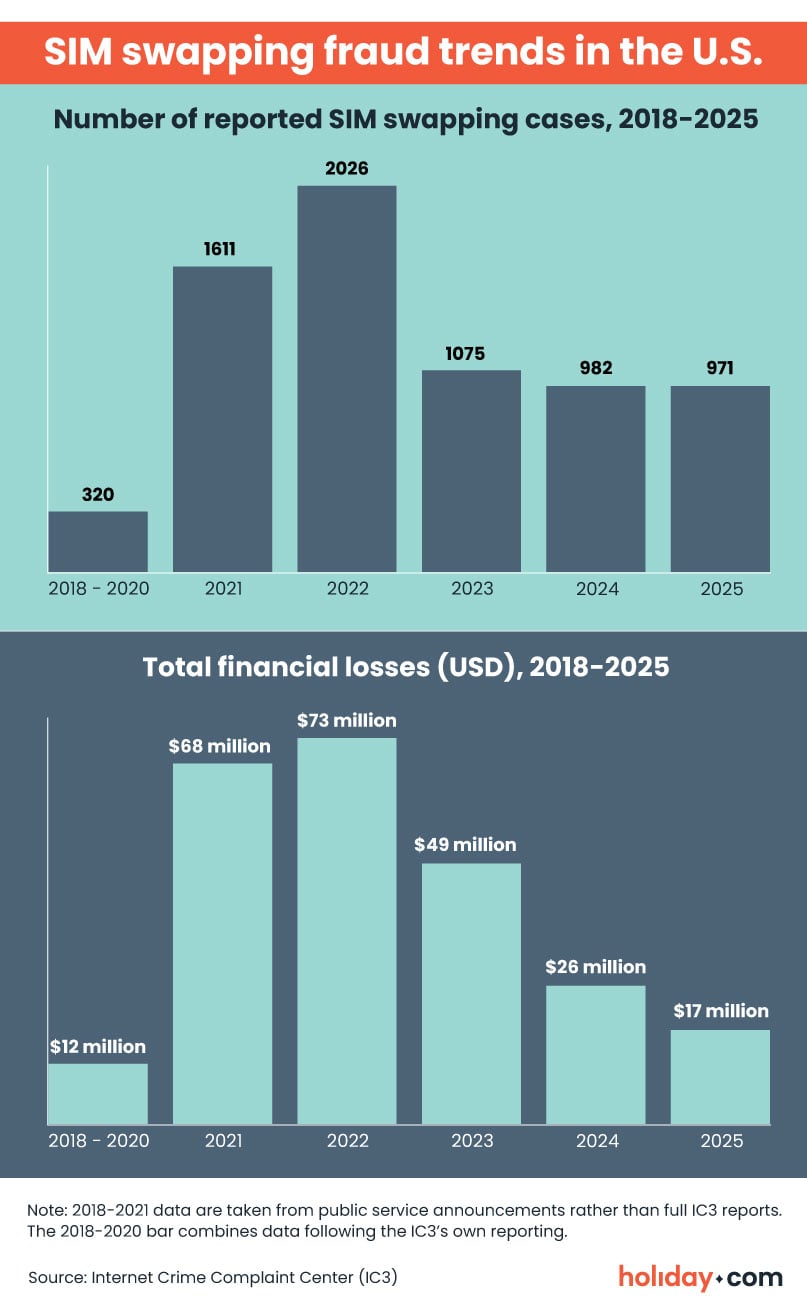
Trends in SIM swap fraud cases vary by country. In the U.S., the number of cases peaked in 2022 before declining between 2023 and 2025. This could be due to mobile carriers improving their security measures, such as implementing PINs for SIM swaps. It’s a different story in the U.K., as cases surged 1055% year-on-year (y-o-y) in 2024, and Australia, where cases spiked 240% y-o-y in the same year.
Still, many telcos view SIM hijacking as a growing risk. In a 2025 telco industry survey, companies identified SIM swap fraud as the second highest emerging threat to their business. This could be due to the:
- Growing reliance on SMS-based authentication. Many people rely on their phones for OTPs and this makes SIM swap fraud lucrative for scammers.
- Oversharing of personal lives. Social media makes it easier for people to share their daily lives but it also makes them targets for scammers.
- Availability of leaked databases. Malicious parties can buy hacked databases on the dark web and other black markets.
- Adoption of AI for committing fraud. AI can help criminals launch cyberattacks faster and at scale.
- Lax security protocols. Weak verification processes make certain telcos easier to manipulate in SIM swap attacks.
How telcos can prevent SIM swapping attacks using AI and blockchain technology
A successful SIM swap attack depends on several factors, and one of the biggest is your mobile carrier’s security. If a telco has a strong identity verification protocol, it’s much harder for scammers to convince them to transfer your number.
Many telcos now have access to real-time network data to verify port‑out requests and alert customers of suspicious requests. Some carriers also openly share with banks when customers transfer numbers to help banks identify potentially fraudulent password changes right after a SIM swap.
Meanwhile, AI-powered analysis can flag potentially fraudulent SIM swaps in real-time by identifying anomalies in user behavior, such as requests coming from an unusual location or odd login times.
An identity-based blockchain technology can help secure accounts even further. In these systems, telcos store user credentials in a decentralized blockchain. Customer reps can run an identity check by asking users to provide their unique identifier (stored in their device, apps, or other tools) before approving SIM transfers.
Additionally, blockchain analysis helps authorities trace stolen crypto funds and provide crucial leads. By using both AI and blockchain tools, telcos have the ability to build a more robust security framework.
Stay vigilant against SIM swapping attacks
A SIM swap attack can seriously mess with your life and finances, so prevention is everything. Many telcos let you set a PIN for SIM-swap or number port-out requests. Stay away from SMS-based MFA and use an authenticator tool (hardware-backed or software-only), biometric, or passkey instead. And avoid sharing your personal details unless necessary and safe, while being careful of what you post online.
Remember that your digital security isn’t a set it and forget it exercise. Stay informed about new threats and check the latest security features offered by your telco to stay one step ahead of scammers.
| Sharing our content: holiday.com is the sole owner of all assets on this site. If you would like to share our content, we ask that you cite holiday.com and provide a link to the page you are citing. This will enable us to maintain the integrity of our intellectual property and continue providing the quality guides and informational content that our readers trust us for. |
FAQ
-
What is a SIM swapping fraud?

A SIM swapping fraud is a type of identity fraud in which a scammer impersonates a target to transfer their mobile number to a SIM owned by the scammer. Once they can control calls, texts, and one-time passcodes (OTPs), they can take over the victim’s personal accounts to steal money, data, or both.
-
How does a SIM swapping attack work?
A SIM swapping attack starts by scammers collecting intel on a target by snooping through their social media, running phishing scams, or buying leaked databases. Once they have enough of their victim’s personal details, they’ll pretend to be the target and initiate a SIM swap request through the telco. Once the swap is approved, the victim will no longer receive calls or texts, and the scammers are now in control.
-
What to do after a SIM swapping attack?
Act quickly to prevent or minimize losses by contacting your telco to reclaim your number. Next, secure all personal accounts, especially bank and email, that use SMS-based 2FA. Reset passwords and use passcodes, authenticator apps, physical security keys, or biometrics instead. Finally, report the incident to the relevant authorities and continue to monitor for follow-up scams.
-
How to avoid a SIM swapping attempt?
Set a PIN for authorizing account changes or SIM swap requests, so attackers can’t transfer your number without your PIN. Avoid using SMS as a two-factor authentication method and switch to passkeys, biometrics, authenticator tools, or physical security keys. Be mindful of what you share online and with strangers, and stay away from suspicious links, sites, and messages as they could be phishing attempts.
-
Who is at risk of SIM swapping?
Victims of SIM swapping fraud cases have come from every age group and demographic that uses a cell phone. Malicious parties can pounce on any opportunity where it’s easy to collect a person’s sensitive information and where a telco’s ID checks are weak.
-
Can SIM swapping happen without personal data?
No, a SIM swap attack cannot happen without the perpetrators knowing your personal details, and this includes your email, address, mobile number, and birth date, at the very least. This is because telcos perform an identity check before approving a SIM swap. Some mobile carriers have stronger checks than others to prevent unauthorized SIM transfers.
-
What should I do if I think I’m being targeted for SIM swapping?
If you suspect you’re a target, you’re likely in pre-crisis mode and need to act fast. Contact your telco to set up a PIN to lock SIM swaps. Secure all personal accounts, especially email, bank, and crypto accounts, by changing passwords and moving away from SMS-based 2FA. Check for any suspicious logins, transactions, and attempts to reset passwords and report to customer support right away.
-
How to spot a SIM swap fraud?
These are signs that your SIM may have been swapped: you lose mobile network service suddenly without any explanation, you receive unusual notifications about password changes, login attempts, or suspicious transactions for your email, bank, or other personal accounts, or you can’t sign in to your personal accounts, and resetting passwords doesn’t work.
-
Can I stop a SIM swap?
Unfortunately, it’s difficult to stop a SIM swap once a malicious party has started an attack because you may not realize that your SIM is being swapped until you lose your number. The average successful attack takes less than 15 minutes. However, spotting the signs early can minimize your losses. Call your telco immediately to reclaim your number and lock down your bank and crypto accounts, as they are the likeliest targets.
-
Is an eSIM safer than a physical SIM for SIM swapping?
An eSIM is not safer than a physical SIM in a SIM swapping attack. Scammers can still get a swap approved remotely, as long as they have enough of your personal data to trick the telco into approving the swap.
-
Can mobile carriers prevent SIM swaps?
Yes, there are many options for mobile carriers to prevent SIM swapping fraud cases. These include: implementing a feature for customers to lock number transfers or account changes with a PIN, improving staff training to better detect fake SIM transfer requests, adopting AI-powered analysis to detect unusual customer behavior and flag SIM swap attempts in real-time, and using an identity-based blockchain technology to secure customer credentials.
-
Is SIM swapping illegal?
Yes, unauthorized SIM swapping is illegal. Many countries consider it a form of identity fraud, and offenses usually involve jail time, fines, or both.
-
Do cyber or travel insurance cover SIM swap fraud?
Some cyber insurance policies do cover financial losses due to identity fraud, which can include SIM swaps. Depending on the terms and conditions, you may also be reimbursed for legal costs or receive assistance from a cyber recovery team. However, most travel insurance policies don’t cover SIM swap fraud cases.
-
Can an eSIM be cloned?
An eSIM can be cloned by copying its international mobile subscriber identifier (IMSI) and the encryption key used by the telco to identify the eSIM profile. Cybercriminals can do this by hacking into the network or bribing a telco employee to bypass security. Recent research found that fraudsters can clone an ESIM by gaining temporary physical access to the phone with the targeted eSIM and then exploiting specific vulnerabilities.
About our author

You might also be interested in...
-
 Safety
How to stay safe while traveling: A practical guide for 2026
Traveling puts you in unfamiliar environments where many things can go wrong. A stolen bag or a compromised digital account can quickly derail your trip. Many travelers assume safety means avoiding ri...
 Sarah Kirton
 05.26.2026
 -
 Safety
Is hotel Wi-Fi safe? What you should know and real-world risks
Travelers commonly log into hotel Wi-Fi without giving a second thought to the potential security risks. Public sources of Wi-Fi, including at hotels, can be vulnerable to cyberattacks. This could exp...
Chené Murphy
05.26.2026 -
 Safety
Is airport Wi-Fi safe? Avoid common scams in 2026
When you’re stuck in an unexpected layover or need to book a ride to the hotel, connecting to the free airport Wi-Fi seems like the fastest solution. The truth is that public networks can put your d...
Ivana Shteriova
05.21.2026 -
 Safety
30+ common travel scams to watch out for abroad
Travel scams can be hard to spot. Scammers often operate out of sight, or greet you with a warm smile as they present an offer that sounds too good to miss. They take advantage of the fact that you’...
Aishah Mustapha
05.15.2026 -
 Safety
Hotel safety tips: The ultimate guide in 2026
Staying in a hotel should feel relaxing and serve as a main highlight of your trip. But even the best properties can pose safety risks. It’s not just theft that can turn the perfect getaway into a s...
Sarah Kirton
05.12.2026 -
 Safety
Is public Wi-Fi safe? The risks you need to know
Public Wi-Fi feels convenient, but it’s not always safe to use. The biggest problem with most public networks is that they use weak security or no encryption at all. Encryption protects the data tra...
Sarah Kirton
04.27.2026