


Switching mobile networks used to mean swapping tiny SIM cards or dealing with expensive roaming abroad. If you’ve recently heard about eSIMs, you might be wondering how they work on Android. Many users assume the setup is overly technical or aren’t sure if their device is even compatible.
An eSIM is a digital SIM built into your phone. Instead of inserting a physical card, you download a profile that securely connects your device to a mobile network. While carrier eSIMs replace your mobile provider’s SIM card, travel eSIMs like holiday.com offer a temporary data plan to stay connected abroad without cutting off access to your primary number.
We’ll explain how eSIMs work on Android and the quickest way to verify if your phone supports this. Whether you’re setting up a carrier line or a travel plan for your next trip, we’ll also show you how dual SIM works and why you should use it.
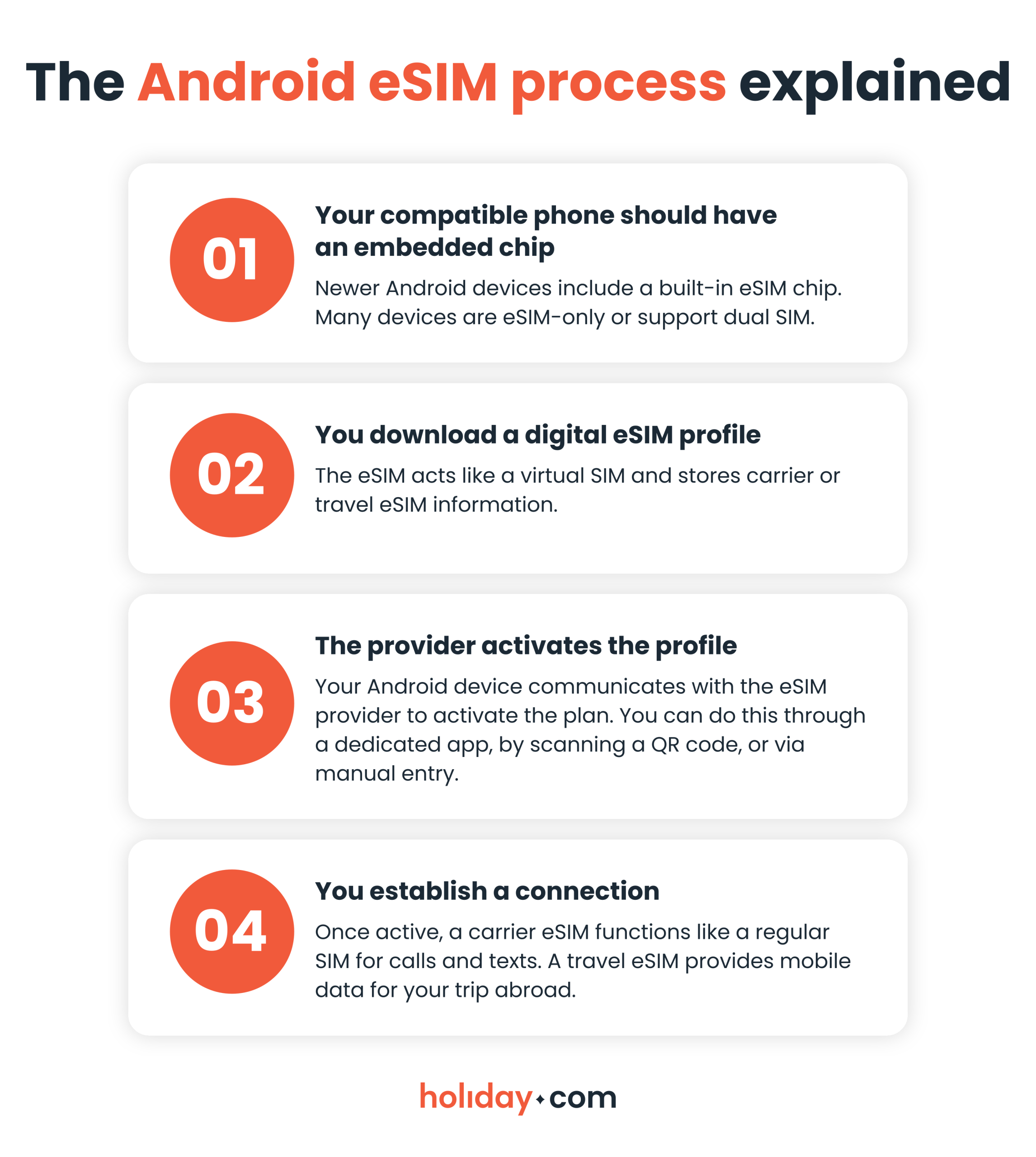
How do digital SIMs actually work?
Because an eSIM is embedded directly into your phone’s hardware, the entire setup process is digital. You can skip the carrier store and stop fumbling with tiny plastic cards when adding a second work line or an international travel plan. Here’s a breakdown of how this technology connects your Android to a mobile network.
Is your Android eSIM-compatible?
Not all Android phones support eSIMs, and some newer models may only support eSIM. You can review our list of compatible Android devices to see if your model’s on the list. Your phone must also be carrier-unlocked to use travel eSIMs like holiday.com. Because carrier restrictions vary, the fastest way to confirm compatibility is to check yourself.
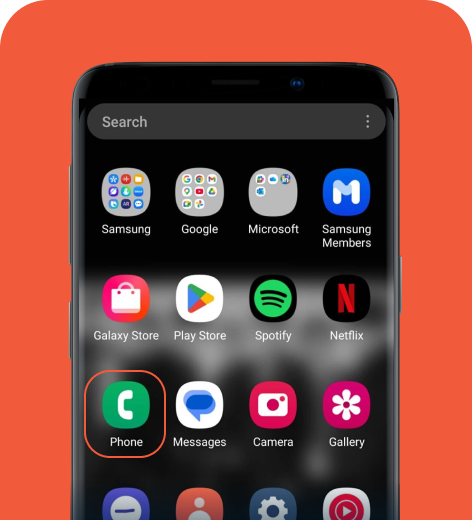
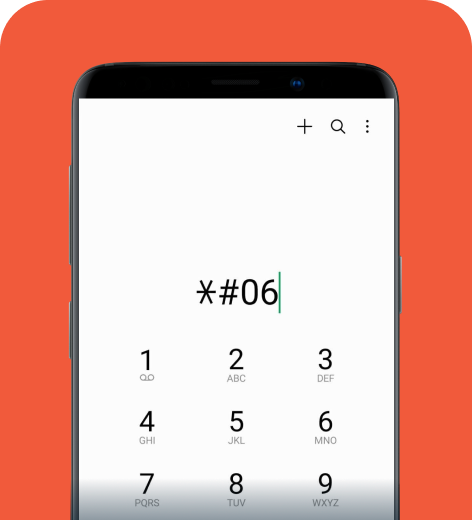
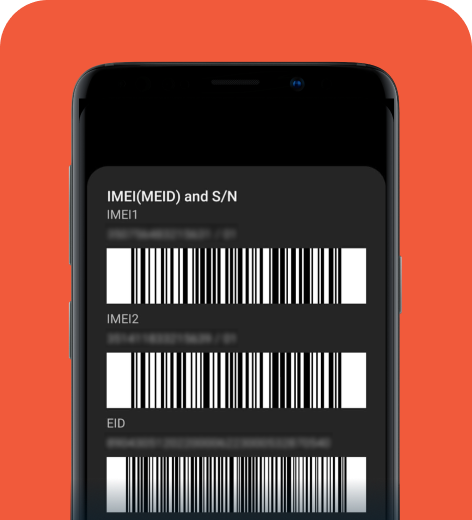
If the dial code doesn’t work, you can always manually check your device’s settings.
On Samsung
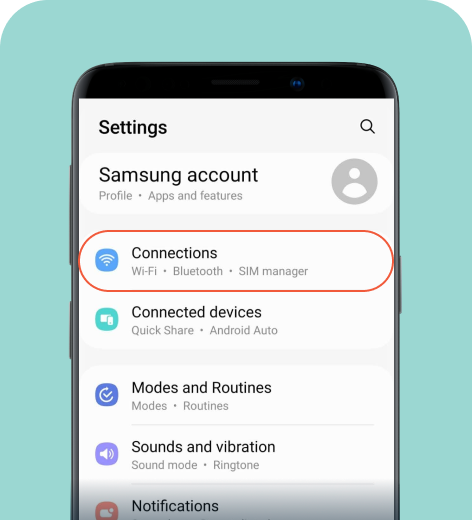
1. Go to Settings > Connections.
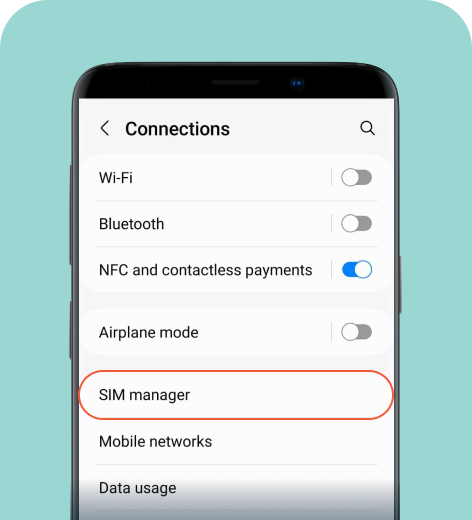
2. Tap SIM manager.
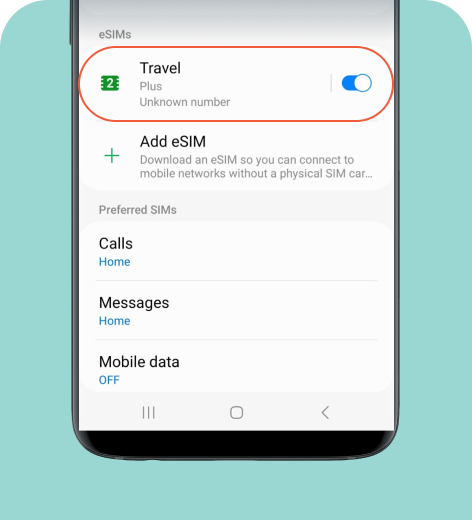
3. If you see the option to Add eSIM, your phone is compatible.
On Google Pixel
1. Go to Settings > Network & internet.
2. Tap SIMs.
3. If you see the option to Add eSIM or Download a SIM, your phone supports eSIM.
On Xiaomi
1. Go to Settings > SIM cards & mobile networks.
2. Scroll down to check for your eSIM options.
3. If you see Add eSIM or Manage eSIM, your device is compatible.
How do you install and activate eSIM on Android?
While setup steps vary by provider, most carriers offer a dedicated app or a QR code for quick installation. Manual entry is also an option if you don’t have a second screen available to scan a code.
- Install the eSIM profile. Follow your provider's instructions to download the digital profile. We highly recommend using an official app, as it’s the fastest method. Since you need a stable Wi-Fi connection, it's best to install your travel eSIM before leaving for the airport.
- Activate your eSIM. Once installed, switch your data line to the new eSIM and enable cellular roaming. If you’re using a travel eSIM like holiday.com, wait until you arrive at your destination to activate it. Connecting beforehand can leave your device stuck on “Activating...” or showing “No Service” until it finds a supported local network.
It might take a few minutes for the activation process to complete. Turning airplane mode on and off or restarting your device can also speed up the process.
How does dual SIM work on Android?
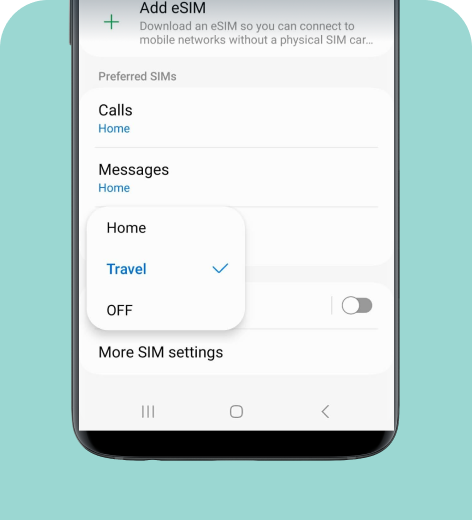
If your Android phone supports dual SIM, you can run two mobile lines on a single device. This is ideal for keeping work and personal numbers separate, or for using a travel plan like holiday.com for mobile data abroad while keeping your primary number active.
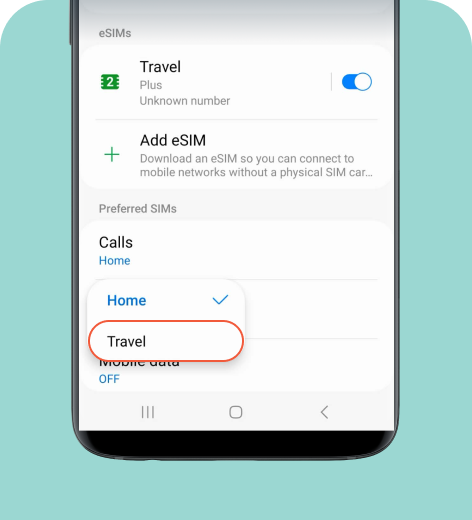
On Samsung
Here’s how to turn on your eSIM and set it as your primary data line.
On Google Pixel
1. Go to Settings > Network & internet > SIMs.
2. Select your downloaded eSIM profile and toggle on Use SIM.
3. Scroll down to “SIM preferences” and assign your preferred line for Mobile data, Calls preference, and SMS preference.
On Xiaomi
1. Go to Settings > SIM cards & mobile networks.
2. Tap your new eSIM profile and toggle it to turn it on.
3. Return to the previous menu to assign your preferred line under Data SIM and Default for calls.
Android layouts vary slightly by model. If yours looks different, type “SIM” in the search bar from the main Settings screen to find this setting.
Using eSIM on Android is simple and convenient
An eSIM allows you to switch carriers more easily, add a second line, or use an international data plan without the hassle of swapping tiny plastic cards or tracking down a local carrier store. The setup is entirely digital and beginner-friendly, particularly when your provider offers app-based activation.
If you travel often and need reliable mobile data abroad, you can download the holiday.com eSIM app from the Play Store. You only need to install the eSIM once. It’s a convenient way to connect to local data networks while abroad and you can still keep your home line active if needed.
FAQ
-
Can I use an eSIM on an Android phone?

Yes. Most newer Android phones support eSIM. However, compatibility depends on your specific model and carrier lock status. You can quickly verify this by dialing *#06# to check for an active EID number.
-
What happens to your physical SIM when you install an eSIM on Android?
Your physical SIM stays in your phone. If your Android supports dual SIM, you can keep both lines active simultaneously, allowing you to use your regular number while accessing a secondary digital profile.
-
How do I transfer an eSIM from Android to iPhone?
Most digital profiles, including holiday.com travel eSIMs, are bound to the original hardware and you cannot transfer it to a new device. However, you can log in to the holiday.com app and purchase additional plans for your other devices.
-
Do I turn off my primary line when using an eSIM?
Not if your phone supports dual SIM. You can keep your main line active for calls and texts while using your new digital profile exclusively for internet access. You can configure these preferences in your Android’s Network & Internet settings.
-
Do you turn off roaming when using a travel eSIM?
No, you actually need to turn on data roaming for your travel eSIM to connect to supported networks abroad. However, to avoid unexpected fees from your home provider, you should disable data roaming on your primary physical SIM.
-
Why use an eSIM instead of roaming?
Travel eSIMs provide mobile data at significantly lower rates than standard carrier roaming fees. For example, holiday.com eSIM offers unlimited data plans for a one-time, predictable fee, so you can stay connected abroad without worrying about unexpected charges.
About our author

You might also be interested in...
-
 eSIM
eSIMHow to turn off an eSIM: Quick guide and tips in 2026
Turning off your eSIM can be helpful in many situations. You may want to disable a travel data plan, switch to another SIM, or avoid roaming charges. The process is quick and you can do it from your p...
 Ana Marković
 06.16.2026
 -
 eSIM
eSIMWhat is an ICCID number and why does it matter?
Knowing how to find your integrated circuit card identifier (ICCID) number makes it easier to manage devices that use SIM cards and eSIMs. When things are going smoothly, you hardly have to think abou...
Sarah Kirton
06.16.2026 -
 eSIM
eSIMeSIM vs. data roaming: Which is better for international travel?
Staying connected while traveling is easier than ever, but the way you access mobile data can make a big difference in your experience and costs. Two popular options are purchasing a travel eSIM or re...
Dawn Prevete
06.09.2026 -
 eSIM
eSIMeSIM vs physical SIM: Pros, cons, and which one is right for you?
An eSIM (embedded SIM) is the digital equivalent of a physical SIM card built into your device. It allows you to activate and manage cellular plans entirely through software, meaning there’s nothing...
Ivana Shteriova
06.08.2026 -
 eSIM
eSIMHow to delete data usage history in 2026: A step-by-step guide
You can erase the data usage counters on your phone, but you can’t permanently erase your carrier’s system-level logs. Deleting your local statistics so the counter returns to zero takes only a fe...
Ana Marković
06.08.2026 -
 eSIM
eSIMDoes an eSIM drain your battery? Fact versus fiction
While eSIMs use the same hardware as physical SIM cards and consume virtually the same power, there are times when you might notice your device’s battery draining faster than usual. Most often, itâ€...
Sarah Kirton
06.08.2026